Opera 137.0.6015.0 developer update
-
burnout426 Volunteer last edited by
We fixed an issue where sessions could be wiped after a crash loop instead of simply skipping page loads
Session fixes are always welcome. Thanks.
-
andrew84 last edited by andrew84
Suggestion could be to transform the tabs counter box into add new tab in island button on hover. It'll look much more cleaner and functional than the appearing each time tiny circle button. And the button will work even if islands are collapsed.

-
Pengguin last edited by
Hi Opera Desktop Team!
Found a reproducible visual repaint glitch in the Bookmarks Bar dropdown menu during Drag & Drop:
When dragging/reordering a bookmark inside an open folder dropdown, the item visually snaps to the very bottom of the menu during the drag operation (reopening the folder reveals that the item was actually saved at the intended position).I have submitted an official bug report via the Bug Report Wizard / Jira Service Desk:
 Ticket ID:
 BUG-28532- Platform: Windows 11 x64
- Affects: Opera Beta 126.x+ / Developer builds
Could you please take a look at
BUG-28532in the internal tracker? Thank you! -
andrew84 last edited by
Tab island's bug regarding the number of tabs visibility > https://forums.opera.com/post/409310
-
andrew84 last edited by
The same suggestion I posted multiple times regarding the tab island/split tab pinning > https://forums.opera.com/post/409331
-
 Opera-QA-Team Opera last edited by
@pengguin: Hello, this bug was fixed a long time ago, I can see in your report that your Opera version is 126. Currently we are on 136 (stable) and 137 (developer). Please update your browser.
-
Pengguin last edited by Pengguin
@Opera-QA-Team Hello,
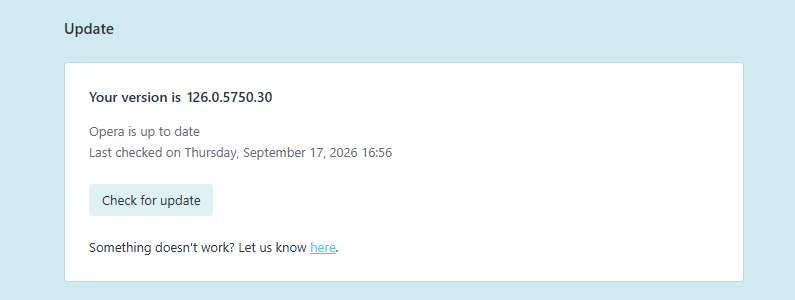
Thanks for the reply, but take a look at the attached screenshot of my opera://update page.
I didn't stay on version 126 out of negligence. I trusted your built-in update mechanism. Every single time I checked for updates, Opera
DeveloperBeta* explicitly assured me: "An updated version is used" (checked right now, September 17, 2026).The entire reason users choose the Developer stream is to test the latest features. Instead, the browser silently broke its update cycle and stranded me nearly a year behind, while actively reporting that no updates exist. If the updater fails to fetch delta patches across older builds, it should trigger a full download or flag an error — not falsely claim that the browser is up to date.
Please forward this to the browser/updater team as a critical update-loop bug. A browser should never report "latest version" when it is 11 major releases behind.
-

-
Opera-QA-Team Opera last edited by
@pengguin: Yes, leocg is right - I didn't pay attention your version is Beta. Beta is no longer supported, you can now test new features in Early Bird - please check the blog post: https://blogs.opera.com/desktop/2025/12/opera-presents-early-bird-mode/
-
Pengguin last edited by
@Opera-QA-Team I already understand. But why didn't the browser tell me that my version was rejected a long time ago? Am I supposed to constantly read blogs to know which browser version to delete and which to keep? Why didn't you display a big browser notification when you ended support for the beta version? What a disregard for the user... Anyway, thanks for responding.
-
burnout426 Volunteer last edited by
@Pengguin said in Opera 137.0.6015.0 developer update:
Am I supposed to constantly read blogs to know which browser version to delete and which to keep?
If you were testing the Beta or Opera Developer, then yes, technically. (Although, it would have been a nice bonus if you would have received a pop-up in Opera Beta like you expected.)
You can monitor https://blogs.opera.com/desktop/. But, you don't have to do it directly. You can subscribe to the RSS feed at https://blogs.opera.com/desktop/feed/.
It sometimes helps to also follow https://blogs.opera.com/news/ via https://blogs.opera.com/news/feed/ and https://blogs.opera.com/security/ via https://blogs.opera.com/security/feed/.
You can click the 3 dots at the bottom of the sidebar and enable the Personal News panel and add those feeds to it. Or, if you don't use the sidebar, you can go directly to the URL
opera://newsin a tab (that you can also bookmark).You could have also followed just the beta tag at https://blogs.opera.com/desktop/category/beta/ and been subscribed to just https://blogs.opera.com/desktop/category/beta/feed/ and you would have caught the change.
If you were using Opera Stable, there'd be no expectations.
-
Locked by leocg
