• Login
    • Search
    • Categories
    • Recent
    • Tags
    • Users
    • Groups
    • Rules
    • Help

    Do more on the web, with a fast and secure browser!

    Download Opera browser with:

    • built-in ad blocker
    • battery saver
    • free VPN
    Download Opera

    Opera 134 Stable

    Blogs
    desktop blog comments
    8
    18
    340
    Loading More Posts
    • Oldest to Newest
    • Newest to Oldest
    • Most Votes
    Reply
    • Reply as topic
    Log in to reply
    This topic has been deleted. Only users with topic management privileges can see it.
    • A
      andrew84 last edited by andrew84

      *You ignored the bug posted in the previous thread and as a result islands and tabs are after the + button issue is in Stable https://blogs.opera.com/desktop/2026/07/opera-133-0-5932-85-stable-update/#comment-406722

      2026-08-06_183945.png

      Reply Quote 0
        Opera-QA-Team 1 Reply Last reply
      • S
        sicu220 last edited by

        1ebcb60b-75c7-43fc-b4e7-91554a4f969b-image.png
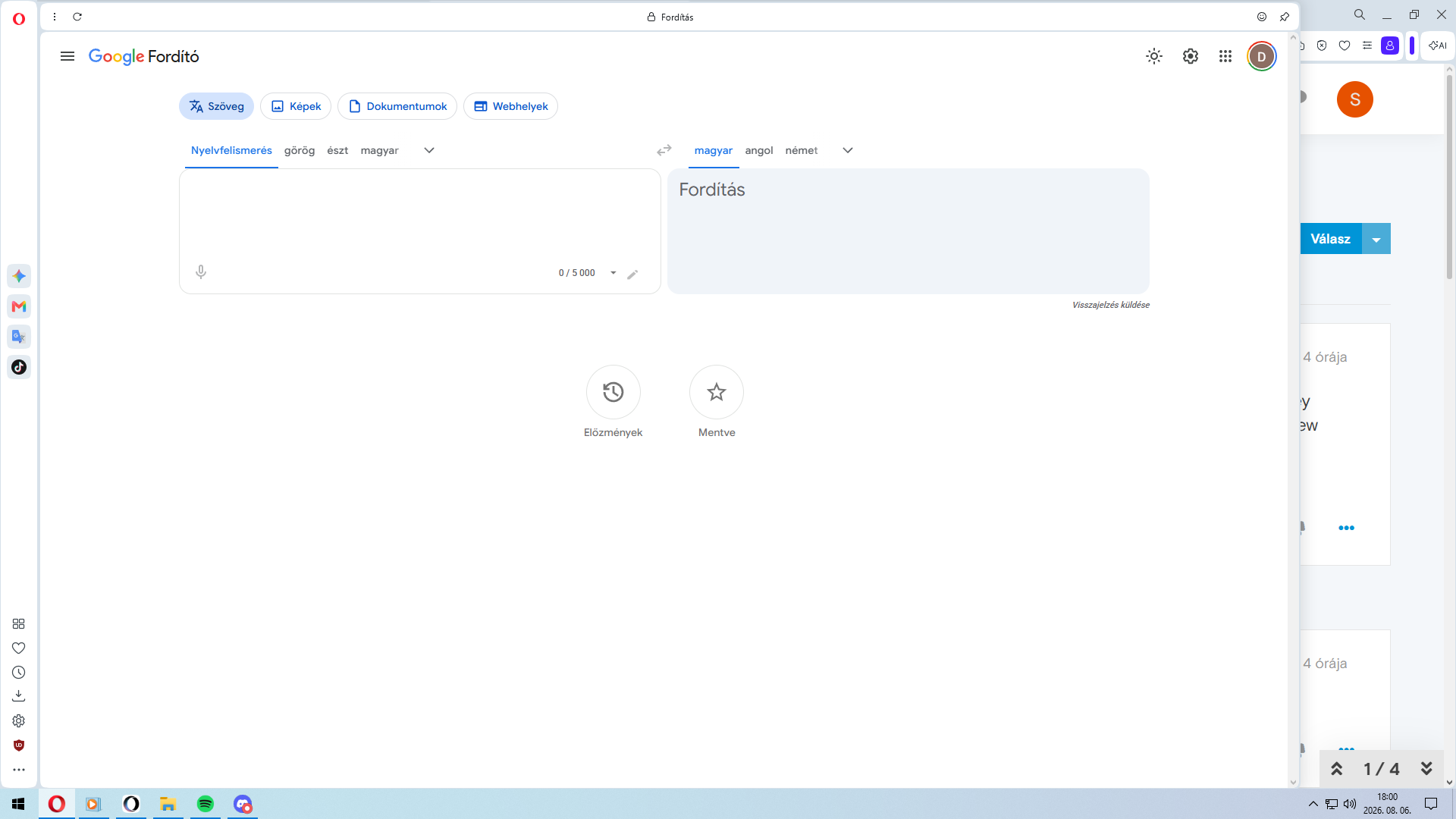
        The whole picture is small. Even though the magnification is set to 150%. The letters are unreadable.

        Reply Quote 0
          1 Reply Last reply
        • J
          jojo0587 last edited by jojo0587

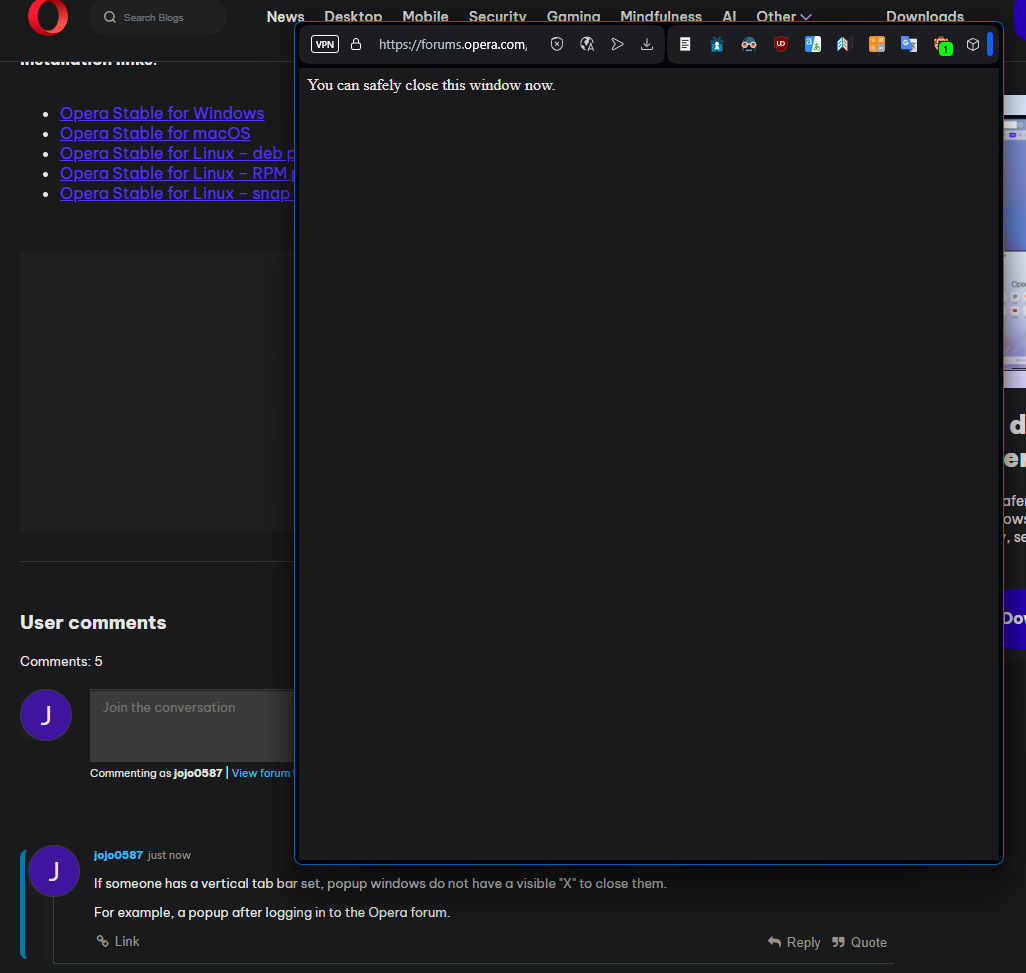
          If someone has a vertical tab bar set, popup windows do not have a visible "X" to close them.

          For example, a popup after logging in to the Opera forum.obraz_2026-08-07_000256601.png

          Reply Quote 0
            Opera-QA-Team 1 Reply Last reply
          • J
            jojo0587 last edited by

            I found a place that takes you to the previous theme editing interface instead of the new-current one.

            1. I downloaded and set up the "Cat corner" theme.
            2. Opera Menu >> Settings
            3. Click in blue "link".
            Reply Quote 0
              1 Reply Last reply
            • J
              jojo0587 last edited by jojo0587
              1. I downloaded and set up the "Cat corner" theme.
              2. Opera Menu >> Settings
              3. Click on the blue link
                obraz_2026-08-07_000821742.png
              Reply Quote 0
                J Opera-QA-Team 2 Replies Last reply
              • J
                jojo0587 last edited by

                Only me, Opera crashes when I try to take a screenshot of a part of the settings page using the "Screenshot" tool in the address bar?

                Reply Quote 0
                  J kmielczarczyk 2 Replies Last reply
                • J
                  jojo0587 @jojo0587 last edited by This post is deleted!
                  Reply Quote 0
                    1 Reply Last reply
                  • J
                    jojo0587 @jojo0587 last edited by

                    @jojo0587: For this to happen, you need to pin some tool to your sidebar, in my case it's an extension
                    https://addons.opera.com/extensions/details/translator/
                    and you may also need to set up a vertical tab bar.

                    Reply Quote 0
                      burnout426 1 Reply Last reply
                    • burnout426
                      burnout426 Volunteer @jojo0587 last edited by

                      @jojo0587 Confirmed. CrashID=bp-e71b15dc-15cb-4e43-8288-62bb80260807

                      Reply Quote 0
                        1 Reply Last reply
                      • kmielczarczyk
                        kmielczarczyk Opera @jojo0587 last edited by

                        @jojo0587: Hello, we're aware of this crash and already fixed it. Will be included in next week's update. Cheers!

                        Reply Quote 1
                          1 Reply Last reply
                        • Opera-QA-Team
                          Opera-QA-Team Opera @andrew84 last edited by

                          @andrew84 Hi! Nothing of the kind! Thanks for bringing the attention to this issue, it's already raported and we're working on it!

                          Reply Quote 0
                            1 Reply Last reply
                          • Opera-QA-Team
                            Opera-QA-Team Opera @jojo0587 last edited by

                            @jojo0587 Hi! We'll take a closer look at it - thanks for pointing it out!

                            Reply Quote 0
                              1 Reply Last reply
                            • Opera-QA-Team
                              Opera-QA-Team Opera @jojo0587 last edited by

                              @jojo0587 Thank you! Reported to our team!

                              Reply Quote 0
                                1 Reply Last reply
                              • I
                                ironbone last edited by

                                For quite some time now, clicking the right mouse button on Opera’s top bar, outside of the tabs area, causes mouse clicks to stop working across the entire system. Sometimes I can recover by pressing CTRL+Tab, but sometimes I have to use Alt+F1 to switch to the console and restart the system.

                                This issue has been present for at least several Opera releases.

                                And of course, I also tested it on a clean installation — the same problem occurs.

                                Reply Quote 0
                                  I 1 Reply Last reply
                                • I
                                  ironbone @ironbone last edited by

                                  @ironbone: Linux (Ubuntu, OpenSuse) + Snap

                                  Reply Quote 0
                                    1 Reply Last reply
                                  • First post
                                    Last post

                                  Computer browsers

                                  • Opera for Windows
                                  • Opera for Mac
                                  • Opera for Linux
                                  • Opera beta version
                                  • Opera USB

                                  Mobile browsers

                                  • Opera for Android
                                  • Opera Mini
                                  • Opera Touch
                                  • Opera for basic phones

                                  • Add-ons
                                  • Opera account
                                  • Wallpapers
                                  • Opera Ads

                                  • Help & support
                                  • Opera blogs
                                  • Opera forums
                                  • Dev.Opera

                                  • Security
                                  • Privacy
                                  • Cookies Policy
                                  • EULA
                                  • Terms of Service

                                  • About Opera
                                  • Press info
                                  • Jobs
                                  • Investors
                                  • Become a partner
                                  • Contact us

                                  Follow Opera

                                  • Opera - Facebook
                                  • Opera - Twitter
                                  • Opera - YouTube
                                  • Opera - LinkedIn
                                  • Opera - Instagram

                                  © Opera Software 1995-