• Login
    • Search
    • Categories
    • Recent
    • Tags
    • Users
    • Groups
    • Rules
    • Help

    Do more on the web, with a fast and secure browser!

    Download Opera browser with:

    • built-in ad blocker
    • battery saver
    • free VPN
    Download Opera

    Opera 135 developer

    Blogs
    desktop blog comments
    7
    17
    286
    Loading More Posts
    • Oldest to Newest
    • Newest to Oldest
    • Most Votes
    Reply
    • Reply as topic
    Log in to reply
    This topic has been deleted. Only users with topic management privileges can see it.
    • A
      andrew84 @vladbabinets last edited by andrew84

      @vladbabinets here the same

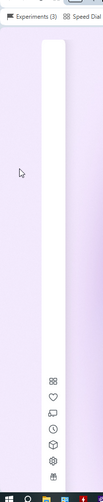
      Edit: it doesn't work in full screen, in minimazed mode it still works. I guess the issue is related to 1px removal.
      I hope the 1px border removal is not a bug and the border won't be restored.

      Edit 2: after mnimizing and maximazing again it works once in full screen mode with the huge gap.
      2026-07-15_141310.png

      Reply Quote 1
        1 Reply Last reply
      • A
        andrew84 last edited by andrew84

        Updated Chromium to 150.0.7871.13

        So it's true that in 151 all the workarounds to keep the MV2 extensions will be removed in chromium and the support will end in Opera as well?
        https://www.techspot.com/news/112722-end-ublock-origin-chrome-now-weeks-away-not.html

        Reply Quote 0
          1 Reply Last reply
        • tastodd
          tastodd @andrew84 last edited by

          @andrew84 said in Opera 135 developer:

          Restore the 2nd click for the ''scroll to top' feature

          I agree. It was a very convenient feature. I used it often. But now it's broken and doesn't function properly.

          Reply Quote 1
            A 1 Reply Last reply
          • A
            andrew84 @tastodd last edited by

            @tastodd I was using Opera because of such features:

            • click on tab to scroll to top/back
            • search with > created engines list
            • best PiP among other browser
            • search popup
            • speed dial

            So now all the features excepting the speed dial look broken or partially broken.
            Search popup is also still good but it was almost desctroyed after the 'redesign' which thankfully was killed before its birth and didn't reach Stable. But I believe the feature won't be left alone if they already had plans to redesign it.

            Reply Quote 0
              1 Reply Last reply
            • A
              andrew84 last edited by andrew84

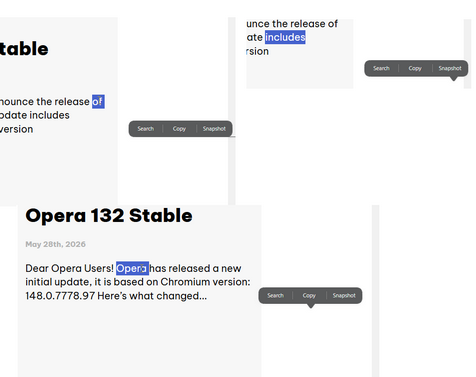
              Btw, after i mentioned search popup I checked it and here it appears in random places and have random shape (its bottom's pointer, depending on how close to display edge) not directly above selected text.

              In Stable is the same story.
              2026-07-15_144235.png

              Reply Quote 0
                1 Reply Last reply
              • KenedSF
                KenedSF last edited by

                Added Google Lens on the Start Page, with a dedicated dialog, file upload, image pasting, and image search via URL
                👏👏👏👏

                Reply Quote 0
                  1 Reply Last reply
                • A
                  andrew84 last edited by

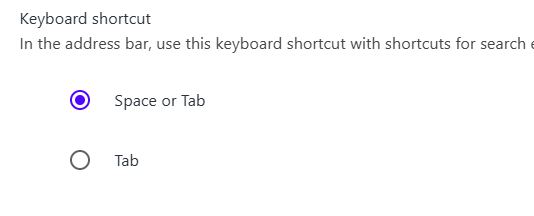
                  you managed to break the creating search engines way but didn't manage to clear the shortcut setting.
                  2026-07-15_220817.png

                  The setting is not functional but stays there for years.

                  Reply Quote 0
                    1 Reply Last reply
                  • Opera-QA-Team
                    Opera-QA-Team Opera @andrew84 last edited by This post is deleted!
                    Reply Quote 0
                      1 Reply Last reply
                    • Opera-QA-Team
                      Opera-QA-Team Opera @andrew84 last edited by

                      @andrew84: Hello, it should be fixed with the next dev release as we are currently working on it.

                      Reply Quote 0
                        1 Reply Last reply
                      • Opera-QA-Team
                        Opera-QA-Team Opera @vladbabinets last edited by

                        @vladbabinets: Sorry for this, it will be fixed in the next dev release.

                        Reply Quote 0
                          1 Reply Last reply
                        • W
                          wbtmagnum last edited by

                          Opera developer v135.0.5960.0 is crashing with the following error "Symbol lookup error: opera-developer: undefined symbol: av_dynamic_hdr_smpte2094_app5_to_t35" on Ubuntu 22.04 (6.8.0-134-generic x86_64).

                          I had to revert to Opera developer v134.0.5952.0 available from https://get.opera.com/pub/opera-developer/134.0.5952.0/linux/.

                          Reply Quote 0
                            1 Reply Last reply
                          • First post
                            Last post

                          Computer browsers

                          • Opera for Windows
                          • Opera for Mac
                          • Opera for Linux
                          • Opera beta version
                          • Opera USB

                          Mobile browsers

                          • Opera for Android
                          • Opera Mini
                          • Opera Touch
                          • Opera for basic phones

                          • Add-ons
                          • Opera account
                          • Wallpapers
                          • Opera Ads

                          • Help & support
                          • Opera blogs
                          • Opera forums
                          • Dev.Opera

                          • Security
                          • Privacy
                          • Cookies Policy
                          • EULA
                          • Terms of Service

                          • About Opera
                          • Press info
                          • Jobs
                          • Investors
                          • Become a partner
                          • Contact us

                          Follow Opera

                          • Opera - Facebook
                          • Opera - Twitter
                          • Opera - YouTube
                          • Opera - LinkedIn
                          • Opera - Instagram

                          © Opera Software 1995-