• Login
    • Search
    • Categories
    • Recent
    • Tags
    • Users
    • Groups
    • Rules
    • Help

    Do more on the web, with a fast and secure browser!

    Download Opera browser with:

    • built-in ad blocker
    • battery saver
    • free VPN
    Download Opera

    Opera 132 Stable

    Blogs
    desktop blog comments
    10
    17
    479
    Loading More Posts
    • Oldest to Newest
    • Newest to Oldest
    • Most Votes
    Reply
    • Reply as topic
    Log in to reply
    This topic has been deleted. Only users with topic management privileges can see it.
    • Opera-QA-Team
      Opera-QA-Team Opera last edited by

      Starting the discussion

      Reply Quote 0
        1 Reply Last reply
      • U
        Urby938 last edited by

        after update lefz side of browser ui is in black

        Reply Quote 0
          1 Reply Last reply
        • S
          Sopronman last edited by

          What the hell is this? On the left side is a 5-6 cm wide empty column, everything is comprimised, Crashes over crashes. Unusable!!!

          Reply Quote 0
            E A 2 Replies Last reply
          • E
            evillol @Sopronman last edited by

            @Sopronman said in Opera 132 Stable:

            What the hell is this? On the left side is a 5-6 cm wide empty column, everything is comprimised, Crashes over crashes. Unusable!!!

            settings>appearance>sidebar>Show sidebar
            Try turning this setting off..

            Reply Quote 0
              S 1 Reply Last reply
            • korol78
              korol78 last edited by korol78 This post is deleted!
              Reply Quote 0
                1 Reply Last reply
              • A
                albano23 last edited by albano23

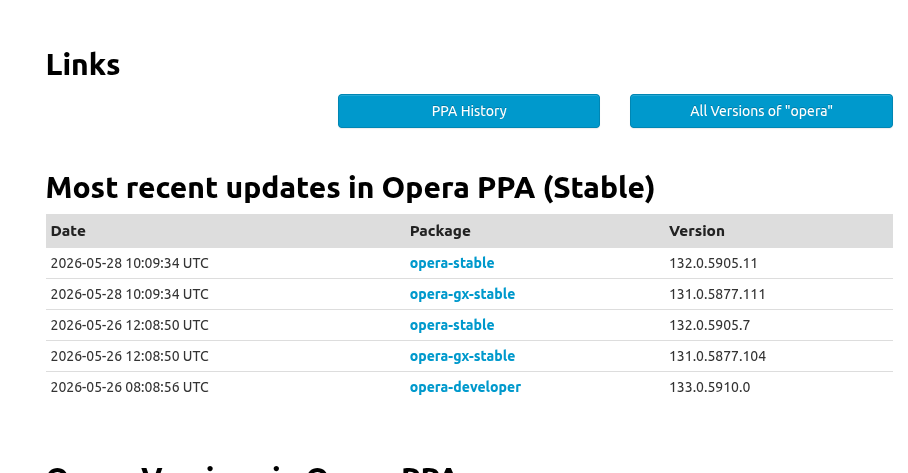
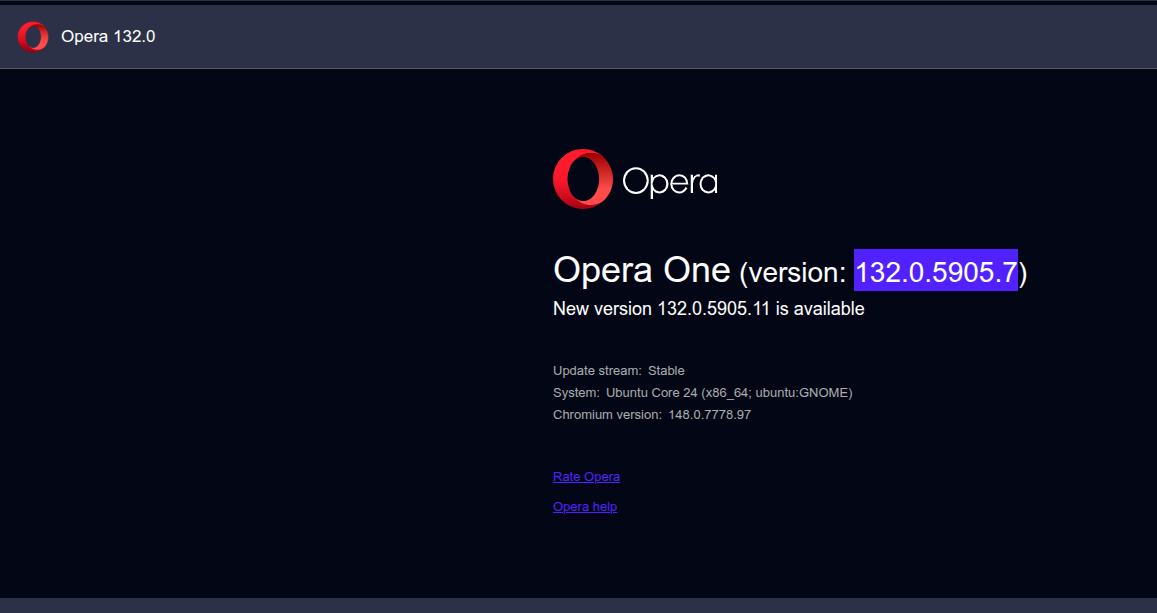
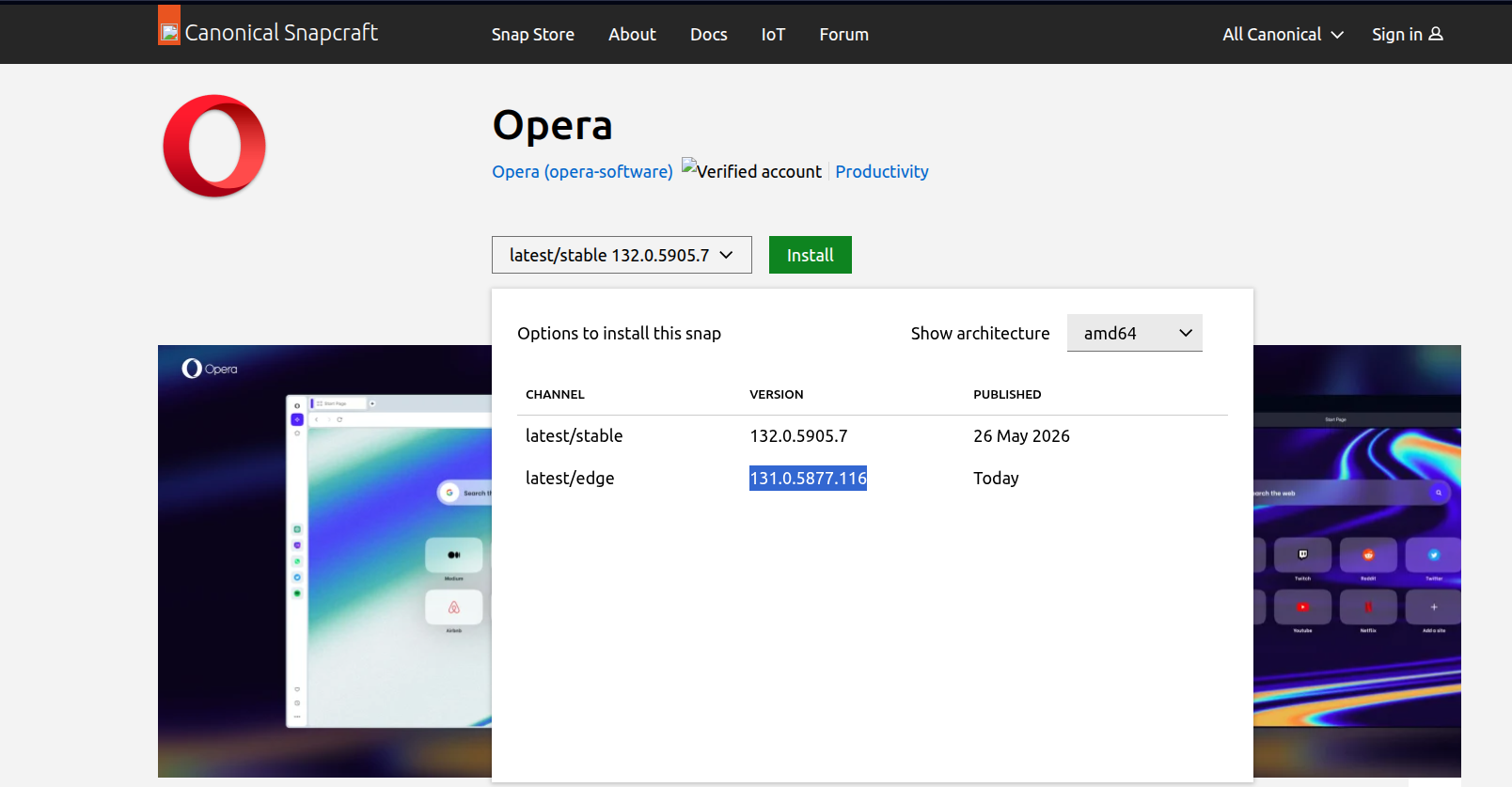
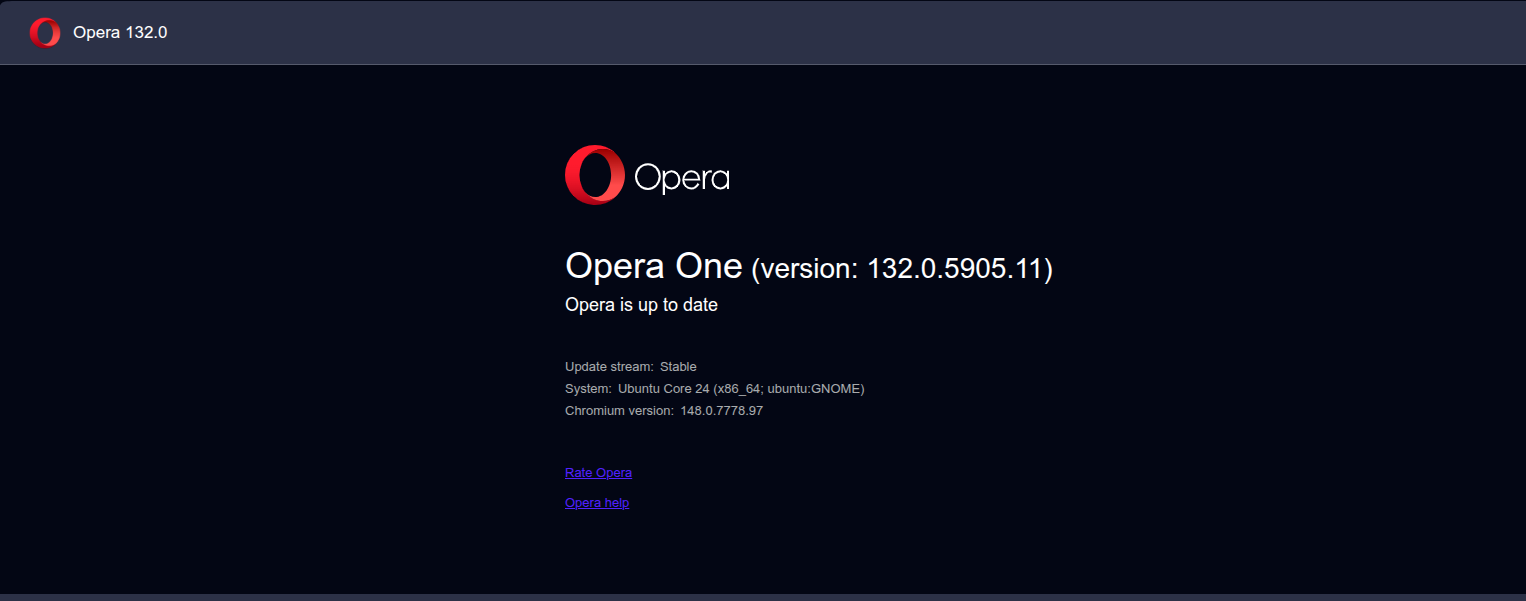
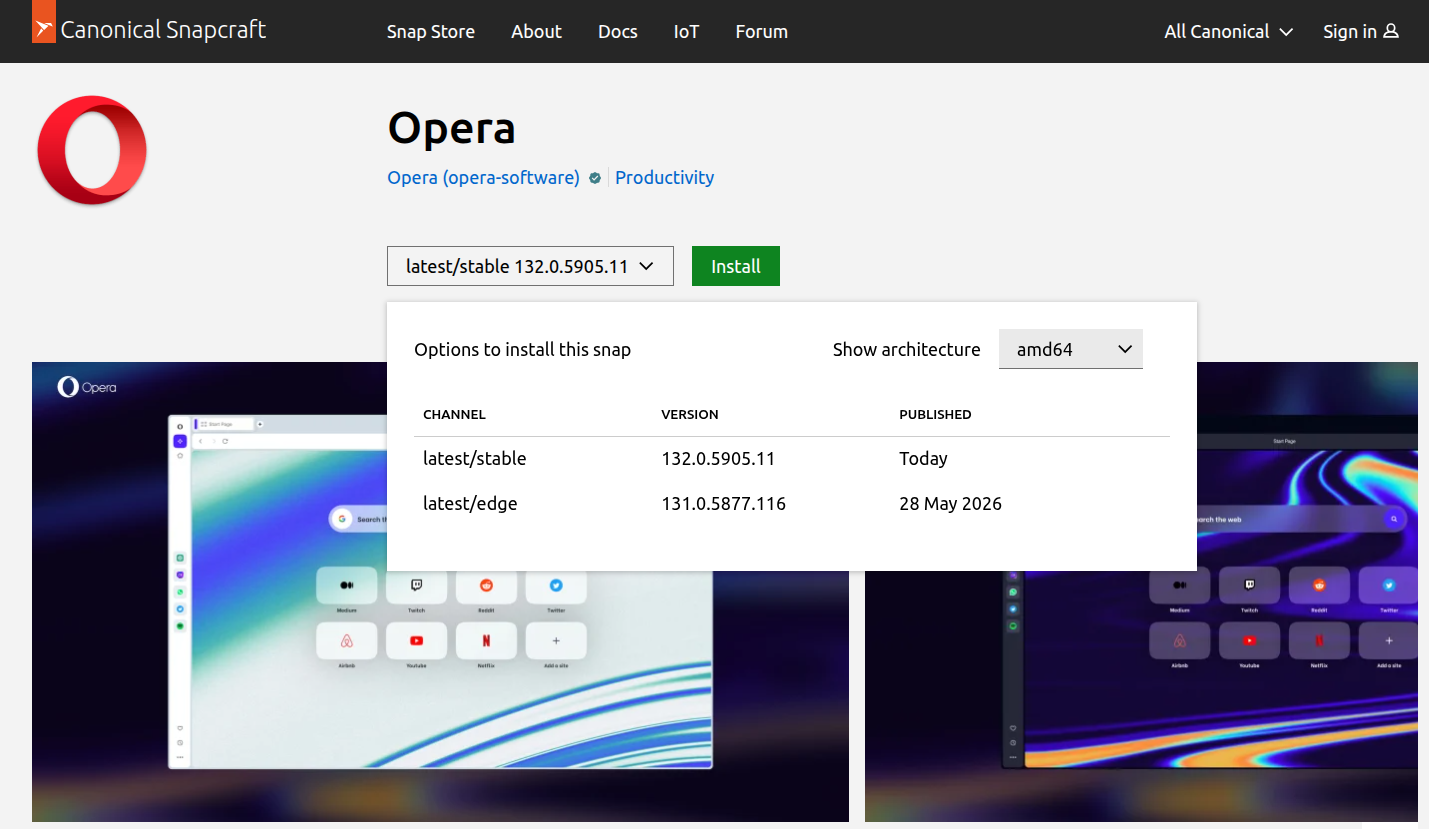
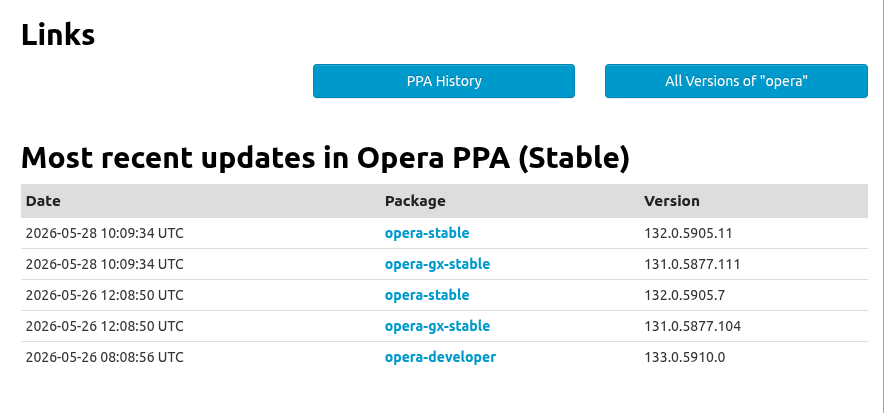
                Please clarify this for Linux. Currently, Snap release 132.0.5905.7, released on May 26th, is stable. Edge Snap release 131.0.5877.116, released today, is also available within the stable branch. Yesterday, 132.0.5905.10 was available in its place, but it was removed. Therefore, Snap users are stuck in limbo, unable to update to the 132 version you just released, which is actually 132.0.5905.11. This 131.0.5877.116 version uses Chromium 147. Show some respect to Linux users, especially those of us who use Ubuntu in my case 22.04.05 LTS. Snap packages also exist; you've only released the deb package 132.0.5905.11 correctly for Ubuntu, but the snap package, which uses 131.05877.116 as its edge version, is also missing. Could a moderator or Opera administrator explain this chaos with Snap Opera for Ubuntu? I say this with kindness, but I don't want to break my system. I've added screenshots to make it clearer.opera ppa deb.png opera snap.png opera snapcraft web.png

                Reply Quote 0
                  Opera-QA-Team 1 Reply Last reply
                • whisperer
                  whisperer last edited by

                  @whisperer said in Opera 131.0.5877.74 Stable update:

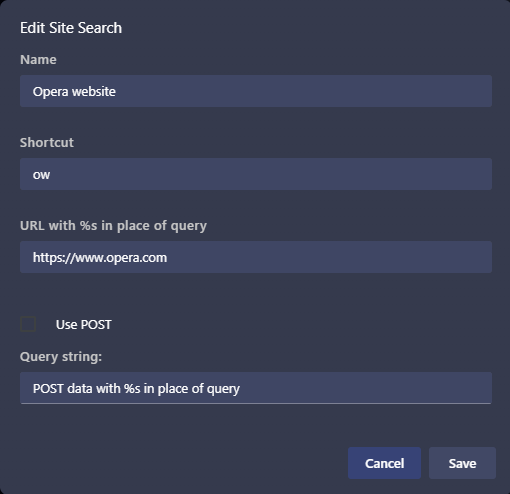
                  Crash when not using %s in site search definition (Opera for Windows)

                  Create a shortcut to go to the Opera website:

                  • Go to opera://settings/searchEngines
                  • Click the Add button to add a site search
                  • Enter these details: 6827c4ba-b4e3-4851-86be-60ab5f7ae73e-image.png
                    (Notice that no %s in used in the URL)
                  • Click Save

                  Now test it:

                  • Open a new tab (Ctrl+T)
                  • Type "ow", then press Space, then press Enter

                  Opera crashes.

                  (Tested with Opera 131.0.5877.97)

                  Not fixed in version 132.0.5905.11.

                  Reply Quote 0
                    1 Reply Last reply
                  • A
                    andrew84 @Sopronman last edited by

                    @Sopronman said in Opera 132 Stable:

                    On the left side is a 5-6 cm wide empty column

                    just turn of the vertical tabs option, it's buggy.

                    Reply Quote 0
                      1 Reply Last reply
                    • whisperer
                      whisperer last edited by whisperer

                      @whisperer said in Opera 131.0.5877.24 Stable update:

                      Still crash when switching to a tab with playing youtube video using Ctrl+Tab and releasing Ctrl late.

                      Not fixed in version 132.0.5905.11.

                      Reply Quote 0
                        1 Reply Last reply
                      • K
                        karen-arzumanyan last edited by

                        The bug BUG-21893 is also present in version 132.0.5905.11.

                        Reply Quote 0
                          1 Reply Last reply
                        • S
                          Sopronman @evillol last edited by

                          @evillol: It is always off by me. I dont use and i neved used the sidebar. I have this problem also without sidebar

                          Reply Quote 0
                            1 Reply Last reply
                          • S
                            Sopronman last edited by

                            By horizontal tabs empty left side, by vertical tabs close the browser spontaneously....unusable....version 131 with horizontal tabs ok, with vertical tabs always tab jumping

                            Reply Quote 0
                              1 Reply Last reply
                            • Opera-QA-Team
                              Opera-QA-Team Opera @albano23 last edited by

                              @albano23: Hello, it was our mistake, but should be fixed now, could you please check if you can reach .11 version from Snap?

                              Reply Quote 0
                                A 2 Replies Last reply
                              • A
                                albano23 @Opera-QA-Team last edited by This post is deleted!
                                Reply Quote 0
                                  1 Reply Last reply
                                • A
                                  albano23 @Opera-QA-Team last edited by

                                  @Opera-QA-Team Sorry for the late reply. Version 132.0.5905.11—the current stable release—is already available on Snap. I can confirm this because I’m using it right now. I’ve included some screenshots so you can see it more clearly. Thanks for your reply. I really appreciate it. I’m browsing without any issues.opera snap 01.png opera snapcraft web 01.png opera ppa deb 01.png

                                  Reply Quote 0
                                    1 Reply Last reply
                                  • S
                                    Sopronman last edited by

                                    Nothing happens? No repaired version? This one is unusable!

                                    Reply Quote 0
                                      1 Reply Last reply
                                    • First post
                                      Last post

                                    Computer browsers

                                    • Opera for Windows
                                    • Opera for Mac
                                    • Opera for Linux
                                    • Opera beta version
                                    • Opera USB

                                    Mobile browsers

                                    • Opera for Android
                                    • Opera Mini
                                    • Opera Touch
                                    • Opera for basic phones

                                    • Add-ons
                                    • Opera account
                                    • Wallpapers
                                    • Opera Ads

                                    • Help & support
                                    • Opera blogs
                                    • Opera forums
                                    • Dev.Opera

                                    • Security
                                    • Privacy
                                    • Cookies Policy
                                    • EULA
                                    • Terms of Service

                                    • About Opera
                                    • Press info
                                    • Jobs
                                    • Investors
                                    • Become a partner
                                    • Contact us

                                    Follow Opera

                                    • Opera - Facebook
                                    • Opera - Twitter
                                    • Opera - YouTube
                                    • Opera - LinkedIn
                                    • Opera - Instagram

                                    © Opera Software 1995-