• Login
    • Search
    • Categories
    • Recent
    • Tags
    • Users
    • Groups
    • Rules
    • Help

    Do more on the web, with a fast and secure browser!

    Download Opera browser with:

    • built-in ad blocker
    • battery saver
    • free VPN
    Download Opera

    Opera 124.0.5705.42 Stable update

    Blogs
    desktop blog comments
    21
    44
    3229
    Loading More Posts
    • Oldest to Newest
    • Newest to Oldest
    • Most Votes
    Reply
    • Reply as topic
    Log in to reply
    This topic has been deleted. Only users with topic management privileges can see it.
    • Urby938
      Urby938 last edited by

      Youtube notifications still not working when enabled windows 11 25 H2 Bennish web notification check works but youtube not. fix it.

      Reply Quote 0
        Opera-QA-Team 1 Reply Last reply
      • sicu220
        sicu220 last edited by

        The bug is still not fixed. The bottom bar is stuck in the background image.594dd200-3b64-47c9-a331-d05d14066ff1-image.png

        Reply Quote 0
          Opera-QA-Team 1 Reply Last reply
        • sicu220
          sicu220 last edited by

          Aria's icon doesn't appear on the tab. Instead, there's a white rectangle there.
          f75aaf2b-fa59-4c5a-9afc-28412bd5ee64-image.png

          Reply Quote 0
            Opera-QA-Team 1 Reply Last reply
          • revalenz
            revalenz last edited by

            When are you going to release a new version for Opera Beta to fix CVE-2025-13223?

            Reply Quote 0
              1 Reply Last reply
            • bbildman
              bbildman last edited by leocg

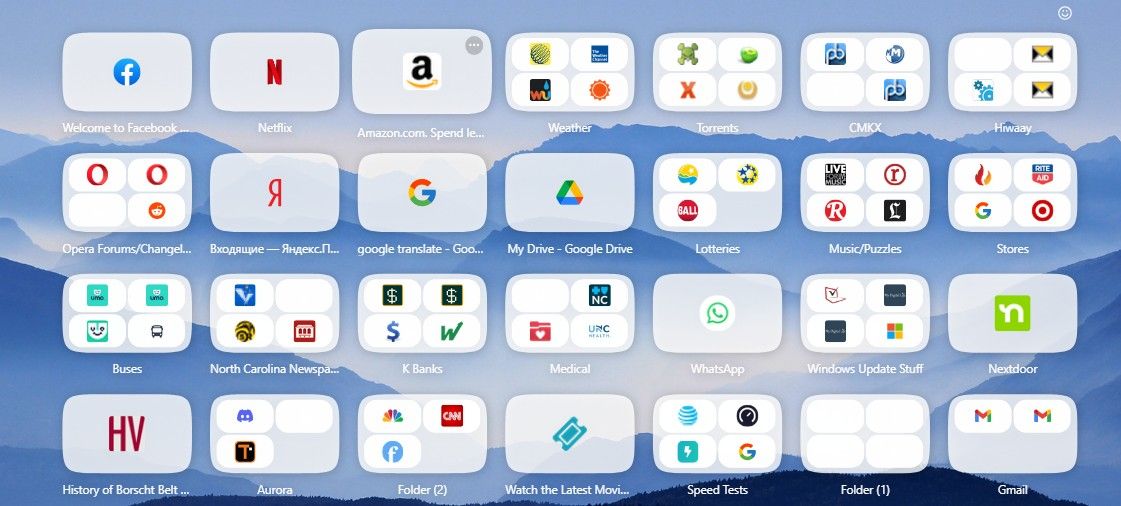
              I really would appreciate it if someone from the development team might address what has happened to my Speed Dial icons, some are missing images of icons within the larger icons, and some of the large icons are simply blank. All the blank icons still work when clicked, the large icons as well as the smaller ones within large icons. I have been addressing this since O122 and my comments have not even been acknowledged, help!!Screenshot_1.jpg

              Reply Quote 0
                Opera-QA-Team 1 Reply Last reply
              • yuseijaden
                yuseijaden last edited by

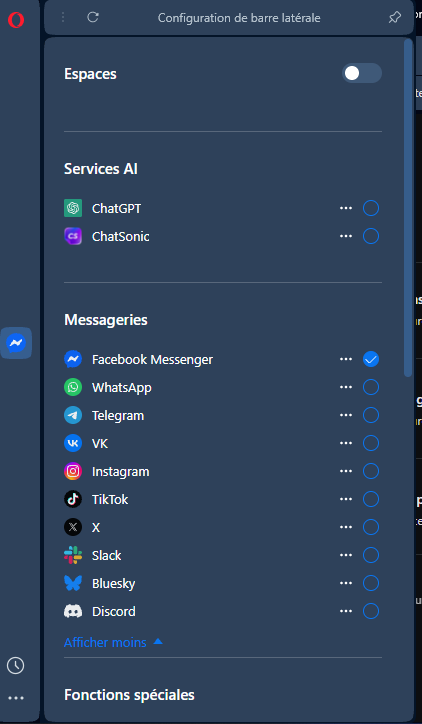
                I have a problem with Aria, the button can't be add, it's normal?
                It only appears in the address bar.
                111.png

                Reply Quote 0
                  sicu220 1 Reply Last reply
                • sicu220
                  sicu220 @yuseijaden last edited by

                  @yuseijaden https://blogs.opera.com/news/2025/11/how-to-opt-in-and-upgrade-to-the-new-opera-ai-in-your-browser/

                  Reply Quote 0
                    yuseijaden 1 Reply Last reply
                  • yuseijaden
                    yuseijaden @sicu220 last edited by

                    @sicu220: Thank you ! I understand better now

                    Reply Quote 0
                      1 Reply Last reply
                    • Kilian01
                      Kilian01 last edited by

                      Why is the Linux release after 2 days still unavailable from the repository? This really should be automatically pushed on release.

                      Reply Quote 0
                        1 Reply Last reply
                      • Opera-QA-Team
                        Opera-QA-Team Opera @sicu220 last edited by

                        @sicu220: Hi, thanks - we are aware of this problem, but thanks for the reminder!

                        Reply Quote 0
                          1 Reply Last reply
                        • flaviu2
                          flaviu2 @andrew84 last edited by

                          @andrew84
                          Yes, I noticed this bug appear from time to time, but seems not be present on every versions.

                          Reply Quote 0
                            1 Reply Last reply
                          • Opera-QA-Team
                            Opera-QA-Team Opera @sicu220 last edited by

                            @sicu220: Hi, thanks for the feedback - we'll check it.

                            Reply Quote 1
                              1 Reply Last reply
                            • history411
                              history411 last edited by

                              "Update."
                              Slowly I turned...
                              Another stolen hour of my time.
                              Opera, as soon as I figure out how to block your pesky updates I will do so.
                              Or maybe just go back to Firefox.

                              Reply Quote 0
                                Opera-QA-Team 1 Reply Last reply
                              • Opera-QA-Team
                                Opera-QA-Team Opera @history411 last edited by

                                @history411: Hello, thanks for sharing. Updates are important for the proper functioning of the browser, they contain bugfixes for issues reported also from Users, so we always suggest to have the newest version.

                                Reply Quote 0
                                  1 Reply Last reply
                                • Opera-QA-Team
                                  Opera-QA-Team Opera @bbildman last edited by

                                  @bbildman: Hi, thanks for the feedback, we will investigate the issue. So this happened after update to v122? Is it only about your old SpeedDials, or also newly added? What icons can you see when you go to opera://bookmarks -> folder Speed Dials? Are they OK or also changed?

                                  Reply Quote 0
                                    bbildman 1 Reply Last reply
                                  • ManagerBOSS
                                    ManagerBOSS last edited by

                                    After the latest browser update to version 124.0.5705.42, the pre-filled login feature stopped working. I have my logins saved in the browser and I haven't made any changes there. However, now when I want to log in to a URL where I have my login details saved, neither the login nor the password are pre-filled as they used to be, and what's more, when I enter my login, the password is not automatically filled in either. When I go to a specific URL, the key is missing in the top right corner, even though the URL is in the list of saved logins. Please note that this mainly concerns URLs that contain IP addresses, e.g., https://192.168.1.2.

                                    Reply Quote 0
                                      1 Reply Last reply
                                    • TheLamer
                                      TheLamer @Opera-QA-Team last edited by

                                      @Opera-QA-Team

                                      The deb is busted since this release:

                                      11.74 Setting up opera-stable (124.0.5705.42) ...
                                      11.82 update-alternatives: error: alternative path /usr/bin/opera-stable doesn't exist
                                      11.85 dpkg: error processing package opera-stable (--configure):
                                      11.85  installed opera-stable package post-installation script subprocess returned error exit status 2
                                      

                                      Tested on bookworm, Trixie, and Noble. Related to renaming the package but the deb contents do not contain that bin.

                                      ./bin
                                      ./bin/opera
                                      

                                      The problem is specifically in your postinst in the deb:

                                      EOF
                                                  chmod 755 /etc/cron.daily/opera-browser
                                                  # Run once now to add Opera's pgp key to apt's keyring
                                                  /etc/cron.daily/opera-browser > /dev/null 2>&1
                                      
                                      
                                              update-alternatives --install /usr/bin/x-www-browser x-www-browser /usr/bin/opera-stable 120 \
                                                      --slave /usr/share/man/man1/x-www-browser.1.gz x-www-browser.1.gz /usr/share/man/man1/opera-stable.1.gz
                                              update-alternatives --install /usr/bin/gnome-www-browser gnome-www-browser /usr/bin/opera-stable 120 \
                                                      --slave /usr/share/man/man1/gnome-www-browser.1.gz gnome-www-browser.1.gz /usr/share/man/man1/opera-stable.1.gz
                                              ;;
                                      
                                      esac
                                      

                                      Because the name was changed your deb build env looks like it templates that name into the post install hooks and every deb is failing now.

                                      Reply Quote 0
                                        lfr1138 1 Reply Last reply
                                      • Kilian01
                                        Kilian01 last edited by

                                        Linux release is now available but fails to properly install. Please fix this immediately. I may remind you that this is calld stable, not beta or developer.

                                        Reply Quote 0
                                          thelittlebrowserthatcould Opera-QA-Team 2 Replies Last reply
                                        • Scrofa
                                          Scrofa last edited by

                                          After the 124.0.5705.42 update I am unable to even open Opera in Ubuntu. Fix this.

                                          Reply Quote 0
                                            ironbone Opera-QA-Team 2 Replies Last reply
                                          • ironbone
                                            ironbone last edited by

                                            The snap opera version does not work with Wayland on Ubuntu

                                            Reply Quote 0
                                              Opera-QA-Team 1 Reply Last reply
                                            • First post
                                              Last post

                                            Computer browsers

                                            • Opera for Windows
                                            • Opera for Mac
                                            • Opera for Linux
                                            • Opera beta version
                                            • Opera USB

                                            Mobile browsers

                                            • Opera for Android
                                            • Opera Mini
                                            • Opera Touch
                                            • Opera for basic phones

                                            • Add-ons
                                            • Opera account
                                            • Wallpapers
                                            • Opera Ads

                                            • Help & support
                                            • Opera blogs
                                            • Opera forums
                                            • Dev.Opera

                                            • Security
                                            • Privacy
                                            • Cookies Policy
                                            • EULA
                                            • Terms of Service

                                            • About Opera
                                            • Press info
                                            • Jobs
                                            • Investors
                                            • Become a partner
                                            • Contact us

                                            Follow Opera

                                            • Opera - Facebook
                                            • Opera - Twitter
                                            • Opera - YouTube
                                            • Opera - LinkedIn
                                            • Opera - Instagram

                                            © Opera Software 1995-