Opera 140 Stable
-
steeveboy last edited by steeveboy
Critical Download Regression in Opera 140.0.6074.17 (Windows 11 x64)
Hi Opera Team,
Please look into a severe download regression introduced in build 140.0.6074.17:
Downloads generated dynamically in the client/browser memory via blob: / data: streams or JavaScript-triggered file downloads (e.g. generated CSV, text, or export files in Google Gemini chat interfaces) fail instantly with an "Interrupted / Cancelled" status. The native Windows "Save As" file dialog either fails to spawn or the stream terminates immediately before writing to disk.
Key details:
- Environment: Windows 11 26H2 (x64)
- Affected Build: 140.0.6074.17 (Chromium 157.0.8103.39)
- Verification: Rolling back to Opera 139.0.6053.38 completely resolves the issue—the exact same file streams download immediately without any errors. Testing the exact same chat session in Microsoft Edge also works without issues.
- Toggling "Parallel downloading", built-in ad/tracker blockers, or the download prompt settings in Opera 140 does not remedy the stream drop.
It seems the updated Chromium download pipeline / download bubble service intercepts or prematurely drops temporary in-memory streams. Please investigate and push a patch for this in the next maintenance build.
-

-
steeveboy last edited by steeveboy
@leocg Just try generating a simple CSV-File oder PDF document in Gemini. It can't be downloaded in the chat window. If you click the download button a small window opens but instantly breaks. The download stops or doesn't even begin in the first place.
The Save As-Dialogue does not appear. So for me it's unusable, because I integrated Gemini in my workflow and need to be able to download certain files it generates for me.
With previous version 139 everything is OK. Something is broken with the download system in Opera 140.
-
albano23 last edited by
@steeveboy: I can confirm that this exact same regression also affects Linux (Ubuntu 22.04.5 LTS, official Snap package) on builds 140.0.6074.17 and 140.0.6074.18 (Chromium 157.0.8103.39), so this is definitely a cross-platform issue in Opera 140's download pipeline, not an OS-specific glitch.
Just like with Gemini's generated files, any site that triggers client-side / in-memory (blob: / JavaScript) downloads—such as MEGA when downloading a shared link without being logged in—fails to trigger the "Save As" dialog:- A temporary tab or window flashes open and closes immediately.
- Nothing appears in the top-right download bubble.
- The entry silently gets stuck in the full Downloads manager (opera://downloads) without actually saving the file.
- The only workaround is to manually copy the link from opera://downloads and paste it into a new tab to force the "Save As" prompt to appear.
Disabling the built-in ad/tracker blocker or changing download prompt settings makes no difference. Reverting back to Opera 139 immediately fixes the issue on Linux as well. Please prioritize a fix for this in the next build, as core download functionality is currently broken across both Windows and Linux.
-
karen-arzumanyan last edited by karen-arzumanyan
Critical Download Regression in 140.0.6074.18 (Windows 11 x64) - Part 2
File downloads do not work when clicking on the links with the middle mouse button (scroll wheel) to open them in a new tab.
However, if you copy the link and paste it into the address bar of a new tab, or simply click on the link directly, the file downloads as expected.
This issue did not exist in version 139; it began after updating to version 140.
The problem occurs on various PCs running Windows 11 Pro 26H2 x64 .
-
 whisperer last edited by whisperer
I can confirm the bug with the Windows version. For example, clicking the download link at https://support.bluestacks.com/hc/en-us/articles/34359017537549-BlueStacks-5-22-Release-Notes doesn't work.
Right-clicking and selecting "Save linked content as" works, as well as copying the target link and pasting it in a new tab.
It happens for links that open in a new tab, so for links with target="_blank", links that are opened while holding Ctrl or Shift, or links that are opened by clicking the link using the scroll button.
-
sicu220 last edited by
Strange characters in Opera AI's response. Stars, strange lines. That's why it's hard to see the response and what it replies doesn't make sense.

-
andrew84 last edited by
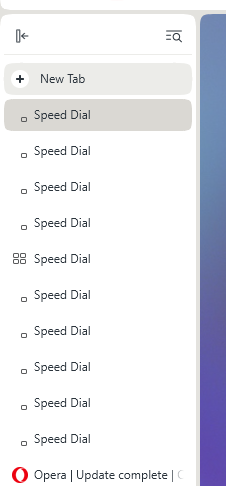
In vertical tabs I'm getting the ugly speed dial icons (only the one 'square' from four) while creating new tabs. In Dveloper the same.