• Войти
    • Поиск
    • Категории
    • Последние
    • Метки
    • Пользователи
    • Группы
    • Rules
    • Help

    Do more on the web, with a fast and secure browser!

    Download Opera browser with:

    • built-in ad blocker
    • battery saver
    • free VPN
    Download Opera

    You can now decorate your tabs with Emojis in Opera 😎

    Blogs
    desktop blog comments
    44
    99
    39851
    Загружаем больше сообщений
    • Сначала старые
    • Сначала новые
    • По количеству голосов
    Ответить
    • Ответить, создав новую тему
    Авторизуйтесь, чтобы ответить
    Эта тема была удалена. Только пользователи с правом управления темами могут её видеть.
    • thelittlebrowserthatcould
      thelittlebrowserthatcould @leocg отредактировано

      @leocg Obviously, I'm ahead of my time 👽

      Opera Snapshot_2024-06-12_070225_opera.png

      Screenshot from 2024-06-12 07-05-23.png

      Ответить Цитировать 0
        albano23 leocg 2 ответов Последний ответ
      • vfisher
        vfisher отредактировано

        How to disable this shit?

        Ответить Цитировать 2
          1 ответ Последний ответ
        • albano23
          albano23 @thelittlebrowserthatcould отредактировано albano23

          @thelittlebrowserthatcould said in You can now decorate your tabs with Emojis in Opera 😎:

          @leocg Obviously, I'm ahead of my time 👽
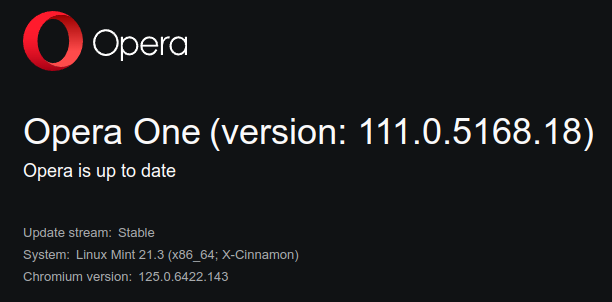
          Opera Snapshot_2024-06-12_070225_opera.png

          Screenshot from 2024-06-12 07-05-23.png

          You are not ahead of your time, just that the .deb package (since you are using synaptic), was released yesterday, in fact on my ubuntu 20.04, which I have the deb, it was updated. Not so with the snap of that same 20.04. In fact for snap it is still coming out, the latest 110.0.5130.66. And this also happens to me on my main pc Ubuntu 22.04.04 lts, where I only have it for snap. No matter where you look if you put snap info opera in a terminal you get 110.0.5130.66 as stable but with yesterday's date of update (I want to think it's a mistake, because to me the one that ends in .66 of the 110, I was renewed on June 4), on the other hand it is true what @leocg says, there is still no stable web for this 111 that you point out. However if you go to https://www.ubuntuupdates.org/ppa/opera there if this the 111 you mention, therefore, and as I said if you use synaptic, ie you have .deb instead of snap, you have been updated, for those who have snap not yet (here you can see https://snapcraft.io/opera) and as you will see if you click on the arrow where it says latest/stable you will see that this the 110 finished in .66 and also as date says Yesterday. Moreover I emphasize if you go to https://blogs.opera.com/desktop/category/stable-2/, the last one that will come out is the 110 ending in 66 and dated June 4. In short, for Linux this is still a bit of a disaster, there is no way to have updated opera without scares or strange things. I am about to think that it is a silent update, that it exists, but it is not but which is not published on the official website of opera stables. In fact in my windows 11, yesterday I tried to update and I did not jump in any way the update. I will have to be patient and when they decide to make it official I hope that the packagers of opera snap, put everything right. As for the chromium ffmpeg, I do not think they will release a new one soon, because it came out very recently that this snap (See in this link the date is 16 May https://snapcraft.io/chromium-ffmpeg) and is the one you do not have to touch when you happen to the videos, without having to enter to modify anything with the lib in github etc.. Also I think that opera is waiting for the update of chrome (Chromium) that will not take long because the beta of 126, is from June 6 (at least by snap) but the 125 that ends in 141 (The current one is from June 3). So I don't know what to think. In short, patience, there is no other option. As for the emojis, with version 110 that ends in 66 of opera, that is, the current stable, the I don't use them, because I don't like it, but it is what it is. but who says @leocg The thing about closing the windows with the X was solved.

          Ответить Цитировать 0
            thelittlebrowserthatcould 1 ответ Последний ответ
          • thelittlebrowserthatcould
            thelittlebrowserthatcould @albano23 отредактировано

            @albano23 the libffmpeg from Chromium is dated 24-May and is a vital update to the version of Opera I am using (which has a flag setting for emojis -- hooray!).

            Ответить Цитировать 0
              1 ответ Последний ответ
            • leocg
              leocg Moderator Volunteer @thelittlebrowserthatcould отредактировано

              @thelittlebrowserthatcould it's not on https://get.opera.com/ftp/pub/opera/desktop/ or in https://get.opera.com/ftp/pub/opera-beta/

              Ответить Цитировать 0
                1 ответ Последний ответ
              • albano23
                albano23 отредактировано

                @thelittlebrowserthatcould and @leocg and:

                For everyone whether they are windows or Linux (Ubuntu and other flavors), it has been updated to the latest version, that is:

                Opera One(version: 111.0.5168.25) based on chromium stable:
                Chromium version:125.0.6422.143

                I just updated on windows 11 and Ubuntu 22.04.04 Lts, on Ubuntu via snap and I had no problems with video playback (I am using chromium ffmpeg 0.1 stable snap version from May 16, 2024). Link: https://snapcraft.io/chromium-ffmpeg

                As for the emojis there is no problem when closing the windows with the X, they are still there but they don't bother me, maybe they overload the browser if you have a lot of tabs open, but they don't bother me.

                As I said in my previous comment, you have to be patient.

                Best regards.

                Postadata: For those who updated via synpatic or gdebi or via terminal or with the software updater of Ubuntu and other flavors, know that the stable version of opera, is the one from yesterday and not the current one, see the ppa page:

                https://www.ubuntuupdates.org/ppa/opera (opera-stable 111.0.5168.18) I imagine it will be updated soon be patient.

                For more information you can go to the stable web of opera, where is already the 111.05168.25) here: https://blogs.opera.com/desktop/category/stable-2/ and inside there by clicking here: https://blogs.opera.com/desktop/2024/06/opera-111/ where you can see the release date of the version today June 12, 2024.

                Ответить Цитировать 1
                  1 ответ Последний ответ
                • asmarachan
                  asmarachan отредактировано

                  how to disable Rich Hints Agent?

                  Ответить Цитировать 0
                    leocg burnout426 2 ответов Последний ответ
                  • Nikopol1821
                    Nikopol1821 @illusiveart отредактировано

                    @illusiveart also opera doesnt let you choose to set the standard search engine of your choice and also doesnt allow you to choose which site to open when opening a new tab - literally basic browser functions but hey we got emojis on tabs now they got their priorities right

                    Ответить Цитировать 0
                      1 ответ Последний ответ
                    • leocg
                      leocg Moderator Volunteer @asmarachan отредактировано

                      @asmarachan Not possible

                      Ответить Цитировать 0
                        1 ответ Последний ответ
                      • burnout426
                        burnout426 Volunteer @asmarachan отредактировано

                        @asmarachan You don't. It's part of Opera.

                        Ответить Цитировать 0
                          1 ответ Последний ответ
                        • lethewaters
                          lethewaters @AwoNaija отредактировано

                          @awonaija I agree. I thought it was a virus also. While it may be a "nifty" cosmetic update it is not required. It adds clutter and confusion to the browser for basic users.

                          Ответить Цитировать 0
                            1 ответ Последний ответ
                          • paulcan
                            paulcan @Opera Comments Bot отредактировано

                            @opera-comments-bot better still, you can now disable them.

                            Ответить Цитировать 2
                              Dave236 1 ответ Последний ответ
                            • Jesseab
                              Jesseab отредактировано leocg

                              How to disable ?

                              Ответить Цитировать 0
                                leocg 1 ответ Последний ответ
                              • leocg
                                leocg Moderator Volunteer @Jesseab отредактировано

                                @jesseab Make sure that you have at least Opera 111 and disable it in settings page

                                Ответить Цитировать 1
                                  1 ответ Последний ответ
                                • Dave236
                                  Dave236 @paulcan отредактировано

                                  @paulcan

                                  Thank you 🙂

                                  Ответить Цитировать 0
                                    1 ответ Последний ответ
                                  • moesyzslak
                                    moesyzslak отредактировано

                                    Please let me disable this childish feature

                                    Ответить Цитировать 0
                                      1 ответ Последний ответ
                                    • moesyzslak
                                      moesyzslak отредактировано

                                      To disable go to - Settings - User interface - Show emojis in tooltip - disable.

                                      Ответить Цитировать 0
                                        1 ответ Последний ответ
                                      • Dfromhein
                                        Dfromhein отредактировано

                                        This is the dumbest feature I have ever seen. How about fixing printing from an iPad instead.

                                        Ответить Цитировать 0
                                          1 ответ Последний ответ
                                        • VashTS21
                                          VashTS21 отредактировано

                                          this feature should have been off by default... imo any "feature" that is not critical or solely for aesthetics should be off by default and a tour should be implemented on new features letting you decide if you want it on or off

                                          Ответить Цитировать 0
                                            1 ответ Последний ответ
                                          • Заблокировано  leocg leocg 
                                          • Первое сообщение
                                            Последнее сообщение

                                          Computer browsers

                                          • Opera for Windows
                                          • Opera for Mac
                                          • Opera for Linux
                                          • Opera beta version
                                          • Opera USB

                                          Mobile browsers

                                          • Opera for Android
                                          • Opera Mini
                                          • Opera Touch
                                          • Opera for basic phones

                                          • Add-ons
                                          • Opera account
                                          • Wallpapers
                                          • Opera Ads

                                          • Help & support
                                          • Opera blogs
                                          • Opera forums
                                          • Dev.Opera

                                          • Security
                                          • Privacy
                                          • Cookies Policy
                                          • EULA
                                          • Terms of Service

                                          • About Opera
                                          • Press info
                                          • Jobs
                                          • Investors
                                          • Become a partner
                                          • Contact us

                                          Follow Opera

                                          • Opera - Facebook
                                          • Opera - Twitter
                                          • Opera - YouTube
                                          • Opera - LinkedIn
                                          • Opera - Instagram

                                          © Opera Software 1995-