• Login
    • Search
    • Categories
    • Recent
    • Tags
    • Users
    • Groups
    • Rules
    • Help

    Do more on the web, with a fast and secure browser!

    Download Opera browser with:

    • built-in ad blocker
    • battery saver
    • free VPN
    Download Opera

    Opera 135.0.5973.123 Stable update

    Blogs
    desktop blog comments
    11
    22
    1580
    Loading More Posts
    • Oldest to Newest
    • Newest to Oldest
    • Most Votes
    Reply
    • Reply as topic
    Log in to reply
    This topic has been deleted. Only users with topic management privileges can see it.
    • J
      jojo0587 @leocg last edited by

      @leocg: Really. Now it works. Before writing the first message, I only cleared cookies and it had no effect.

      PS. Can the cache be deleted from somewhere other than DevTools (Ctrl + Shift + I)?

      My proposals for changes in Opera (Google Document).
      - There are not enough signs to put all the links here.

      Reply Quote 0
        J 1 Reply Last reply
      • J
        jojo0587 last edited by

        I have a bug with the vertical tab bar. If I want to move the card, after moving it and releasing it in the indicated place, it is copied and not moved.

        My proposals for changes in Opera (Google Document).
        - There are not enough signs to put all the links here.

        Reply Quote 0
          1 Reply Last reply
        • J
          JamesneedHelp @jojo0587 last edited by

          @jojo0587 Hello, I have fixed my problem by unchecking the allow acceptable ads function in the ad blocker function then restarting twice. The Accepatble ads function disapears. I don't to which problem you are refering.
          Can any Moderators show that my Issue is now fixed.
          Thanks

          Reply Quote 0
            1 Reply Last reply
          • R
            red last edited by

            How do I stop this new version of Opera from auto-starting on login, in Fedora Linux Mate 44?

            Reply Quote 0
              1 Reply Last reply
            • J
              JamesneedHelp @JamesneedHelp last edited by

              @JamesneedHelp My issue is fixed now. Thanks to Opera customers services by email. Show as solved please.

              Reply Quote 0
                1 Reply Last reply
              • A
                andrew84 last edited by This post is deleted!
                Reply Quote 0
                  1 Reply Last reply
                • ddvddv
                  ddvddv @kmielczarczyk last edited by

                  @kmielczarczyk: OK , I will be wait

                  Reply Quote 0
                    1 Reply Last reply
                  • M
                    Moses1 @Opera Comments Bot last edited by

                    @Opera-Comments-Bot said in Opera 135.0.5973.123 Stable update:

                    a round of stability and UI fixes. Key highlights You can find the full

                    How do get this

                    Reply Quote 0
                      leocg 1 Reply Last reply
                    • leocg
                      leocg Moderator Volunteer @Moses1 last edited by

                      @Moses1 This what?

                      Reply Quote 0
                        1 Reply Last reply
                      • S
                        skpy last edited by

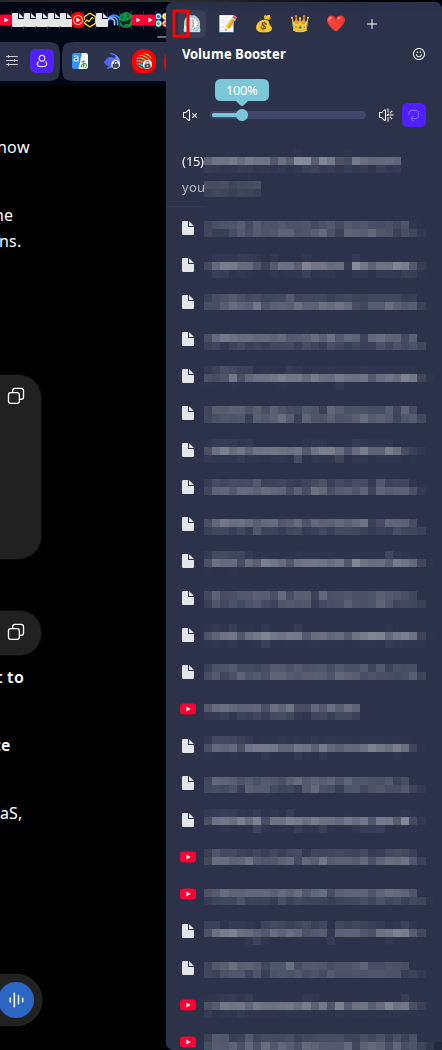
                        There are 2 issues:

                        1. When there are a lot of tabs of the same site and one of them are playing audio - it is not possible to select the tab - the popup covers the tab under the mouse cursor and I can only add a tab icon instead of select a tab. 2026-09-14_12-01.png
                        2. When a new modal window is opened (in this case the window to login into Opera's forum), the window bar is totally black with no buttons on it.
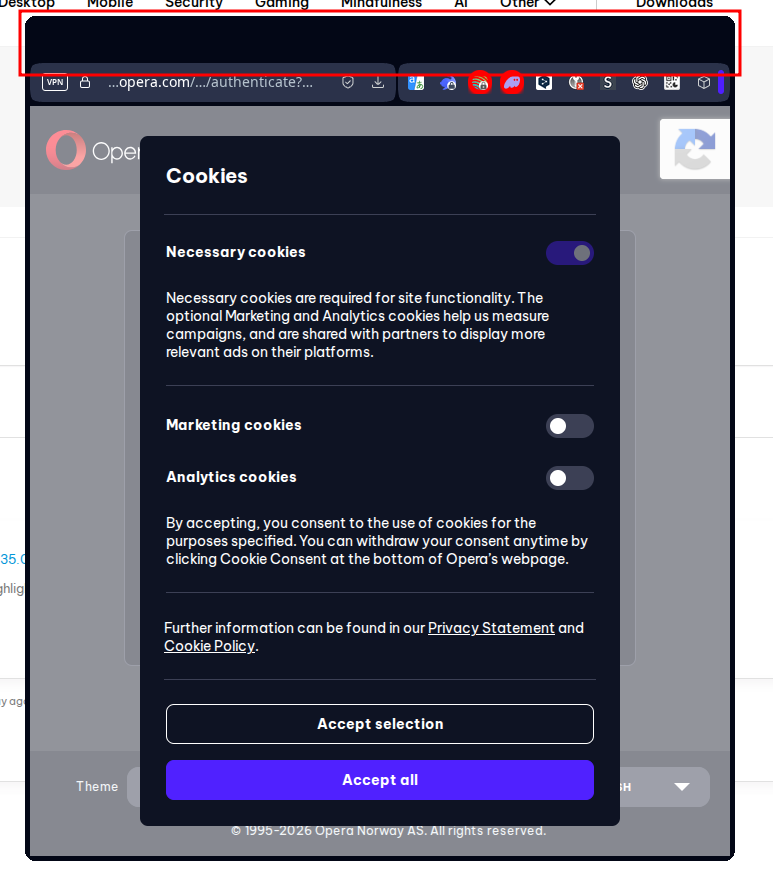
                          2026-09-15_00-22.png

                        I am on Kubuntu 24.04, KDE Plasma 5.27.12, Opera 135.0.5973.133

                        Reply Quote 0
                          1 Reply Last reply
                        • First post
                          Last post

                        Computer browsers

                        • Opera for Windows
                        • Opera for Mac
                        • Opera for Linux
                        • Opera beta version
                        • Opera USB

                        Mobile browsers

                        • Opera for Android
                        • Opera Mini
                        • Opera Touch
                        • Opera for basic phones

                        • Add-ons
                        • Opera account
                        • Wallpapers
                        • Opera Ads

                        • Help & support
                        • Opera blogs
                        • Opera forums
                        • Dev.Opera

                        • Security
                        • Privacy
                        • Cookies Policy
                        • EULA
                        • Terms of Service

                        • About Opera
                        • Press info
                        • Jobs
                        • Investors
                        • Become a partner
                        • Contact us

                        Follow Opera

                        • Opera - Facebook
                        • Opera - Twitter
                        • Opera - YouTube
                        • Opera - LinkedIn
                        • Opera - Instagram

                        © Opera Software 1995-