Opera 133.0.5932.85 Stable update
-
 Opera-QA-Team Opera last edited by
@andrew84: Hello, thank you, it is reported as RNA-4154 and will be fixed.
-
andrew84 last edited by
I'm quite sure that vertical tabs and horizontal tabs management way should be the same (or very close).
Currently we have.
-
tab island's tabs have the colored accent in vertical mode but don't have in horizontal mode.
-
in horizontal mode islands can be crated by dragging tabs but in vertical mode it can't (btw, there should option for creating island by overlapping tabs or not, like in Edge)

-
in horizontal mode tabs aren't auto named but in vertical mode they are.
-
I already mentioned the different 'pill' design
-
in horizontal mode there's one click button to create new tab in island but in vertical mode it can't (need to use context menu).
-
in horizontal mode the edit menu appears on hover but in vertical need to use context menu.
*the last two options are well organized in Edge so it could be the same in opera
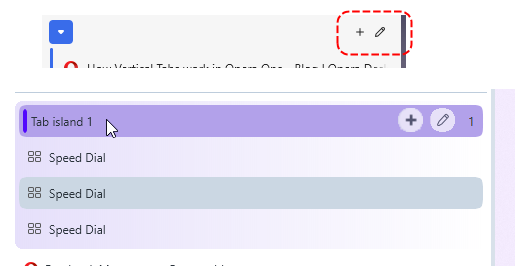
Also. there should option whether to hide the title bar like in Edge.

-
-
andrew84 last edited by
One more bug
as an example
-
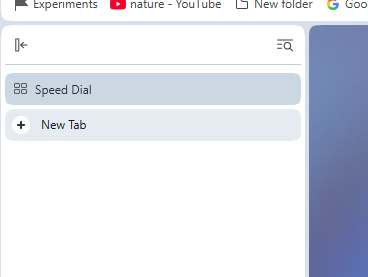
turn on vertical mode
-
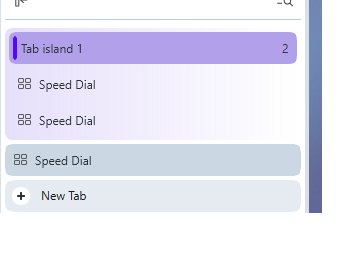
add some new tabs, 2 tabs more for example. Select 1st and 2nd tab and creat tab island.
-
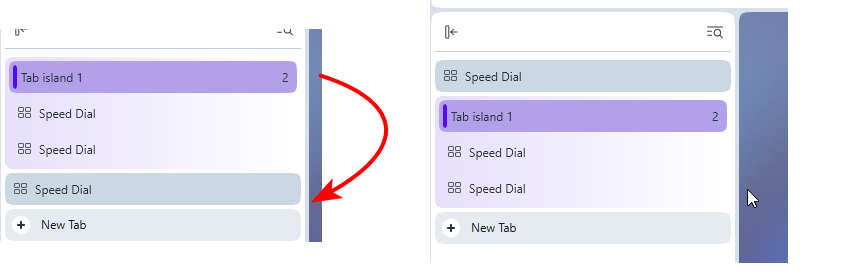
Now move the island below the last tab.
-
turn on horizontal mode.
the island will be after the new tab button

After closing tabs in the island there can be such case that the single tab will be after the new tab button and can't be closed being the last one tab.

5.Maybe ther are other anomalies regarding the moving tabs/island and then switching horizontal/vetical mode but I have no wish checking more.
-
-
-
Opera-QA-Team Opera last edited by
@whisperer: Hi, thank you for the reminder. The bug is awaiting fix.
-
andrew84 last edited by andrew84
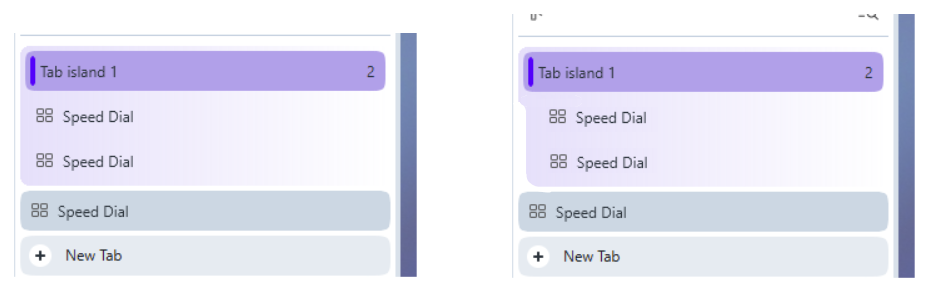
To better understand that tab island is expanded in vertical mode I'd suggest shifting the island's tabs and background bubble shifted to the right a bit.
Smth. like this.
Also, tab islands should be pinnable!
So is it really logical that some single tab can be pinned but multiple categorized tabs cannot?
-
andrew84 last edited by
@andrew84 said in Opera 133.0.5932.85 Stable update:
vertical tabs and horizontal tabs management way should be the same (or very close)
Another ones mismathes I read on forum.
In collapsed mode(favicons only) inactive tabs can't be closed (no 'x' appearing on hover), no vlume booster in the tooltip, no sound indicators.
https://forums.opera.com/post/406887 -
andrew84 last edited by andrew84
Another one bug I noticed is that in horizontal mode the 'scroll to top' feature doesn't work at all.
And it's logical to assume that even if it'll be fixed for the expanded panel, for the collapsed panel the feature can't be even fixed because the tab (only icon visible) will close instead.
The solution could be smth. between the autohide and pinned (collapsed) mode. Like it works in Edge.
When pinned it shows icons only (like in Opera currently) but after hovering it expands to previously predefined width.
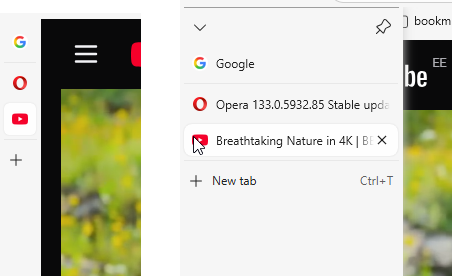
So 3 modes in total> expanded/collapsed/auto-expand.
*There could be also the 4th option when the panel is not visible at all and appears only when touching the edge of the screen (like sidebar) but it's a bit more complicated option to implement as it needs option to move the vertical tabs panel to the right (otherwise the both sidebar and vertical tabs will appear).
As fo me, the vertical tabs are introduced a bit too early if the functional is cut vs horizontal mode.
-
A Former User last edited by
Where's the next stable version? Still on 133 (Chromium 149) for over a month now is ridiculous. I'm sure I've seen the announcement of version 134 on the news block two or three days ago. Why has it been removed then?
-
burnout426 Volunteer last edited by
@Himmelsschlingel I see there's a 134 build for macOS and Windows (no Linux) at https://ftp.opera.com/pub/opera/desktop/134.0.5954.26/, but it's not approved for updating yet. As to why and why a post was published and removed, not sure.
-
A Former User last edited by
@burnout426 Sometimes I think, they've given up on the core browser. They're so concentrated to add all these flashy features that they can't keep pace with the development of Chromium and adapting their add ons.
So I mainly use Vivaldi nowadays. They seem to cope better with the updates even they also have their flaws. -
sgrandin last edited by
Since PatchMyPC has been nagging me about the 134 update several times a day since Thursday (30th), I posted on their forum about the discrepancy and got a long answer Aug 1 claiming from different sources that the update is valid - https://forum.patchmypc.com/index.php/topic,8939.0.html. I pointed out that Help > About Opera and this site indicate otherwise, but haven't received a reply.
-
burnout426 Volunteer last edited by
@burnout426 For what it's worth, I did test the x64 134 build on Windows and it works fine.
https://forums.opera.com/post/407102 shows there's an issue with the macOS installer though, which I can't personally test.
-
andrew84 last edited by andrew84
@Himmelsschlingel Browsers per company oversaturation (4 browsers!) led to a decrease in quality.
-
andrew84 last edited by andrew84
It's rather carelessness to keep the 134 version with disabled autoupdate without any explanation.
If there were problems with this release so autoupdates were stopped the version should be removed from the server. -
Locked by
 leocg
leocg
