Opera 131.0.5877.0 developer update
-
 Opera Comments Bot last edited by
Hello! Opera developer new update is now live, version 131.0.5877.0 Key highlights: For a full list of changes check out our changelog. Happy browsing! Installation links:
Read full blog post: Opera 131.0.5877.0 developer update
-

-
andrew84 last edited by andrew84
Sidebar improvements:
No more oversizing when auto-hide is enabledSidebar setup panel is still oversized (or too small) depending on page default zoom set in Settings.
Refers to the all sidebar's panels. actually (Especially the History panel which after the 'redesign' consumes more vertical space so it means x2 times more scrolling).The both EasySetup and sidebar setup menu don't reset scrolled position on open.
-
andrew84 last edited by
All the issues /bugs/crashes (except the cut Extension popup) I mentioned in the previous thread are still there.
And I still see the pink full screen on browser start.
-
Opera-QA-Team Opera last edited by
@andrew84: Hi, this is not about text size, but about the bug which was expanding sidebar when auto-hiding was enabled.
-
andrew84 last edited by andrew84
@Opera-QA-Team I understand this.
I simply mention again the issue which is appeared after the 'New sidebar setup panel' flag was enabled and stays unfixed
for months.*the scrolling bugs were in the past also but were fixed, now reappeared again.
-
andrew84 last edited by andrew84
Gap between sidebar and side panel when auto-hide is enabled
I guess the gap = shadow effect
I reported earlier https://forums.opera.com/post/398368
that sometimes panel can't be closed due to the too wide shadow effect.But I noticed that menus/dropdowns can be closed without problem if clicking on the shadow (the shadow area is active). But it doesn't work in case of the sidebar panel.
*So I guess the menu's shadow effect better suits for using with the panel (if it is possible).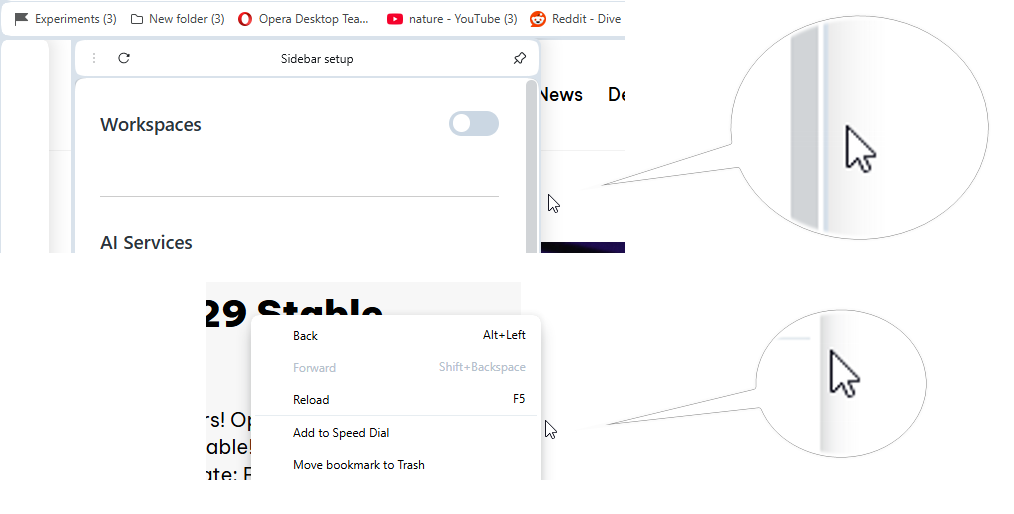
-
ome last edited by
This build is almost completely frozen/unresponsive for me. Loading my 200+ tabs on startup takes forever. Any UI action like switching to a different tab takes like a minute or more. Task manager reports only around 20% CPU use, and other apps are still responsive when Opera developer is not.
Exiting also takes a long time. After exiting I made sure all Opera instances in the task manager (details) were gone before starting Opera again. It was just as unresponsive after the second (and third) launch. So I had to give up on 131.0.5877.0.
Had to revert to developer build 131.0.5868.0 which is fine and responsive.
-
ome last edited by
I think I solved it. I Googled the Chromium version from the changelog above "Chromium 147.0.7727.56" and found this Reddit thread:
https://www.reddit.com/r/chrome/comments/1snk7pb/massive_lag_on_startup_since_new_chrome_update/Several users reported uninstalling and reinstalling the Bitwarden extension as a potential solution, and it worked for me as well. I uninstalled it while still on 131.0.5868.0 and upgraded to 131.0.5877.0. Opera was responding normally this time.
I then reinstalled the Bitwarden extension from the Opera store and it's still OK after restarting Opera again. So I guess problem solved for now.
So if anyone runs into this issue, try uninstalling and reinstalling the Bitwarden extension.
-
Locked by Opera-QA-Team