• Login
    • Search
    • Categories
    • Recent
    • Tags
    • Users
    • Groups
    • Rules
    • Help

    Do more on the web, with a fast and secure browser!

    Download Opera browser with:

    • built-in ad blocker
    • battery saver
    • free VPN
    Download Opera

    Opera 130.0.5832.0 developer update

    Blogs
    desktop blog comments
    5
    18
    1991
    Loading More Posts
    • Oldest to Newest
    • Newest to Oldest
    • Most Votes
    Reply
    • Reply as topic
    Log in to reply
    This topic has been deleted. Only users with topic management privileges can see it.
    • tspringer
      tspringer last edited by

      I'm having problems with fonts, on several pages/sites, showing up like in this example;
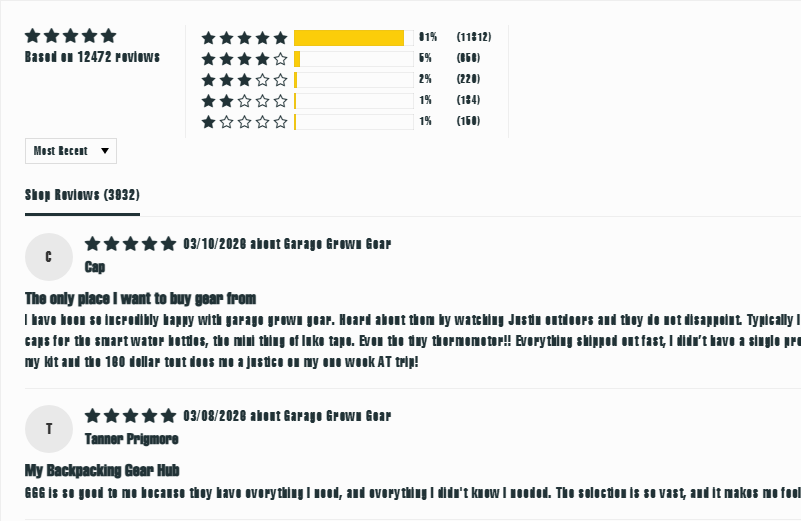
      bd32cda7-bb35-45fe-b827-f206649aa04d-image.png
      Where it usually, and when tested with MS Edge, looks like this;
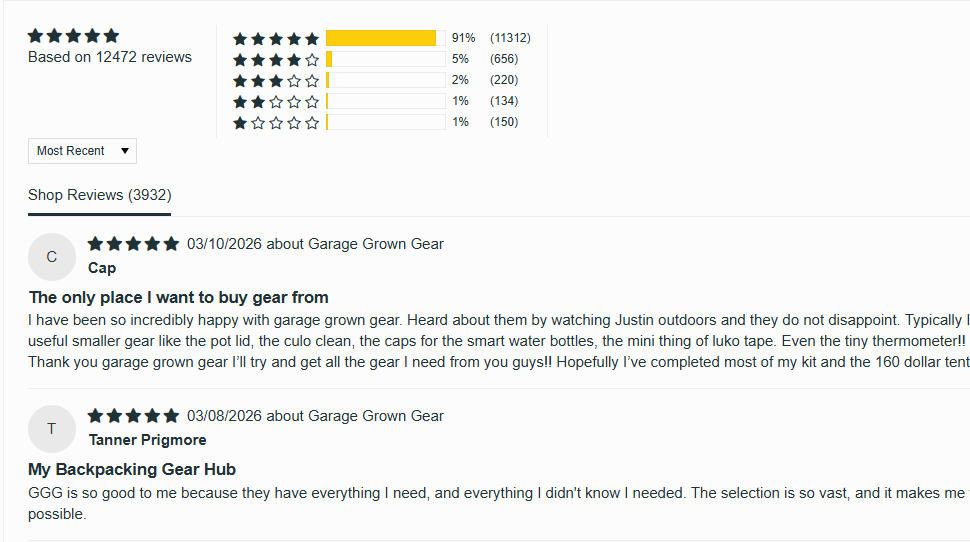
      0aa4fa72-0243-4189-9878-c4ac270cbd59-image.png

      Any idea, what's going on/how to fix it?

      Reply Quote 0
        Opera-QA-Team 1 Reply Last reply
      • Opera-QA-Team
        Opera-QA-Team Opera @tspringer last edited by

        @tspringer: Hello, can you share the exact url of this page, or any other with the problem? We will check it.

        Reply Quote 0
          tspringer 1 Reply Last reply
        • Opera-QA-Team
          Opera-QA-Team Opera @donq last edited by

          @donq: Hello, thanks for letting us know. Could you share the crash ID? You will find it in opera://crashes

          Reply Quote 0
            D 1 Reply Last reply
          • D
            donq @Opera-QA-Team last edited by

            @Opera-QA-Team said in Opera 130.0.5832.0 developer update:

            @donq: Hello, thanks for letting us know. Could you share the crash ID? You will find it in opera://crashes

            Sure, for two last crashes:
            Crash from Monday, March 16, 2026 at 1:32:53 PM
            CrashID=bp-cd9af9d2-3df2-4dc6-be9c-66ed20260316
            Crash from Monday, March 16, 2026 at 1:32:53 PM
            CrashID=bp-11748b48-48f9-4d5d-9756-d0c270260316

            This time crashed without forcing scale factor - similar problems.
            I have had no possibility to check latest dev version yet.

            Reply Quote 0
              Opera-QA-Team 1 Reply Last reply
            • tspringer
              tspringer @Opera-QA-Team last edited by

              @Opera-QA-Team
              https://www.garagegrowngear.com
              https://addons.opera.com/extensions
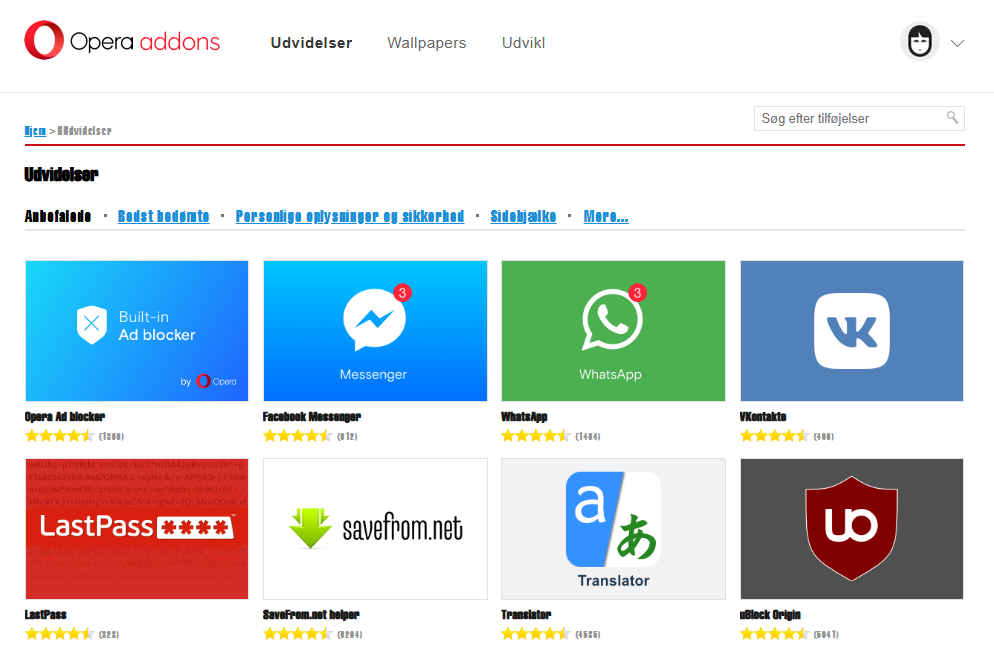
              dd90c3fb-254a-435d-805a-3fa107eee86f-image.png

              And on many others, ofc, I can't find any right now 🙂

              Reply Quote 0
                Opera-QA-Team 1 Reply Last reply
              • Opera-QA-Team
                Opera-QA-Team Opera @tspringer last edited by

                @tspringer: For me they are fine. Are you using some extensions? Maybe some of them is causing the problem?

                Reply Quote 0
                  tspringer 1 Reply Last reply
                • Opera-QA-Team
                  Opera-QA-Team Opera @donq last edited by

                  @donq: Thanks for sharing. I checked that this crash should be fixed on the next developer release. Please check it after update.

                  Reply Quote 0
                    D 1 Reply Last reply
                  • tspringer
                    tspringer @Opera-QA-Team last edited by tspringer

                    @opera-qa-team:
                    I have tried to run opera without any extensions, with --disable-extensions, and I still had problems on the sites.
                    I also tried to start a fresh clean profile, to check if some settings was messed up, but the result was the same.

                    Edit: Tried the sites with Edge, Vivaldi and Comet the pages looks fine. With Firefox, the result was the same as I experience with Opera.. weird.

                    Reply Quote 0
                      Opera-QA-Team 1 Reply Last reply
                    • Opera-QA-Team
                      Opera-QA-Team Opera @tspringer last edited by

                      @tspringer: What screen resolution do you have? And what scaling in system settings?

                      Reply Quote 0
                        tspringer 1 Reply Last reply
                      • tspringer
                        tspringer @Opera-QA-Team last edited by

                        @opera-qa-team: 2560x1440 - 100% Scaling. And I'm on Win11.

                        Reply Quote 0
                          Opera-QA-Team 1 Reply Last reply
                        • Opera-QA-Team
                          Opera-QA-Team Opera @tspringer last edited by

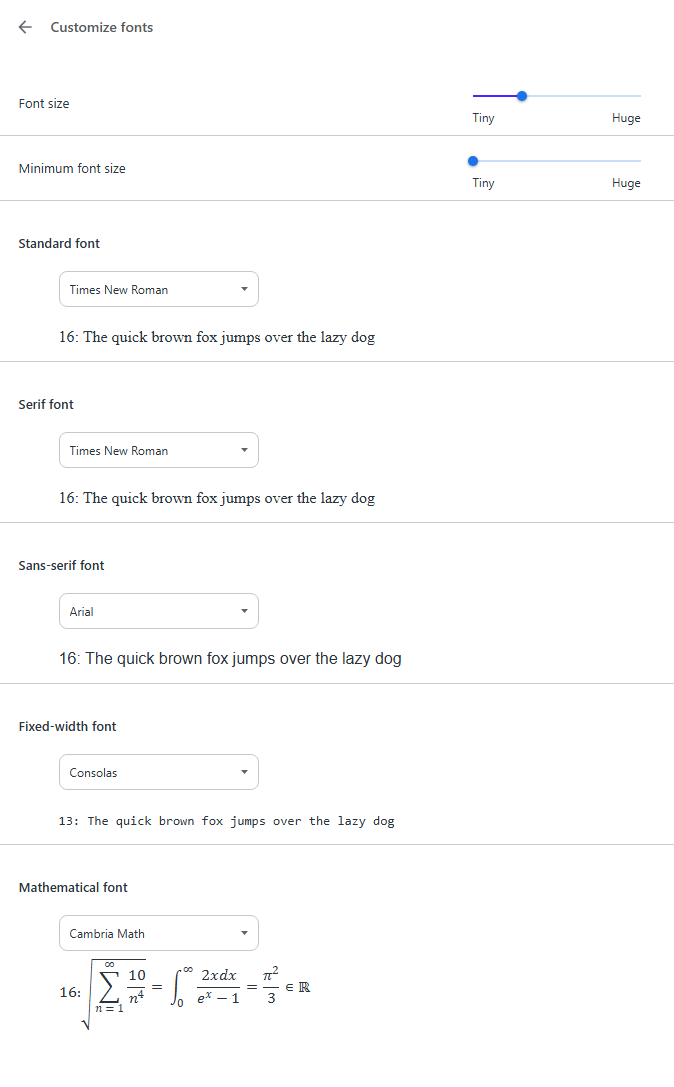
                          @tspringer: And did it start in this version 130.0.5832.0? It looks like your font is different that standard, did you change it?

                          Reply Quote 0
                            tspringer 1 Reply Last reply
                          • tspringer
                            tspringer @Opera-QA-Team last edited by

                            @Opera-QA-Team
                            Yes, it started with v130.0.5832.0
                            And fonts are standard.
                            As I mentioned, I did try with a clean (deleted the profile folder) profile, with same result.
                            c2e64425-fa40-45c0-9700-ec0172bfd020-image.png

                            Reply Quote 0
                              1 Reply Last reply
                            • D
                              donq @Opera-QA-Team last edited by

                              @Opera-QA-Team said in Opera 130.0.5832.0 developer update:

                              @donq: Thanks for sharing. I checked that this crash should be fixed on the next developer release. Please check it after update.

                              Checked today, everything is working well again, thank you!

                              PS. I had some problems with updating after I had rolled Opera back to 128 and renamed opera_autoupdate - renaming it back did not help anymore. Reinstalling from downloaded installer worked without problems. Just FYI 🙂

                              Reply Quote 0
                                1 Reply Last reply
                              • First post
                                Last post

                              Computer browsers

                              • Opera for Windows
                              • Opera for Mac
                              • Opera for Linux
                              • Opera beta version
                              • Opera USB

                              Mobile browsers

                              • Opera for Android
                              • Opera Mini
                              • Opera Touch
                              • Opera for basic phones

                              • Add-ons
                              • Opera account
                              • Wallpapers
                              • Opera Ads

                              • Help & support
                              • Opera blogs
                              • Opera forums
                              • Dev.Opera

                              • Security
                              • Privacy
                              • Cookies Policy
                              • EULA
                              • Terms of Service

                              • About Opera
                              • Press info
                              • Jobs
                              • Investors
                              • Become a partner
                              • Contact us

                              Follow Opera

                              • Opera - Facebook
                              • Opera - Twitter
                              • Opera - YouTube
                              • Opera - LinkedIn
                              • Opera - Instagram

                              © Opera Software 1995-