• Login
    • Search
    • Categories
    • Recent
    • Tags
    • Users
    • Groups
    • Rules
    • Help

    Do more on the web, with a fast and secure browser!

    Download Opera browser with:

    • built-in ad blocker
    • battery saver
    • free VPN
    Download Opera

    Opera 128.0.5807.52 Stable update

    Blogs
    desktop blog comments
    13
    18
    666
    Loading More Posts
    • Oldest to Newest
    • Newest to Oldest
    • Most Votes
    Reply
    • Reply as topic
    Log in to reply
    This topic has been deleted. Only users with topic management privileges can see it.
    • Opera Comments Bot
      Opera Comments Bot last edited by

      Hello! New update to Opera stable is now available- version: 128.0.5807.52 This update focuses on improving overall stability and reducing crashes, including fixes for issues affecting macOS and extension syncing. What’s been fixed: Several crash scenarios have been addressed, including: You can find the full list in the changelog. Update now to get the latest fixes. Happy […]

      Read full blog post: Opera 128.0.5807.52 Stable update

      Reply Quote 0
        1 Reply Last reply
      • K
        krteq last edited by

        This "Stable" build is still affected by tabs jumping issue

        https://streamable.com/63oygx

        Reply Quote 0
          1 Reply Last reply
        • S
          Sopronman last edited by

          Tab jumping is still here, also by the newest 128.0.5807.52.....always the same problem...shame....Version 127 is the last one, without this problem.

          Reply Quote 0
            1 Reply Last reply
          • S
            Sopronman last edited by

            Is this moderation only for me?? Why?

            Reply Quote 0
              leocg 1 Reply Last reply
            • leocg
              leocg Moderator Volunteer @Sopronman last edited by

              @Sopronman You seem to have negative reputation and it's causing your posts to be put on queue.

              Reply Quote 0
                S 1 Reply Last reply
              • T
                terrater last edited by

                The "Assistant" folder appeared in the Program Files Opera folder with version 128. The last time this happened was in 2020, and it was quite frustrating. What is this Assistant folder and its contents like browser.exe, etc.?

                1. The "Web Application Installations" setting in Site Settings isn't working.

                2. When you open and close "Manage Sidebar" in Settings, it throws you back to the top.

                Reply Quote 0
                  1 Reply Last reply
                • Opera-QA-Team
                  Opera-QA-Team Opera last edited by

                  starting the discussion...

                  Reply Quote 0
                    1 Reply Last reply
                  • K
                    karen-arzumanyan last edited by

                    Please pay attention to the bug:
                    BUG-21893
                    The dialog box for adding a page or folder to the bookmarks bar extends beyond the monitor borders.

                    Reply Quote 0
                      1 Reply Last reply
                    • S
                      Sopronman @leocg last edited by

                      @leocg: My reputatiton is for me OK. Sometimes is my style not so sophisticated,

                      Reply Quote 0
                        leocg 1 Reply Last reply
                      • leocg
                        leocg Moderator Volunteer @Sopronman last edited by

                        @Sopronman I was talking about your reputation here on the forum/blog.

                        Check your profile.

                        Reply Quote 0
                          S l33t4opera 2 Replies Last reply
                        • l33t4opera
                          l33t4opera @leocg last edited by

                          @leocg @sopranoman
                          What's my reputations here i don't remember? ;-)

                          Reply Quote 0
                            1 Reply Last reply
                          • KenedSF
                            KenedSF last edited by

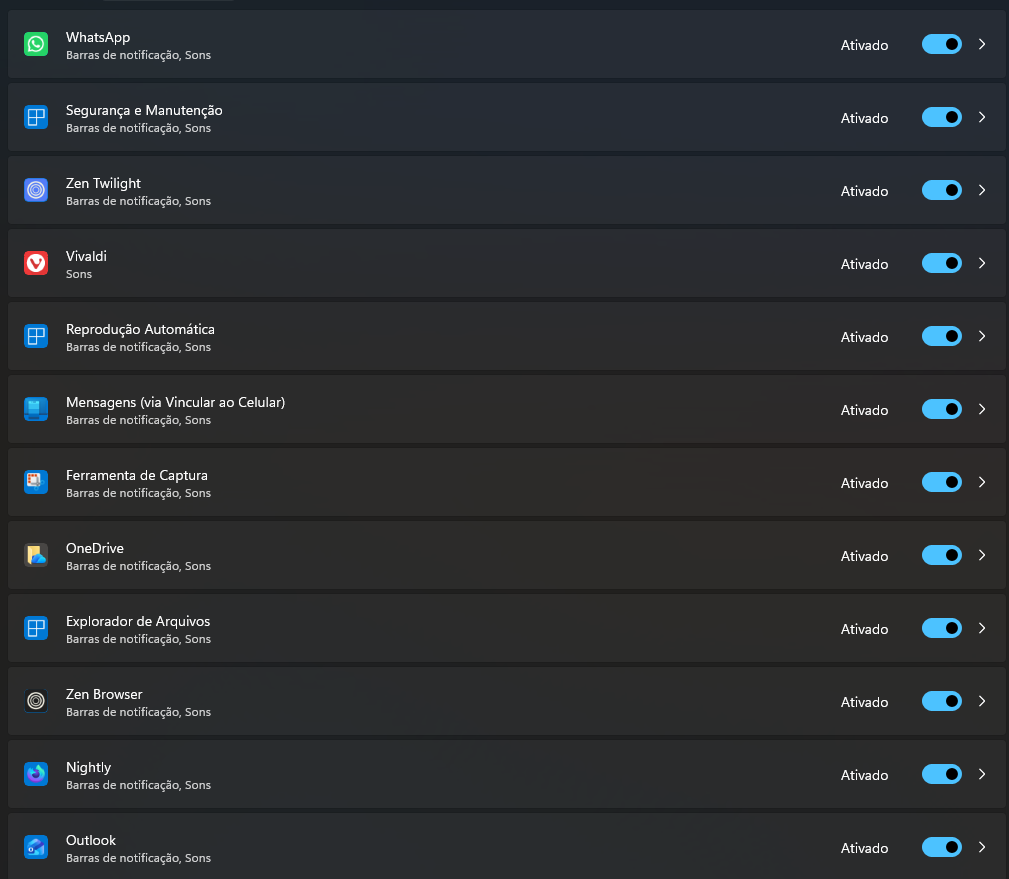
                            Windows 11 is blocking notifications from Opera (One, Dev, GX, and Air).

                            8b5e7b69-9971-4e21-ad73-33dec03f3f05-image.png

                            Reply Quote 0
                              U 1 Reply Last reply
                            • S
                              Sopronman @leocg last edited by

                              @leocg: Work on the errorless browser, not on my behaviour. Opera blog as punisher. LOL

                              Reply Quote 0
                                1 Reply Last reply
                              • W
                                wjcollum last edited by

                                This "feature" has just about prompted me to abandon Opera, as much as I like most of the browser: Whenever I drag something on to a tab and cross over the "sidebar", some random new tab opens preventing me from completing the operation I intended to perform. So, I have to stop what I'm doing, drop what I'm dragging, close the unwanted tab, and start over again from the beginning. This is becoming absolutely infuriating. The solution is not to tell me to "change my dragging habits", the solution is to fix this severe user interface bug masquerading as a feature. Please do so. Thanks!

                                Reply Quote 0
                                  1 Reply Last reply
                                • rick2
                                  rick2 last edited by

                                  "A crash that could occur during application shutdown (macOS)."

                                  I experience a similar crash on Linux, next time I'll get some logs to send.

                                  Reply Quote 0
                                    1 Reply Last reply
                                  • S
                                    slim54 last edited by

                                    Starting with stable version 128, the Opera browser assistant has disappeared from the Task Manager. Windows settings and registry are also missing. The processes do not automatically update when the browser is started, as they did in version 127.

                                    Reply Quote 0
                                      1 Reply Last reply
                                    • U
                                      Urby938 @KenedSF last edited by

                                      @kenedsf: yeah i reported many times notifications not working but they just dont care... its so lame and unprofessional from them

                                      Reply Quote 0
                                        1 Reply Last reply
                                      • K
                                        krteq last edited by

                                        @krteq reuploaded after expiration

                                        https://streamable.com/rpyuhi

                                        Reply Quote 0
                                          1 Reply Last reply
                                        • First post
                                          Last post

                                        Computer browsers

                                        • Opera for Windows
                                        • Opera for Mac
                                        • Opera for Linux
                                        • Opera beta version
                                        • Opera USB

                                        Mobile browsers

                                        • Opera for Android
                                        • Opera Mini
                                        • Opera Touch
                                        • Opera for basic phones

                                        • Add-ons
                                        • Opera account
                                        • Wallpapers
                                        • Opera Ads

                                        • Help & support
                                        • Opera blogs
                                        • Opera forums
                                        • Dev.Opera

                                        • Security
                                        • Privacy
                                        • Cookies Policy
                                        • EULA
                                        • Terms of Service

                                        • About Opera
                                        • Press info
                                        • Jobs
                                        • Investors
                                        • Become a partner
                                        • Contact us

                                        Follow Opera

                                        • Opera - Facebook
                                        • Opera - Twitter
                                        • Opera - YouTube
                                        • Opera - LinkedIn
                                        • Opera - Instagram

                                        © Opera Software 1995-