Opera 125.0.5729.21 Stable update
-
 Opera-QA-Team Opera last edited by
@sicu220: Hello, thanks for the reminder, the bug is awaiting fix.
-
Opera-QA-Team Opera last edited by
@kilian01: Hi we tried the deb installation before the release could you please share what is wrong, as we haven't noticed that issue before the release.
-
Opera-QA-Team Opera last edited by
@rick2: Hi thanks for letting us know! We'll take a closer look into it.
-
sparrow93 last edited by
@opera-qa-team: I have similar, yet different problem with deb installation on Zorin OS. I have updatedthe package but the browser is still not opening. No errors. Typing in the terminal "opera" renders nothing. Only thing that helped me launch Opera was chnage the executive in /usr/bin/ from "opera" to "opera-stable".
-
metana last edited by
2 problems:
-
DevTools in separate window isnt being resized, it gets full screen.
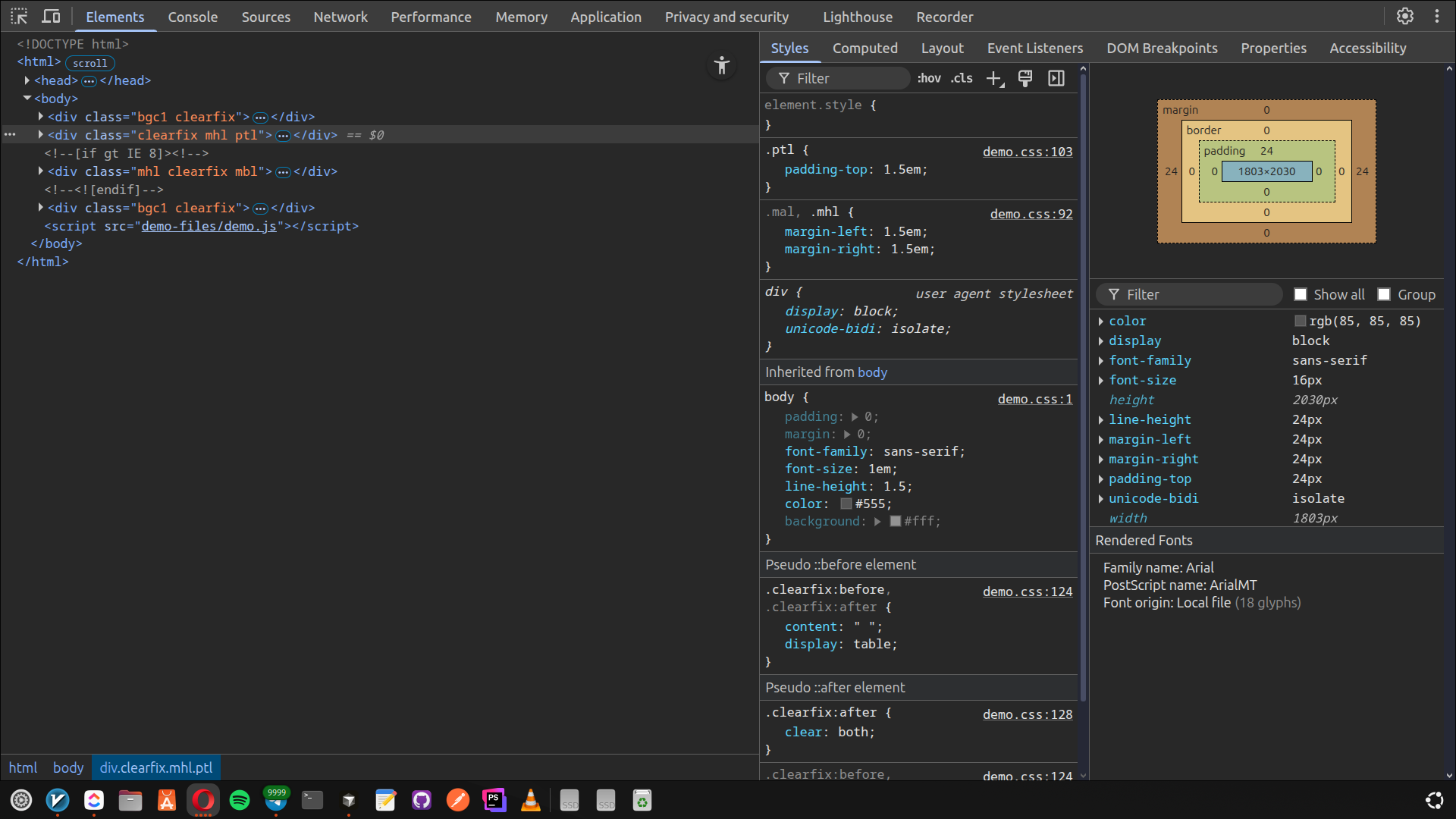
-
youTube PiP mode (small window in separated window) its not being resized too.
OS: Ubuntu 24.04 - Gnome:
OS: Ubuntu 24.04.3 LTS x86_64
Host: Vivobook_ASUSLaptop K3605VC_K3
Kernel: 6.14.0-36-generic
Uptime: 34 mins
Packages: 2757 (dpkg), 37 (snap)
Shell: bash 5.2.21
Resolution: 1920x1080
DE: GNOME 46.0
WM: Mutter
WM Theme: Adwaita
Theme: Yaru-dark [GTK2/3]
Icons: Yaru [GTK2/3]
Terminal: gnome-terminal
CPU: 13th Gen Intel i7-13700H (20) @
GPU: Intel Raptor Lake-P [Iris Xe Gr
GPU: NVIDIA GeForce RTX 3050 4GB Lap
Memory: 10651MiB / 15655MiB
Opera Info: (Snap)
metana@metana:~$ snap info opera name: opera summary: Fast, secure, easy-to-use browser publisher: Opera (opera-software✓) store-url: https://snapcraft.io/opera license: unset description: | Try the Opera browser - now with a built-in ad blocker, battery saver and free VPN. commands: - opera snap-id: AljMvoQbHtnnrka00lIoxHJ6Qhfn0X8m tracking: latest/stable refresh-date: yesterday at 20:32 +0330 channels: latest/stable: 125.0.5729.21 2025-12-11 (416) 187MB - latest/candidate: ↑ latest/beta: ↑ latest/edge: 125.0.5729.21 2025-12-10 (416) 187MB - installed: 125.0.5729.21 (416) 187MB - -
-
Kilian01 last edited by Kilian01
@Opera-QA-Team Here are simple steps to reproduce the issue:
1 Get opera-stable_123.0.5669.47_amd64.deb and opera-stable_125.0.5729.21_amd64.deb
2 Open Terminal and install 123
user@workstation:~/Downloads$ sudo dpkg -i opera-stable_123.0.5669.47_amd64.deb
[sudo: authenticate] Password:
Selecting previously unselected package opera-stable.
(Reading database ... 144087 files and directories currently installed.)
Preparing to unpack opera-stable_123.0.5669.47_amd64.deb ...
Unpacking opera-stable (123.0.5669.47) ...
dpkg: dependency problems prevent configuration of opera-stable:
opera-stable depends on libqt5core5a (>= 5.3.0); however:
Package libqt5core5a is not installed.
opera-stable depends on libqt5gui5 (>= 5.10.0) | libqt5gui5-gles (>= 5.10.0); however:
Package libqt5gui5 is not installed.
Package libqt5gui5-gles is not installed.
opera-stable depends on libqt5widgets5 (>= 5.0.2); however:
Package libqt5widgets5 is not installed.dpkg: error processing package opera-stable (--install):
dependency problems - leaving unconfigured
Processing triggers for gnome-menus (3.36.0-3ubuntu2) ...
Processing triggers for desktop-file-utils (0.28-1) ...
Processing triggers for hicolor-icon-theme (0.18-2) ...
Processing triggers for shared-mime-info (2.4-5build2) ...
Errors were encountered while processing:
opera-stable3 Type in "opera" and confirm that Opera successfully starts.
user@workstation:~/Downloads$ opera
[1212/184223.609685:ERROR:third_party/crashpad/crashpad/util/file/directory_reader_posix.cc:43] opendir /home/user/.config/opera/Crash Reports/attachments/9559ff31-f72b-4a04-ae82-cc9b27f1f3c8: No such file or directory (2)
[8097:8097:1212/184225.084491:ERROR:extensions/browser/service_worker/service_worker_task_queue.cc:449] DidStartWorkerFail jifbgnmbgbdiedhdecealmlgmekpagde: 15
[8142:8148:1212/184229.046001:ERROR:net/socket/ssl_client_socket_impl.cc:914] handshake failed; returned -1, SSL error code 1, net_error -1014 Uninstall 123 and install 125
user@workstation:~/Downloads$ sudo apt remove opera-stable
REMOVING:
opera-stableSummary:
Upgrading: 0, Installing: 0, Removing: 1, Not Upgrading: 2
1 not fully installed or removed.
Freed space: 361 MBContinue? [Y/n]
(Reading database ... 144277 files and directories currently installed.)
Removing opera-stable (123.0.5669.47) ...
Processing triggers for hicolor-icon-theme (0.18-2) ...
Processing triggers for gnome-menus (3.36.0-3ubuntu2) ...
Processing triggers for shared-mime-info (2.4-5build2) ...
Processing triggers for desktop-file-utils (0.28-1) ...
user@workstation:~/Downloads$ sudo dpkg -i opera-stable_125.0.5729.21_amd64.deb
Selecting previously unselected package opera-stable.
(Reading database ... 144087 files and directories currently installed.)
Preparing to unpack opera-stable_125.0.5729.21_amd64.deb ...
Unpacking opera-stable (125.0.5729.21) ...
dpkg: dependency problems prevent configuration of opera-stable:
opera-stable depends on libqt5core5a (>= 5.3.0); however:
Package libqt5core5a is not installed.
opera-stable depends on libqt5gui5 (>= 5.10.0) | libqt5gui5-gles (>= 5.10.0); however:
Package libqt5gui5 is not installed.
Package libqt5gui5-gles is not installed.
opera-stable depends on libqt5widgets5 (>= 5.0.2); however:
Package libqt5widgets5 is not installed.dpkg: error processing package opera-stable (--install):
dependency problems - leaving unconfigured
Processing triggers for gnome-menus (3.36.0-3ubuntu2) ...
Processing triggers for desktop-file-utils (0.28-1) ...
Processing triggers for hicolor-icon-theme (0.18-2) ...
Processing triggers for shared-mime-info (2.4-5build2) ...
Errors were encountered while processing:
opera-stable5 Type in "opera" and confirm that Opera fails to start
user@workstation:~/Downloads$ opera
[1212/185927.019260:ERROR:third_party/crashpad/crashpad/util/file/directory_reader_posix.cc:43] opendir /home/user/.config/opera/Crash Reports/attachments/b80c360c-3ab0-40a4-8061-3e33132e9102: No such file or directory (2)
[9031:9031:1212/185927.021586:FATAL:sandbox/linux/suid/client/setuid_sandbox_host.cc:167] The SUID sandbox helper binary was found, but is not configured correctly. Rather than run without sandboxing I'm aborting now. You need to make sure that /usr/lib/x86_64-linux-gnu/opera-stable/opera_sandbox is owned by root and has mode 4755.
[1212/185927.030139:ERROR:third_party/crashpad/crashpad/util/file/file_io_posix.cc:145] open /sys/devices/system/cpu/cpu0/cpufreq/scaling_cur_freq: No such file or directory (2)
[1212/185927.030226:ERROR:third_party/crashpad/crashpad/util/file/file_io_posix.cc:145] open /sys/devices/system/cpu/cpu0/cpufreq/scaling_max_freq: No such file or directory (2)
Trace/breakpoint trap (core dumped) -
P1tzO last edited by
Hello Opera team! I would like to congratulate you on the redesign of the task manager window. it is a tool I utilize regularly and it helps me out a lot whenever some bum cant make a proper website and ends up eating up tons of gigabytes of ram and I have to terminate the tab. this is the second update that garners my interest. it's one of the better redesigns that actually retains functionality and is easy on the eyes and doesnt completely screw over my muscle memory forcing me to relearn the process again (cough cough unlike the picture in picture redesign)


also why does a red bar appear on the bottom of the window then go away when i open the browser and it hasnt finished loading yet? some new loading optimization?

lastly, any updates regarding pinboards? it's a feature I also use and would like it to be less clunky and more smooth and maybe have a little functionality added -
burnout426 Volunteer last edited by
@Kilian01 Opera had a bug a bit ago *DNA-123982( where you had to call opera-stable instead of opera to launch Opera, but it was verified fixed in 124.0.5705.30. I'm guessing that an update to a build with the fix doesn't fix the issue.
What happens if you uninstall Opera and remove any traces of it (including "opera", "opera-stable" and any aliases) (you can keep your profile in ~/.config) and then install 125 fresh? Does that sort things out? If so, that might be what users have to do to fix things if they have the issue.
-
filbo last edited by
@burnout426: that was fixed in a way that should self-repair successfully on package update.
-
filbo last edited by
@kilian01: I see 3 separate sets of issues in your log, unclear which of them might be relevant. First, easiest to fix, the sandbox binary has wrong permissions:
$ cd /usr/lib/x86_64-linux-gnu/opera-stable
$ sudo chown root opera_sandbox
$ sudo chmod 4755 opera_sandbox
Try after that.
But that is probably actually caused by the 2nd problem: the deb you're installing depends on 4 others, parts of your distro, which are not installed. Because of that it never finished installing, never ran /var/lib/dpkg/info/opera-stable.postinst which would have set up that setuid.
Package libqt5core5a is not installed.
Package libqt5gui5 is not installed.
Package libqt5gui5-gles is not installed.
Package libqt5widgets5 is not installed.
dpkg: error processing package opera-stable (--install):
dependency problems - leaving unconfiguredThis not only leaves Opera unconfigured, but also missing libraries it depends on.
dpkg -iis the lowest level package installer. It is not meant to handle package dependencies; those belong to the higher APT subsystem. Try running instead:sudo apt install opera-stable_125.0.5729.21_amd64.deb. This will automatically pull in the packages it depends on.The 3rd issue is a crash:
Trace/breakpoint trap (core dumped)
but that might be caused by the other two issues, so ignore it for now.
-
Limon12324 Banned last edited by
Found a way to crash any user's Opera GX browser. See you in Bugcrowd Opera team

-
MehrzadS last edited by
In Zorin OS, when I want to attach a file in sidepanel telegram/whatsapp/... opera crashes (because the sidepanel window disapears and the file dialogue won't have a parent window)
-
MehrzadS last edited by
Opera keeps wanting to update to 125.0.5729.21 but after every restart it's stuck to 125.0.5729.15. It doesn't upgrade.
-
Kilian01 last edited by
@filbo Thanks, I did notice that you can avoid or rather hide the problem with apt. The thing is the missing dependencies weren't critical in Opera 123. It still started at least. But Opera 124+ doesn't. If this is intentional (might be, only the Opera developer can answer that), then Opera shouldn't even install with the unmet dependencies. So there is a bug either way.

