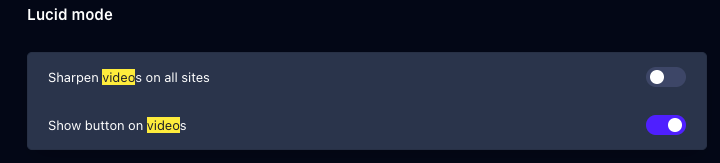
Welcome @AdemirCamargo, did you disable Opera's Lucid Mod?
-
Paste opera://settings/lucidMode into your address bar and press Enter.
-
Turn OFF all options.
Do more on the web, with a fast and secure browser!
Download Opera browser with:
Welcome @AdemirCamargo, did you disable Opera's Lucid Mod?
Paste opera://settings/lucidMode into your address bar and press Enter.
Turn OFF all options.
@windeoutside , what does the history window show you? is it missing the important periods?
@Footytang , Just hover over title of tab should show the x icon! what is the power of your PC and how many tabs you're running?
@Jouron , while Claude has some excellent features but currently on its doc portal say the browser extension is not yet supported on other Chromium-based browsers.
@mmmatukas , Did you test the 10 tabs in private mode when extensions are not active?
Also did you benefit from the RAM limiter which allows to set hard limits or fine-tune exactly how much memory GX can use.
Hey there, messenger.com announced that will be shut down soon. (April 15)
@andrew84, We also encountered popup issue in Firefox and we implemented a fix for Firefox only using CSS and on other browsers works fine.
Hey Opera team, thanks for the services provided on the addons catalog.
Having a public download stats API for Opera add‑ons should help developers showcase adoption on landing pages or other showcases.
Best intents
@Nearmelab said in how do i delete my opera forum account:
you might need to contact Opera forum moderators directly for that.
We didn't confirm but your confirmation came after.
Thanks, @leocg
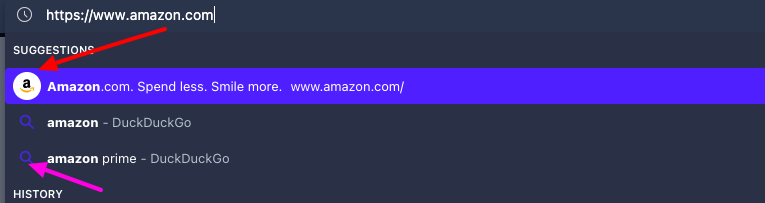
Welcome @nelliott500 , seems like you navigated using keyboard arrow to the search list items! (see the example below for clear user experience)
Using suggestion 1 go directly to Amazon website as you want but clicking other suggestions give the use case you meet.
Welcome @torando - we wanted to add that if you're only looking to delete your forum account specifically (not your entire Opera account which may use other services), you might need to contact Opera forum moderators directly for that. The link @leocg provided will delete your entire Opera account including any associated services.
Best intents
@jenajinx1 , after disabling "Sharpen videos on all sites" the quality of video returned to the usual.
@sicu220 It offers them as part of the membership subscription for $19.90 as Best-in-class models: GPT-5.2, Gemini 3, Nano Banana PRO, Veo 3.1, Sora 2, and more.
Didn't find details about requests/tokens offered by the membership but more productivity expected from using Neon browser.
@loststr تقصد إدماج اللغة العربية ، وإن كان النظام يعمل باللغة الإنجليزية أو لغة أخرى؟