White line around extension pop-up
-
pinkzhang last edited by leocg
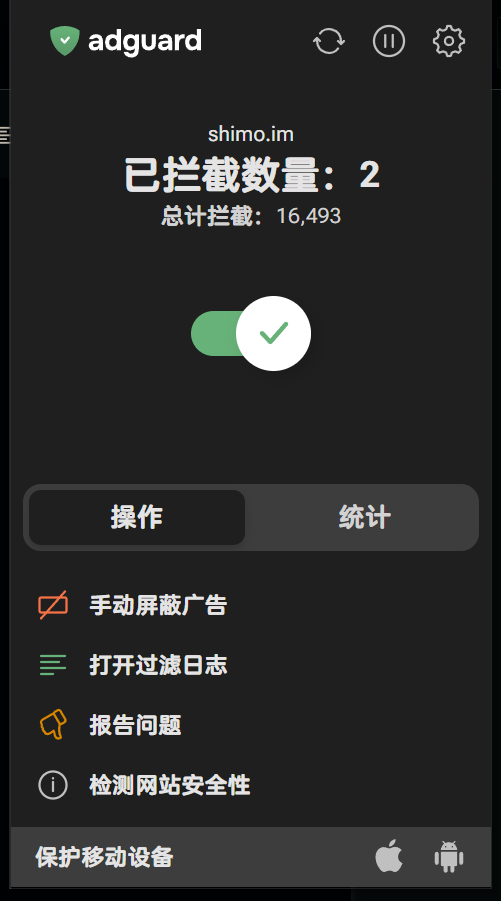
As shown in Figure 1, open any extension program with a pop-up window. Move the mouse over the pop-up window, and a white line will appear on the left and bottom of the pop-up window. I have tested the Chrome browser and did not encounter this issue, as shown in Figure 2.
OS:Windows 11
version of Opera One:128.0.5806.0Figure 1:
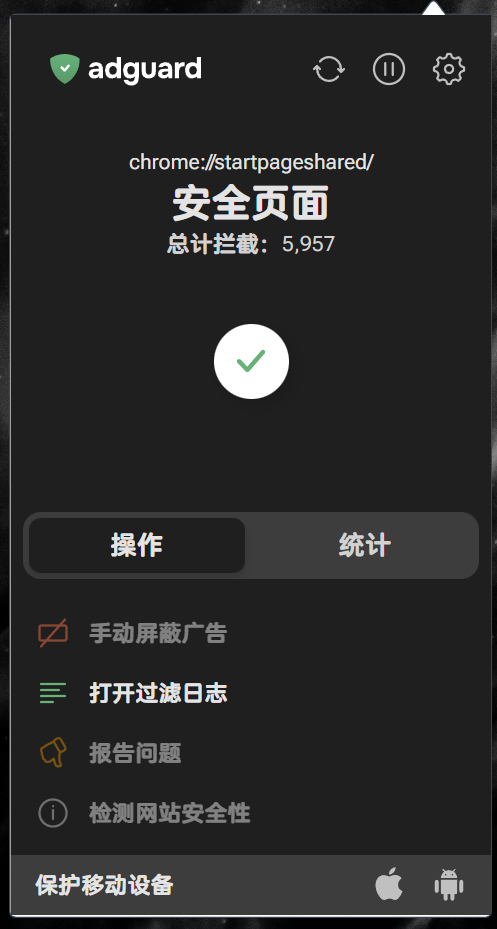
Figure 2:
-
Referenced by P pinkzhang
-
burnout426 Volunteer last edited by
I can confirm.
Example extension:
manifest.json:
{
    "manifest_version": 3,
    "name": "Extension Popup White Border Test",
    "version": "0.1",
    "action": {
        "default_popup": "popup.html"
    }
}
popup.html:
<!DOCTYPE html>
<html>
    <head>
        <meta charset="utf-8">
        <title>White Border on Extension Popup</title>
        <style>
            * {
                background-color: black;
                color: white;
            }
            body {
                width: 300px;
                height: 500px;
            }
        </style>
    </head>
    <body>
        <p>There shouldn't be a white border for this popup.</p>
    </body>
</html>
It's in current Opera Stable, Opera GX and Opera Developer. I know the border used to not be there, but I'm not sure if the change is intentional or not.
@Opera-QA-Team, Do you know if the white border is intentional?
@andrew84 Do you remember if anyone else has complained about this on the forums?
-
andrew84 last edited by
@burnout426 said in White line around extension pop-up:
Do you remember if anyone else has complained about this on the forums?
Don't know.
Btw, I can't confirm the issue here on win 10.I can see here that the Extensions popup is cut here on the right and the thing I mentioned earlier regarding the odd shadow effect for the toolbar popups.
https://forums.opera.com/post/397211 -

-
pinkzhang last edited by
@burnout426 Hello, could you please submit this bug? I noticed that the latest version of Opera Developer still hasn't fixed this issue.
-
-
burnout426 Volunteer last edited by
Chrome has the same border, so it looks like the border is coming from Chromium. A bug might have to be filed at https://issues.chromium.org/ about it, but not sure yet.
