• Login
    • Search
    • Categories
    • Recent
    • Tags
    • Users
    • Groups
    • Rules
    • Help

    Do more on the web, with a fast and secure browser!

    Download Opera browser with:

    • built-in ad blocker
    • battery saver
    • free VPN
    Download Opera

    Opera 140 Stable

    Blogs
    desktop blog comments
    13
    22
    1552
    Loading More Posts
    • Oldest to Newest
    • Newest to Oldest
    • Most Votes
    Reply
    • Reply as topic
    Log in to reply
    This topic has been deleted. Only users with topic management privileges can see it.
    • A
      andrew84 last edited by

      In vertical tabs I'm getting the ugly speed dial icons (only the one 'square' from four) while creating new tabs. In Dveloper the same.
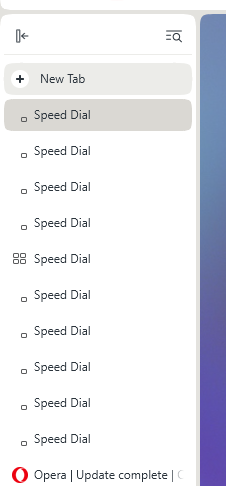
      2026-11-13_004703.png

      Reply Quote 0
        Opera-QA-Team 1 Reply Last reply
      • whisperer
        whisperer last edited by

        When using the offline installer and choosing Options, the error "The install path is invalid" is displayed. (This doesn't happen when using the mini installer.)
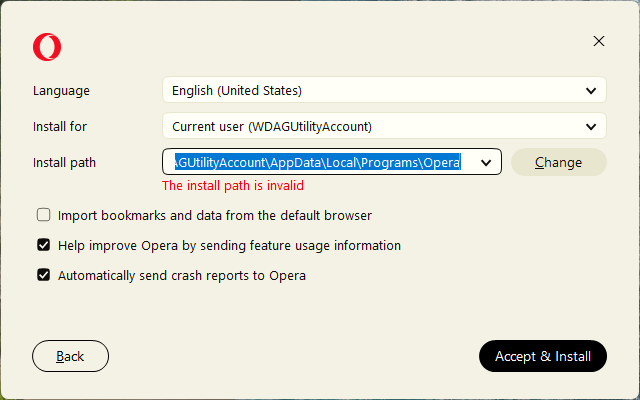
        de3e33ed-28bb-4a15-91c6-c38ae411b8af-image.png

        The error disappears when changing any option, for example by adding "123" to the end of the path or clicking one of the options.

        Reply Quote 0
          1 Reply Last reply
        • Referenced by  burnout426 burnout426 
        • S
          sgrandin last edited by

          https://www.youtube.com/watch?v=6QSc940cukI&ab_channel=EmmetCohen
          Audio but no video, except running cursor along time bar. Shows in lower corner if I move to another webpage. Also fine in Edge.

          Reply Quote 0
            S 1 Reply Last reply
          • S
            sgrandin @sgrandin last edited by

            @sgrandin I'm seeing the absent video is not just the link above, but other YouTube pages at the Emmet Cohen channel, e.g., https://www.youtube.com/watch?v=pMKYkUN5Eo8&list=RDEMJjNChrzZRpz5SwqG9HKbxw&index=4

            Reply Quote 0
              1 Reply Last reply
            • S
              sgrandin last edited by

              140.0.6074.18. espn.com - The black banner next to the ESPN is supposed to show NFL, NBA, NCAAF, NHL, More Sports (drop downs). It shows none with this build of Opera. Two apparent bugs I've never seen before just tonight.

              Reply Quote 0
                1 Reply Last reply
              • A
                AlexeyGrinko @steeveboy last edited by leocg

                @steeveboy: Confirmed !!! Fix it!!!

                Reply Quote 0
                  Opera-QA-Team 1 Reply Last reply
                • Opera-QA-Team
                  Opera-QA-Team Opera @andrew84 last edited by

                  @andrew84: Hi we're fixing this as we speak! Thanks for letting us know 🙂

                  Reply Quote 0
                    1 Reply Last reply
                  • Opera-QA-Team
                    Opera-QA-Team Opera @AlexeyGrinko last edited by

                    @alexeygrinko: Hi, thanks for letting us know - this has been reported and will be fixed soon 🙂

                    Reply Quote 0
                      1 Reply Last reply
                    • iPristy
                      iPristy last edited by

                      Can't download GIMP from official site www.gimp.org, under download and show more it says canceled.

                      Reply Quote 0
                        1 Reply Last reply
                      • U
                        Urby938 last edited by

                        I previously reported an issue with website push notifications, particularly YouTube notifications, not working correctly in Opera. The issue was eventually fixed, and notifications started working again.

                        However, there is now another problem with notification handling.

                        I use Opera with the following command-line parameter:

                        --disable-features=NativeNotifications

                        The purpose of this parameter is to disable native Windows notifications and use the browser's own notification interface instead.

                        Currently, Opera displays website notifications using native Windows notifications, even when this parameter is present.

                        This behaviour is different from other Chromium-based browsers. Google Chrome, Brave and Vivaldi still respect this command-line parameter and display browser-style notifications instead of native Windows notifications.

                        Expected behaviour:
                        Opera should respect --disable-features=NativeNotifications and display its own browser notifications.

                        Actual behaviour:
                        Opera ignores this parameter and continues to display native Windows notifications.

                        Please investigate why this Chromium feature flag is no longer respected by Opera and restore the previous behaviour.

                        Thank you.

                        Reply Quote 1
                          1 Reply Last reply
                        • First post
                          Last post

                        Computer browsers

                        • Opera for Windows
                        • Opera for Mac
                        • Opera for Linux
                        • Opera beta version
                        • Opera USB

                        Mobile browsers

                        • Opera for Android
                        • Opera Mini
                        • Opera Touch
                        • Opera for basic phones

                        • Add-ons
                        • Opera account
                        • Wallpapers
                        • Opera Ads

                        • Help & support
                        • Opera blogs
                        • Opera forums
                        • Dev.Opera

                        • Security
                        • Privacy
                        • Cookies Policy
                        • EULA
                        • Terms of Service

                        • About Opera
                        • Press info
                        • Jobs
                        • Investors
                        • Become a partner
                        • Contact us

                        Follow Opera

                        • Opera - Facebook
                        • Opera - Twitter
                        • Opera - YouTube
                        • Opera - LinkedIn
                        • Opera - Instagram

                        © Opera Software 1995-