• Login
    • Search
    • Categories
    • Recent
    • Tags
    • Users
    • Groups
    • Rules
    • Help

    Do more on the web, with a fast and secure browser!

    Download Opera browser with:

    • built-in ad blocker
    • battery saver
    • free VPN
    Download Opera

    Opera 136.0.5995.0 developer update

    Blogs
    desktop blog comments
    8
    19
    494
    Loading More Posts
    • Oldest to Newest
    • Newest to Oldest
    • Most Votes
    Reply
    • Reply as topic
    Log in to reply
    This topic has been deleted. Only users with topic management privileges can see it.
    • Opera Comments Bot
      Opera Comments Bot last edited by

      Hello! We’ve rolled out a new Opera Developer release (version: 136.0.5995.0) with a Chromium bump and a big round of stability fixes. Key highlights: For a full list of changes check out our changelog. Happy browsing! Installation links:

      Read full blog post: Opera 136.0.5995.0 developer update

      Reply Quote 0
        1 Reply Last reply
      • A
        andrew84 last edited by

        Improved visibility of the currently active tab in Vertical Tabs

        • Again the new design for the island body in vertical tabs...
          You really think that the count of tabs in island is more important than name and highlighted body of island? Now the island's body looks like tab but the number of tabs is highlighted. The previous design (the solid background box for the island name) was better. The even more earlier design (the bright box + clear text) was even more better.

        Now if speaking about bugs...

        1. The island created while being in vertical mode will have no corresponding context menu.
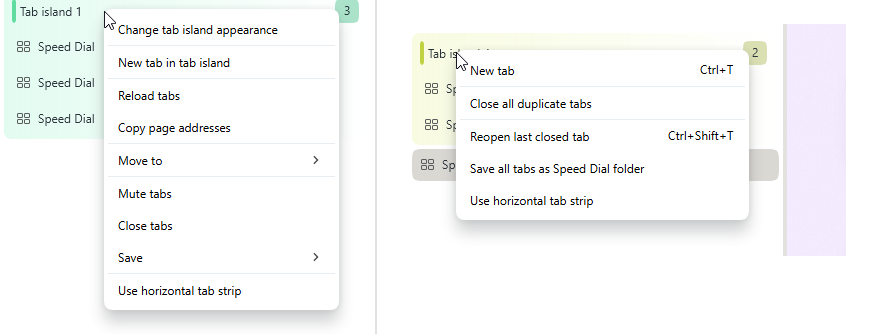
          2026-08-19_143447.png

        2. In horizontal mode the new tab button and some last tabs will be hidden after expanding islands. After moving the cursor away from the tabstrip the elements will restore.
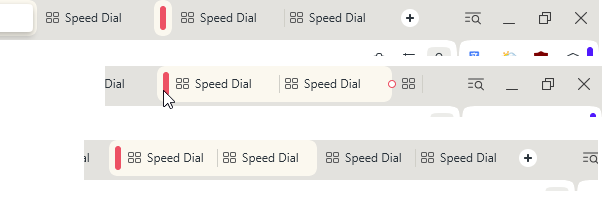
          2026-08-19_144045.png

        Reply Quote 0
          A 2 Replies Last reply
        • A
          andrew84 last edited by andrew84

          RNA-2097 Option ‘Force dark mode on pages’ resets after changing theme or mode

          the toggle still works incorrectly (the synchronization EasySetup vs Settingss broken)

          Reply Quote 0
            1 Reply Last reply
          • A
            andrew84 last edited by

            RNA-4384 Remove separator above ‘Wallpapers’ title in easy setup

            return the wallpapers toggle in EasySetup menu.
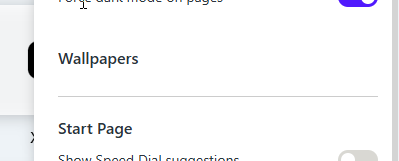
            2026-08-19_154204.png

            Reply Quote 0
              1 Reply Last reply
            • A
              andrew84 last edited by

              The color accent slider is broken here.
              After clicking the color accents 'boxes' it shows the corresponding color but after moving the slider it'll show the default grey color in all cases.
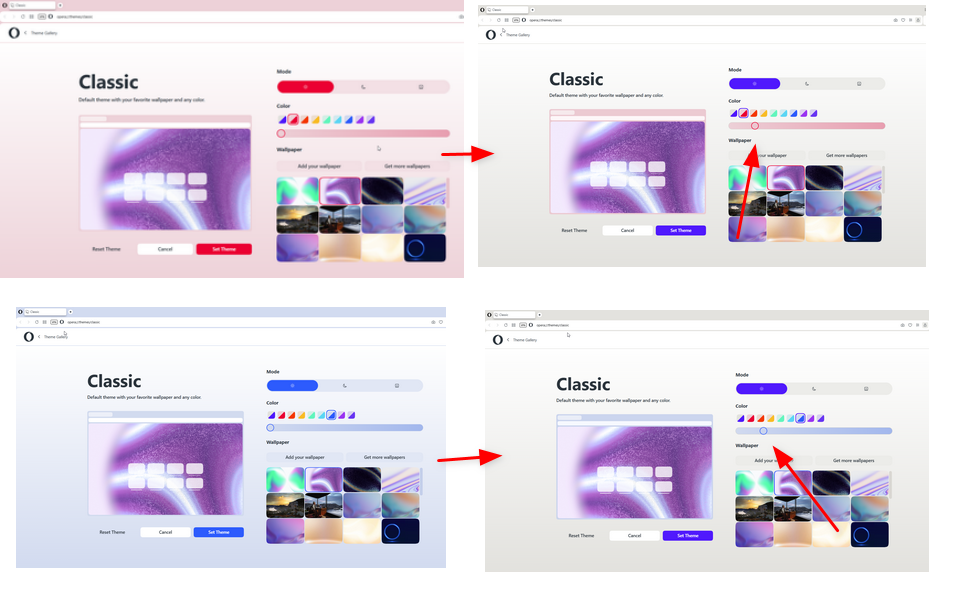
              2026-08-19_160210.png

              Reply Quote 0
                1 Reply Last reply
              • M
                mbstafs last edited by

                Search engine shortcuts stopped working

                Only recently did I notice that the search engine shortcuts have - partly - stopped working. My custom ones appear disabled, but I could (seemingly) reenable them manually.

                But the "built-in" shortcuts - such as "w" for Wikipedia (the German version in my case, due to some mechanism inside Opera) - have also partly ceased to work. Typing "w Opera" into the URL field show bring me directly to Wikipedia, but directs my to the default search engine Google, using "https://www.google.com/search?client=opera&q=w [---]".

                I have seen some changelog entries regarding "search", but I cannot usually understand what was changed from their cryptic titles. And I couldn't find anything in these forums.

                Opera One(version: 136.0.5995.0)
                Update stream:developer
                System:Fedora Linux 44 (Workstation Edition) (x86_64; GNOME)

                I have been observing this for a few versions now, on two different Linux machines with independent, different search engine configurations.

                Has anyone else been seeing this?

                Reply Quote 0
                  M burnout426 2 Replies Last reply
                • M
                  mbstafs @mbstafs last edited by leocg

                  Pardon my typos: "Should bring me directly..." and "but directs me to the default..."

                  Reply Quote 0
                    1 Reply Last reply
                  • J
                    jojo0587 last edited by

                    Why does a new tab in the vertical bar (mouse gesture or "new tab" button) open at the top of the list? Similarly, a new page from the bookmarks bar is also opened first. But the pages from the thumbnails on the home page are opened as the last ones on the list. It's a bit inconsistent.
                    As for me, I would prefer new tabs to be opened at the end of the vertical tab list.

                    My proposals for changes in Opera (Google Document).
                    - There are not enough signs to put all the links here.

                    Reply Quote 0
                      A mohamedsalah 2 Replies Last reply
                    • A
                      andrew84 @jojo0587 last edited by

                      @jojo0587 check the #vertical-tabs-new-tab-on-top flag and disable as a temporary solution.

                      *It's unclear why the flag not only changes the new tab button position but also changes the way tabs are open.

                      Reply Quote 0
                        J 1 Reply Last reply
                      • J
                        jojo0587 @andrew84 last edited by

                        @andrew84: I don't like changing anything in the flags. Wouldn't it be simpler to add the appropriate switch to the opera settings?

                        My proposals for changes in Opera (Google Document).
                        - There are not enough signs to put all the links here.

                        Reply Quote 0
                          1 Reply Last reply
                        • burnout426
                          burnout426 Volunteer @mbstafs last edited by

                          @mbstafs I can confirm this. I wonder if it's a regression caused by the fix for:

                          RNA-4324 [Search Engines] Opera triggers inactive search shortcuts in address bar
                          

                          that was first included in the previous Opera Developer build as shown at https://blogs.opera.com/desktop/changelog-for-136/.

                          I mentioned this new issue in that bug at least, so someone is at least informed about it.

                          Reply Quote 0
                            1 Reply Last reply
                          • A
                            andrew84 @andrew84 last edited by

                            @andrew84 the second one bug is also in Stable.

                            Reply Quote 0
                              1 Reply Last reply
                            • D
                              dnzrzx34 last edited by

                              It seems you changed the default Opera theme-color.
                              The visibility and readability of tab-islands improved here on Windows 10.

                              Reply Quote 0
                                1 Reply Last reply
                              • mohamedsalah
                                mohamedsalah Opera @jojo0587 last edited by

                                @jojo0587: when you have a lot of open tabs you have to move the mouse cursor or scroll all the way down to see the latest open tabs, now they open at the top so they are more reachable

                                when i comes to opening a bookmark or history link, this did not change they just open after your current active tab as they always did

                                Reply Quote 0
                                  1 Reply Last reply
                                • M
                                  mbstafs last edited by

                                  URL bar loses content when losing focus

                                  I noticed another very annoying thing, which makes Operas less easy to use:
                                  The URL bar loses my typed content, if I switch to a different tab, or a different window (via window manager).

                                  Like e.g. I open a new tab, or switch to the URL bar with Ctrl+L, so to enter a new search term for my default search engine or any other string (even a URL), then switch to a different tab to look something up, or if I let Opera lose focus while I do something else on my PC, in a different program. Whatever I have typed just disappears when I return to my tab! Totally impractical.

                                  BTW: What used to also happen was when switching back and forth between tabs, if one tab had its focus IN the URL bar, when returning to that tab, the focus was no longer there (but the text still was present). I had reported that MANY years ago and it was quickly fixed, but some time ago this "issue" returned and I wasn't sure whether that was intentional, so i stopped caring.

                                  Reply Quote 0
                                    SiMcarD78 burnout426 2 Replies Last reply
                                  • SiMcarD78
                                    SiMcarD78 @mbstafs last edited by

                                    @mbstafs: I confirm.

                                    Reply Quote 0
                                      1 Reply Last reply
                                    • A
                                      andrew84 @andrew84 last edited by

                                      @andrew84 clarification regarding the 1st bug. The menu will be missed if an island in vertical mode was created by drag and drop way.

                                      Reply Quote 0
                                        1 Reply Last reply
                                      • burnout426
                                        burnout426 Volunteer @mbstafs last edited by

                                        @mbstafs I can confirm also. It seems to only happen when switching to a different window and back if the address field drop-down is open. If I hit esc or click somewhere outside the drop-down to close the drop-down before switching to another window and back, the text in the address field remains as expected.

                                        Reply Quote 0
                                          M 1 Reply Last reply
                                        • M
                                          mbstafs @burnout426 last edited by

                                          @burnout426: Thanks for the confirmation (both of you).

                                          I double-checked: If I let the URL dropdown fold "up" by clicking somewhere else, then switch the tab forth and back, its content still disappears. If I instead switch to a different application on my PC, the content stays.

                                          This is on Linux:
                                          Opera One(version: 136.0.5995.0)
                                          Update stream:developer
                                          System:Fedora Linux 44 (Workstation Edition) (x86_64; GNOME)

                                          Reply Quote 1
                                            1 Reply Last reply
                                          • First post
                                            Last post

                                          Computer browsers

                                          • Opera for Windows
                                          • Opera for Mac
                                          • Opera for Linux
                                          • Opera beta version
                                          • Opera USB

                                          Mobile browsers

                                          • Opera for Android
                                          • Opera Mini
                                          • Opera Touch
                                          • Opera for basic phones

                                          • Add-ons
                                          • Opera account
                                          • Wallpapers
                                          • Opera Ads

                                          • Help & support
                                          • Opera blogs
                                          • Opera forums
                                          • Dev.Opera

                                          • Security
                                          • Privacy
                                          • Cookies Policy
                                          • EULA
                                          • Terms of Service

                                          • About Opera
                                          • Press info
                                          • Jobs
                                          • Investors
                                          • Become a partner
                                          • Contact us

                                          Follow Opera

                                          • Opera - Facebook
                                          • Opera - Twitter
                                          • Opera - YouTube
                                          • Opera - LinkedIn
                                          • Opera - Instagram

                                          © Opera Software 1995-