• Login
    • Search
    • Categories
    • Recent
    • Tags
    • Users
    • Groups
    • Rules
    • Help

    Do more on the web, with a fast and secure browser!

    Download Opera browser with:

    • built-in ad blocker
    • battery saver
    • free VPN
    Download Opera

    Opera 132.0.5889.0 developer update

    Blogs
    desktop blog comments
    5
    9
    445
    Loading More Posts
    • Oldest to Newest
    • Newest to Oldest
    • Most Votes
    Reply
    • Reply as topic
    Log in to reply
    This topic has been deleted. Only users with topic management privileges can see it.
    • Opera Comments Bot
      Opera Comments Bot last edited by

      Hello! New update is here, Opera developer has been updated to version 132.0.5889.0. Key highlights: For a full list of changes check out our changelog. Happy browsing! Installation links:

      Read full blog post: Opera 132.0.5889.0 developer update

      Reply Quote 0
        1 Reply Last reply
      • A
        andrew84 last edited by andrew84

        Volume Booster

        Buggy feature.
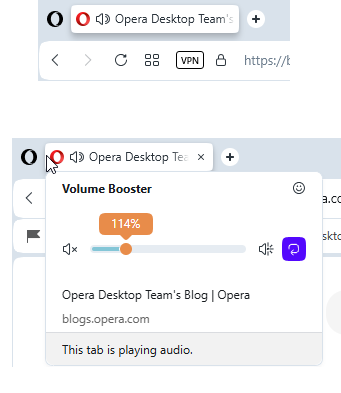
        2026-05-05_131106.png
        After volume adjustments and opening other page while playing audio the tab will show sound play icon even if there is no sound at all.

        *There's still impossible to adjust volume by using mousse wheel. It's almost impossible to manually set volume back to 100% (besides the reset button).

        Reply Quote 0
          Opera-QA-Team 1 Reply Last reply
        • A
          andrew84 last edited by

          Split screen still crashes. The crash is already in Stable.

          Reply Quote 0
            1 Reply Last reply
          • P
            pkap1 last edited by pkap1

            The issue with tiles not being transparent in some of the themes (e.g. Regnet) still persists.image_2026-05-05_183243625.png

            Reply Quote 0
              A 1 Reply Last reply
            • A
              andrew84 @pkap1 last edited by andrew84

              @pkap1 the tiles shouldn't be transparent in all themes. In accordance with their statement the tile are adopted to currently active wallpapers.
              But if on the same theme (after switching other themes or wallpaper) tiles look differently (transparent or almost solid), then there's an issue and possible workaround I described here.
              https://forums.opera.com/post/385986

              *Thanks to your message I discovered that some themes (including the Regnet) don't work here. The theme is switching on but I don't see the background. I thought it's my old integrated GPU but some other themes (Cybervroom for example) work fine here, including animation.

              Reply Quote 0
                P 1 Reply Last reply
              • P
                pkap1 @andrew84 last edited by

                @andrew84 I used your workaround previously, and it worked fine. This issue has appeared in more recent Opera updates.

                Reply Quote 0
                  A 1 Reply Last reply
                • Opera-QA-Team
                  Opera-QA-Team Opera @andrew84 last edited by

                  @andrew84: Hi, thanks for reporting. The remaining icon is reported as RNA-3232.
                  You don't have to set manually back to 100%, this is why we have the reset button.

                  Reply Quote 0
                    1 Reply Last reply
                  • A
                    andrew84 @pkap1 last edited by andrew84

                    @pkap1 unfortunately I can't check on the Regnet theme because it malfunctions here .
                    But when trying other themes it seems that it's really doesn't help anymore.

                    • I also noticed that tiles still have unreadable text (black text on dark background) on some wallpaper or themes.

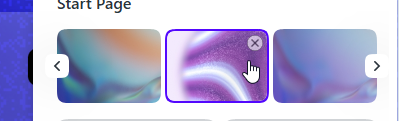
                    • I also noticed an issue that while in Classic theme and selecting wallpaper the selected wallpaper tile disappears (it looks like). Actually it's placed on the first position in the carousel but the carousel itself doesn't reset. Even after EasySetup reopening you don't see currently active wallpaper. In pre One version it works correctly and selected tile and carousel position are remembered.

                    before click
                    2026-05-06_103158.png

                    after click
                    2026-05-06_103218.png

                    the tile is the first one now
                    2026-05-06_103715.png

                    Reply Quote 0
                      1 Reply Last reply
                    • B
                      beboss last edited by

                      I'm running into a frequent issue when switching between Workspaces. The mouse cursor position doesn't match the actual clickable area of the page. I often have to move the mouse slightly (usually downward) to click the correct element, even when the cursor visually appears to be over it. This is especially noticeable on buttons and text fields with hover effects.
                      Example:

                      • I'm in Workspace 1 and copy some text.
                      • I switch to Workspace 2 (or 3, 5, etc.).
                      • I try to click into a text box to paste — but the click registers somewhere else.

                      This happens very often when I switch Workspaces. It feels like the page hasn't fully resized/rendered to the window yet, so elements are temporarily (or sometimes persistently) offset from where they should be. Sometimes I can even see the page snapping into place after switching.

                      Environment:

                      • Mac Mini M2
                      • macOS 15.7.7 (24G718)
                      • External monitor: HP Z27k G3, 27" @ 3840x2160
                        Opera version: always updated and this issues has been for a while

                      I use 5–6 Workspaces and switch between them constantly, so this is quite annoying. Would be great if this could be fixed.

                      Reply Quote 0
                        1 Reply Last reply
                      • First post
                        Last post

                      Computer browsers

                      • Opera for Windows
                      • Opera for Mac
                      • Opera for Linux
                      • Opera beta version
                      • Opera USB

                      Mobile browsers

                      • Opera for Android
                      • Opera Mini
                      • Opera Touch
                      • Opera for basic phones

                      • Add-ons
                      • Opera account
                      • Wallpapers
                      • Opera Ads

                      • Help & support
                      • Opera blogs
                      • Opera forums
                      • Dev.Opera

                      • Security
                      • Privacy
                      • Cookies Policy
                      • EULA
                      • Terms of Service

                      • About Opera
                      • Press info
                      • Jobs
                      • Investors
                      • Become a partner
                      • Contact us

                      Follow Opera

                      • Opera - Facebook
                      • Opera - Twitter
                      • Opera - YouTube
                      • Opera - LinkedIn
                      • Opera - Instagram

                      © Opera Software 1995-