Opera 131 Stable
-
steeveboy last edited by steeveboy
Maybe the first is just a pinned Google-Tab from a previous session? Try unpinning it, then close it. Try a restart. Then it should be gone.
Otherwise it seems like a bug, if it is not a pinned tab.
-
steeveboy last edited by
Try a clean install. Otherwise try a previous Opera Version.
Never had such a behaviour.
If it happens again and again, just file a bug-report and send it to Opera. Maybe you can test it with another PC or Laptop, then at least you know it is your special configuration.
Hope a dev answers your post soon directly, I'm also interested in this one.
Could also be a corrupt installation of the OS, so that TEMP-files mess up in the background. But better let the devs speak for themselves...
-
 leocg Moderator Volunteer last edited by
@theory65-0 right click on the first one - unpin tab. Or simply, right click - close tab
It happens every time you open Opera?
-
burnout426 Volunteer last edited by
@theory65-0 Someone on Reddit had this and it was one of their extensions that was causing it.
-
steeveboy last edited by steeveboy
Me again
Hi! Based on your screenshot, if it's not a standard pinned tab, here are three likely causes and how to fix them:
- "On Startup" Settings
Google might be set as a static startup page in addition to your normal session.
Go to opera://settings/onStartup.
Check if "Open a specific page or set of pages" is selected and if Google is listed there.
If so, remove the entry or switch back to "Retain tabs from previous session".
- Modified Shortcut Target
Sometimes the URL is accidentally added to the Opera shortcut itself.
Right-click your Opera shortcut (on Desktop or Taskbar) and select Properties.
Look at the "Target" field. It should end with opera.exe". If there is a URL (like https://www.google.com) behind the quotes, delete it.
- Corrupt Session Files
If a session file is bugged, it might "freeze" tabs and force them to reopen every time.
Go to opera://about to find your Profile path.
Close Opera completely.
Navigate to that folder and delete the "Sessions" subfolder. (Note: This will clear all currently open tabs, but it usually fixes persistent "ghost" tabs).
Bonus tip: Since Opera 131 uses Tab Islands, check if that Google icon is actually the start of a collapsed "Island." Try right-clicking the icon and selecting "Separate from Island" or "Close Tab Island."
Hope this helps!
- "On Startup" Settings
-
theory65 0 last edited by
@steeveboy: Hi, Thanks
Opera One(Version: 131.0.5877.5)
remove the entry "Retain tabs from previous session"= didn’t help
Modified Shortcut Target = mine is: "C:\Program Files\Opera\opera.exe"
Corrupt Session Files= tested: didn’t help
Bonus tip: i right click on Tab Icon and close it, but it comes back every time I start the program ?Thanks again
Theo -
burnout426 Volunteer last edited by burnout426
Long shot, but check anyway. Goto the URL
opera://flags/#policy, enable the "Show policy page" flag, restart Opera and goto the URLopera://policy. Does it show that any policies are set from the registry? -
burnout426 Volunteer last edited by
@theory65-0 Try uninstalling all extensions instead of just disabling them.
What extensions do you have installed?
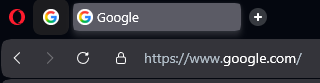 why 2 google Icons on every new program start ?