Opera 140.0.6074.36 Stable update
-

-
karen-arzumanyan last edited by
Download Regression already exist in 140.0.6074.36 (Windows 11 x64)
File downloads do not work when clicking on the links with the middle mouse button (scroll wheel) to open them in a new tab.
However, if you copy the link and paste it into the address bar of a new tab, or simply click on the link directly, the file downloads as expected.
This issue did not exist in version 139; it began after updating to version 140.
The problem occurs on various PCs running Windows 11 Pro 26H2 x64 .
-
albano23 last edited by albano23
@karen-arzumanyan: The entire branch of the different versions of 140 have the same error and I confirm what @karen-arzumanyan said, I refer to my previous message, which I already posted in the 140 stable. The bug continues and I use 22.04.5 lts of Ubuntu, on LINUX. "I can confirm that this exact same regression also affects Linux (Ubuntu 22.04.5 LTS, official Snap package) on builds 140.0.6074.17 and 140.0.6074.18 (Chromium 157.0.8103.39), so this is definitely a cross-platform issue in Opera 140's download pipeline, not an OS-specific glitch.
Just like with Gemini's generated files, any site that triggers client-side / in-memory (blob: / JavaScript) downloads—such as MEGA when downloading a shared link without being logged in—fails to trigger the "Save As" dialog:A temporary tab or window flashes open and closes immediately.
Nothing appears in the top-right download bubble.
The entry silently gets stuck in the full Downloads manager (opera://downloads) without actually saving the file.
The only workaround is to manually copy the link from opera://downloads and paste it into a new tab to force the "Save As" prompt to appear.
Disabling the built-in ad/tracker blocker or changing download prompt settings makes no difference. Reverting back to Opera 139 immediately fixes the issue on Linux as well. Please prioritize a fix for this in the next build, as core download functionality is currently broken across both Windows and Linux." -
Urby938 last edited by
How long you will ignore reported bugs:? !!!!!!
Bug 31335 watch it goddamit !
-
sgrandin last edited by sgrandin
https://www.youtube.com/watch?v=6QSc940cukI&ab_channel=EmmetCohen
https://www.youtube.com/watch?v=pMKYkUN5Eo8&list=RDEMJjNChrzZRpz5SwqG9HKbxw&index=4Problem with Emmet Cohen YouTube channel video being blank continues with this build.
ESPN banner problem fixed.
-
steeveboy last edited by leocg
Still Broken in Opera 140.0.6074.36 – Critical Showstopper Regression Persists Across All 140 Builds!
Hi Opera Team,
I have just re-tested this in the newly released Opera 140.0.6074.36 (Chromium 157.0.8103.79) on Windows 11 Pro 26H2 (x64), and I can confirm that this critical download regression is still not fixed.
Steps reproduced just minutes ago:
- Triggered a standard client-side generated PDF download (a simple 1-page test PDF generated in Google Gemini).
- In Opera 140.0.6074.36: A temporary window/tab briefly flashes open and immediately closes itself. The Windows "Save As" dialog never spawns, nothing starts downloading, and the file cannot be saved at all.
- Rolled back once again to Opera 139.0.6053.38 on the exact same machine and profile: Clicking the exact same download button immediately opens the native "Save As" dialog and saves the PDF without any issue.
As already confirmed by multiple Windows and Linux users in the previous 140.0.6074.17/.18 threads and here above, Opera 140's download pipeline is completely breaking client-side / blob: / new-tab triggered downloads.
Downloading files is one of the most fundamental core features of a web browser. Having this broken across three consecutive Stable releases (.17, .18, and now .36) is a massive showstopper that forces users to downgrade to Opera 139 and block auto-updates just to keep their daily work functional.
Please treat this with highest priority and ensure a fix lands immediately in the very next 140 maintenance update or ahead of Opera 141 Stable.
-
sgrandin last edited by
@sgrandin I'm finding now it's not just the Emmet Cohen YT site, but here's another example where there's no video in the main screen: https://www.youtube.com/watch?v=cjXJL1Tqas0&ab_channel=TAILLE6
-
karen-arzumanyan last edited by
@albano23: Yes, I agree. It’s exactly the same for me. It’s really annoying, especially when you have to download things frequently.
-
Urby938 last edited by
I previously reported an issue with website push notifications, particularly YouTube notifications, not working correctly in Opera. The issue was eventually fixed, and notifications started working again.
However, there is now another problem with notification handling.
I use Opera with the following command-line parameter:
--disable-features=NativeNotifications
The purpose of this parameter is to disable native Windows notifications and use the browser's own notification interface instead.
Currently, Opera displays website notifications using native Windows notifications, even when this parameter is present.
This behaviour is different from other Chromium-based browsers. Google Chrome, Brave and Vivaldi still respect this command-line parameter and display browser-style notifications instead of native Windows notifications.
Expected behaviour:
Opera should respect --disable-features=NativeNotifications and display its own browser notifications.Actual behaviour:
Opera ignores this parameter and continues to display native Windows notifications.Please investigate why this Chromium feature flag is no longer respected by Opera and restore the previous behaviour.
Thank you.
-
 whisperer last edited by
@whisperer said in Opera 140 Stable:
When using the offline installer and choosing Options, the error "The install path is invalid" is displayed. (This doesn't happen when using the mini installer.)
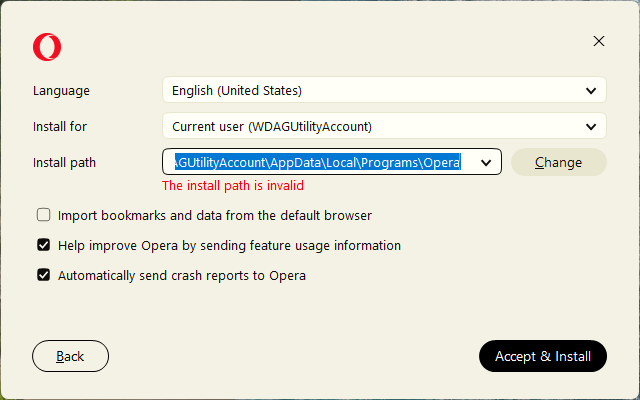
The error disappears when changing any option, for example by adding "123" to the end of the path or clicking one of the options.
This also happens with Windows offline installers for the latest stable version (140.0.6074.36) and developer version (141.0.6087.0).
I encounter this with Windows installers since version 134.0.5954.46. Prior installers (133.0.5932.85 and earlier) do not have this bug.