@7kjcndri4 said in restart opera:
How to restart opera?
Type this in your address bar: opera://restart and hit enter.
Do more on the web, with a fast and secure browser!
Download Opera browser with:
@7kjcndri4 said in restart opera:
How to restart opera?
Type this in your address bar: opera://restart and hit enter.
@sgunhouse said in Cannot Sync Speed Dials in Opera, So why sign in or keep account?:
@tuffkitten Your other devices are there, and you can see them if you want to just Select all and then Paste.
The idea was that you may not want ALL your speed dials on a work computer or phone, or likewise all you work speed dials on your personal laptop or phone.
I'm tired of hearing this. No one knows the real reason why Opera has chosen not to sync speed dials.
Like me, I'm sure there is lots of people that have a desktop Opera and a laptop Opera. Heck yeah I want them to sync. Fortunately I do know how to make them the same. And thank fully I rarely change my speed dial.
I'm constantly finding myself duplicating tabs.
Would love a keyboard shortcut to make this
go faster.
It's a very old discussion but basically most people prefer to have different Speed Dials for home, work, etc.
I wish we could do a poll on this. I want the same speed dial myself on my devices. Why not just have a flag for sync speed dial yes|no.
Try this...
Open a new tab
Open a 2nd new tab and go to a website
Go back to the first tab. Is it empty?
Mine is.
Win 8.1, Opera 54.xxx
I'm sure we've all run across sites that "Don't work" in Opera. Usually (But not always) because of the browser ID string.
Well I just signed up for Hulu and it wouldn't work in Opera so no big deal, it worked in Chrome and I was happy.
I mentioned this to my daughter and she said she got it to work in Opera! I was pleasantly shocked. I guess
she's more tech savvy then I realized!
Here's how
She said she found this on a Reddit page.
@blackbird71 said in How to change your browser ID within Opera:
@browzer1 said in How to change your browser ID within Opera:
@rif ... Does this not change the Opera "statistics" on web browsing? Is it a good thing or a bad thing?
Yes, it does affect the usage stats. If a user can access a site by changing the browser ID, it's a good thing for him in gaining access to the site... but it's not a good thing for Opera's market share stats. The ideal would be for websites to respect and operate properly with Opera's genuine user-agent string or respond to user complaints if they don't. But all too often, that's not how the online world seems to operate...
Exactly. Ever try to email a big company such as Hulu and tell them the site works in Opera but you have us blocked for some reason.
Easy to follow instructions here...
https://forums.opera.com/topic/30081/how-to-change-your-browser-id-within-opera
Well I should have just googled that!
Just enter this in your address bar and hit enter!
opera://restart
@burnout426
Thanks for this.
My most used search has always been on maps.google.com. After reading your post and the description of how it works now I was surprised that a search wasn't created. Especially after noticing that a search that I had to activate was created for drive.google.com (I was able to create my own search for that site).
I can confirm also.
Opera One(version: 132.0.5905.112)
@leocg said in Passwords not private and secure:
@telindow That's how it always worked, and not only in Opera.
It's the screen lock that protects your data on your phone.
So Opera is forcing me to have a phone screen lock to access my passwords on mobile. I wonder why?
Myself, my wife and 2 daughters have no screen locks on our phones for the past 20 years. I wonder how many others don't have screen locks.
I don't think I've ever tried to access my passwords on Opera Mobile and last night I tried and ran into this so I had no idea this is how it has always been.
Opera: Private Web Browser
Version: 95.1.4982.87307
@leocg Before, when you pressed Ctrl - / a box popped up in the middle of the screen. I'm actually not sure of its technical name. This is what I was referring to.
Now when you press Ctrl - / a sidebar opens up on the right side of the screen and its labeled "Opera AI."
I just assumed that the pop up in the middle of the browser window was also called Opera AI.
I use the keyboard a lot when browsing and I loved being able to pop up Opera AI in a pop up window, type by query, then hit escape to make it go away when I was done.
Opera One(version: 126.0.5750.43)
Dang, got rid of a laptop, then added another laptop, then got rid of that and got a better laptop.
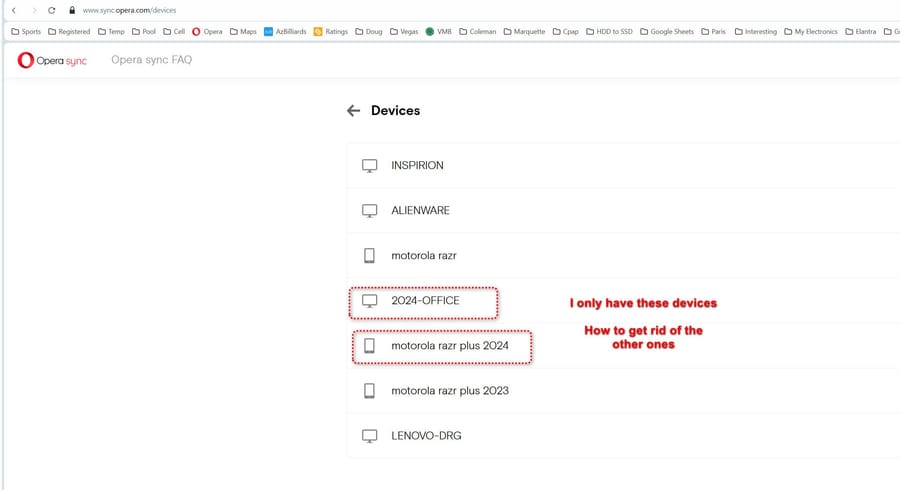
When I first posted I had 7 devices at sync.opera.com. Now I have 9.
This is long standing unsolved.
I have 7 devices listed at https://www.sync.opera.com/devices but I only have two of them.
How to get rid of the deprecated ones?
Opera One(version: 117.0.5408.228)
I asked about this 4 years ago and didn't get an answer then.
https://forums.opera.com/topic/51092/get-rid-of-devices-at-sync-opera-com/2?_=1746187561007
@leocg said in "This version is no longer supported" message on Google Calendar:
@rif Current version is 117, maybe that's why you are seeing that message?
That was it. The bummer was that Opera would not update itself. Had to uninstall and reinstall again.
@bantikilugai I've been on chess.com since 2012 and have played 50,000+ games (Yep, I'm addicted). Never had any problems.