• Login
    • Search
    • Categories
    • Recent
    • Tags
    • Users
    • Groups
    • Rules
    • Help

    Do more on the web, with a fast and secure browser!

    Download Opera browser with:

    • built-in ad blocker
    • battery saver
    • free VPN
    Download Opera

    How to disable google ai on Opera ?

    Opera for Windows
    4
    9
    1428
    Loading More Posts
    • Oldest to Newest
    • Newest to Oldest
    • Most Votes
    Reply
    • Reply as topic
    Log in to reply
    This topic has been deleted. Only users with topic management privileges can see it.
    • D
      domie-cat last edited by leocg

      How to disable google ai on Opera ?
      Thanks for your help

      Reply Quote 0
        leocg E 2 Replies Last reply
      • D
        domie-cat last edited by

        As I don't get any answer, I am wondering wether my question is OK.
        (english is not my mother toungue). So I read that the google's ai can be disabled on other browser ... but how to do on Opera ?

        Reply Quote 0
          leocg 1 Reply Last reply
        • leocg
          leocg Moderator Volunteer @domie-cat last edited by

          @domie-cat You didn't even waited the minimum of 24 hours and is already complaining that you didn't get an reply?

          Reply Quote 0
            1 Reply Last reply
          • leocg
            leocg Moderator Volunteer @domie-cat last edited by

            @domie-cat What do you mean by Google AI? Are you talking about the Gemini answers when you do a search on Google?

            If so, then it should be disabled in Google page settings, if there's an option available. You can also try to find an extension that hides the AI answers on searches.

            Reply Quote 0
              D 1 Reply Last reply
            • D
              domie-cat @leocg last edited by

              @leocg I don't know if it is called gemini but yes I wish to get rid of AI on google and I found on the net several advices to do that on chrome or safari but nothing about Opera.

              Reply Quote 0
                leocg 1 Reply Last reply
              • M
                misterjordan845 last edited by

                @domie-cat said in How to disable google ai on Opera ?:

                How to disable google ai on Opera ?
                Thanks for your help

                You can check Opera's settings and privacy options to disable or limit AI-related features. Also, keeping your home and workspace clean can make your overall digital and physical environment more comfortable and organized.

                Reply Quote 0
                  leocg 1 Reply Last reply
                • leocg
                  leocg Moderator Volunteer @misterjordan845 last edited by

                  @misterjordan845 It will disable Opera AI features, not AI features on Google or any other pages.

                  Reply Quote 0
                    1 Reply Last reply
                  • leocg
                    leocg Moderator Volunteer @domie-cat last edited by

                    @domie-cat No browser can disable it natively, you need to use an extension.

                    You can use Chrome extensions in Opera.

                    Reply Quote 0
                      1 Reply Last reply
                    • E
                      Eric05Bee @domie-cat last edited by Eric05Bee

                      @domie-cat said in How to disable google ai on Opera ?:

                      disable google ai

                      There is a 'URL hack': put '&udm=14' at the end of the address!
                      That stops Google defaulting to 'AI-mode-at-top'.

                      You can add it in Settings > Search Engine > Manage search engines and site search > Site Search > [Add]
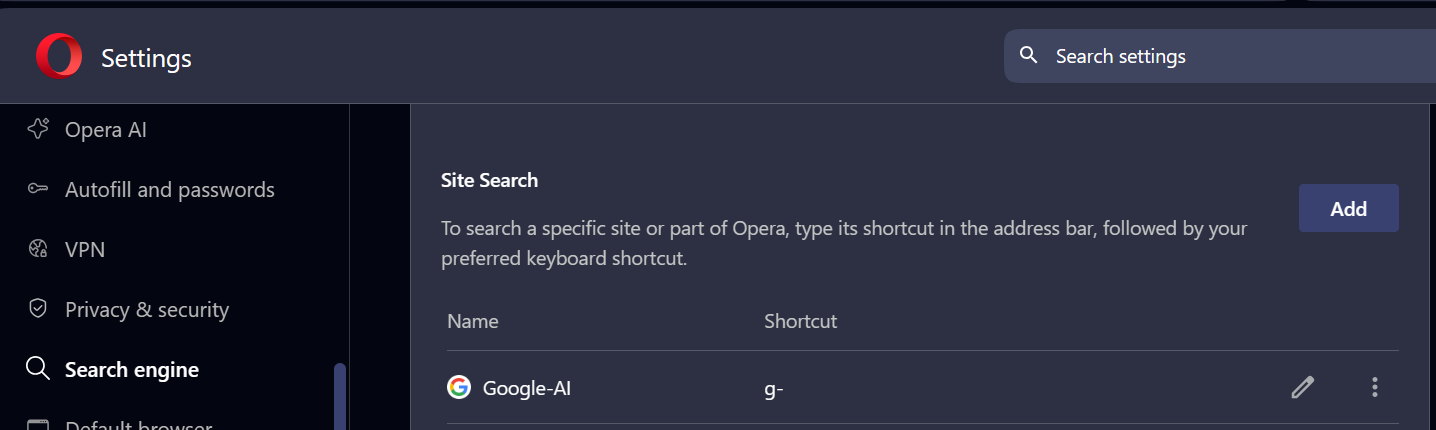
                      6930d085-3ff1-42b8-bcb3-a541e0fe5468-image.png

                      If you want to search for 'whatever', you can set it up to use a keyboard shortcut: I chose 'g-'.
                      Now if you type 'g- whatever' in the address/search bar, it detects the 'g-' when you type the ' ' space key, loads the custom site search address

                      https://google.com/search?q=%s&udm=14
                      

                      and replaces %s with the 'whatever' that you type.

                      56e65446-96b2-4de2-9ee9-bc33aac1c601-image.png

                      (Ignore the 'POST' option underneath: just leave it and click [Add].)

                      This doesn't stop the AI bit if you forget the 'g- ' prefix shortcut.

                      Reply Quote 0
                        1 Reply Last reply
                      • First post
                        Last post

                      Computer browsers

                      • Opera for Windows
                      • Opera for Mac
                      • Opera for Linux
                      • Opera beta version
                      • Opera USB

                      Mobile browsers

                      • Opera for Android
                      • Opera Mini
                      • Opera Touch
                      • Opera for basic phones

                      • Add-ons
                      • Opera account
                      • Wallpapers
                      • Opera Ads

                      • Help & support
                      • Opera blogs
                      • Opera forums
                      • Dev.Opera

                      • Security
                      • Privacy
                      • Cookies Policy
                      • EULA
                      • Terms of Service

                      • About Opera
                      • Press info
                      • Jobs
                      • Investors
                      • Become a partner
                      • Contact us

                      Follow Opera

                      • Opera - Facebook
                      • Opera - Twitter
                      • Opera - YouTube
                      • Opera - LinkedIn
                      • Opera - Instagram

                      © Opera Software 1995-
