How to disable google ai on Opera ?
-
domie-cat last edited by
As I don't get any answer, I am wondering wether my question is OK.
(english is not my mother toungue). So I read that the google's ai can be disabled on other browser ... but how to do on Opera ? -
 leocg Moderator Volunteer last edited by
@domie-cat You didn't even waited the minimum of 24 hours and is already complaining that you didn't get an reply?
-
leocg Moderator Volunteer last edited by
@domie-cat What do you mean by Google AI? Are you talking about the Gemini answers when you do a search on Google?
If so, then it should be disabled in Google page settings, if there's an option available. You can also try to find an extension that hides the AI answers on searches.
-
misterjordan845 last edited by
@domie-cat said in How to disable google ai on Opera ?:
How to disable google ai on Opera ?
Thanks for your helpYou can check Opera's settings and privacy options to disable or limit AI-related features. Also, keeping your home and workspace clean can make your overall digital and physical environment more comfortable and organized.
-
leocg Moderator Volunteer last edited by
@misterjordan845 It will disable Opera AI features, not AI features on Google or any other pages.
-
leocg Moderator Volunteer last edited by
@domie-cat No browser can disable it natively, you need to use an extension.
You can use Chrome extensions in Opera.
-
Eric05Bee last edited by Eric05Bee
@domie-cat said in How to disable google ai on Opera ?:
disable google ai
There is a 'URL hack': put '&udm=14' at the end of the address!
That stops Google defaulting to 'AI-mode-at-top'.You can add it in Settings > Search Engine > Manage search engines and site search > Site Search > [Add]
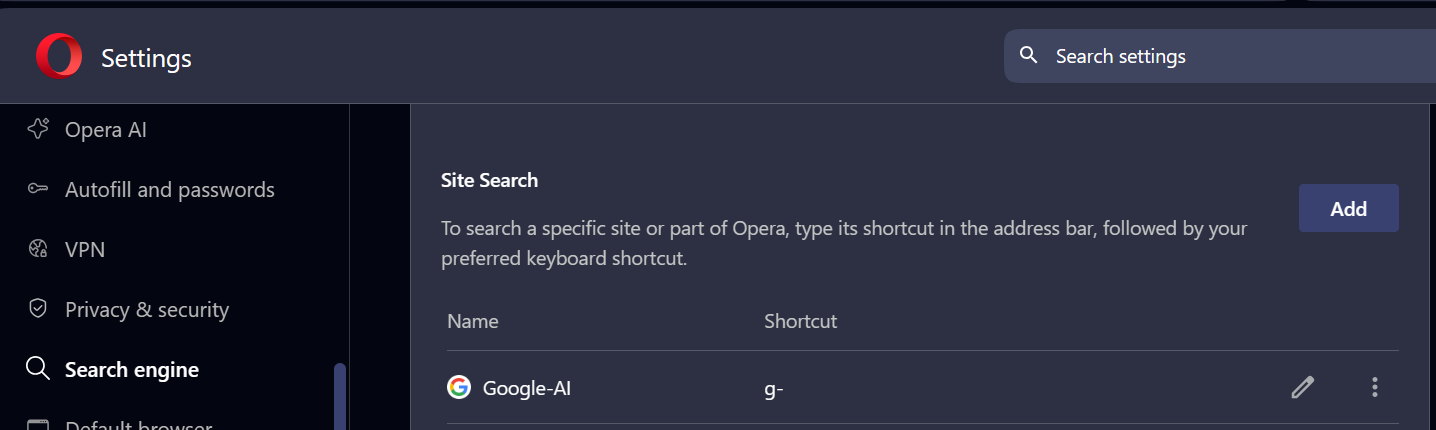
If you want to search for 'whatever', you can set it up to use a keyboard shortcut: I chose 'g-'.
Now if you type 'g- whatever' in the address/search bar, it detects the 'g-' when you type the ' ' space key, loads the custom site search addresshttps://google.com/search?q=%s&udm=14and replaces %s with the 'whatever' that you type.

(Ignore the 'POST' option underneath: just leave it and click [Add].)
This doesn't stop the AI bit if you forget the 'g- ' prefix shortcut.