• Login
    • Search
    • Categories
    • Recent
    • Tags
    • Users
    • Groups
    • Rules
    • Help

    Do more on the web, with a fast and secure browser!

    Download Opera browser with:

    • built-in ad blocker
    • battery saver
    • free VPN
    Download Opera

    Opera 137.0.6022.0 developer update

    Blogs
    desktop blog comments
    3
    5
    97
    Loading More Posts
    • Oldest to Newest
    • Newest to Oldest
    • Most Votes
    Reply
    • Reply as topic
    Log in to reply
    This topic has been deleted. Only users with topic management privileges can see it.
    • Opera Comments Bot
      Opera Comments Bot last edited by

      Hello! We’ve rolled out a new Opera developer release with a round of stability and polish fixes. We fixed several crashes: including one in tab hover cards, one after approving permissions for the ChatGPT extension, a macOS split screen crash, and crashes when dragging tabs between pinned and unpinned sections or switching workspaces with a […]

      Read full blog post: Opera 137.0.6022.0 developer update

      Reply Quote 0
        1 Reply Last reply
      • Opera-QA-Team
        Opera-QA-Team Opera last edited by

        Starting the discussion

        Reply Quote 0
          1 Reply Last reply
        • A
          andrew84 last edited by

          In vertical mode the serchTabs btton still doesn't work (works only if the sidebar is enabled).
          'Scroll to top' also doesn't work in vertical mode.

          Reply Quote 0
            1 Reply Last reply
          • A
            andrew84 last edited by
            1. Restore the 2nd click for the 'scroll to top' feature.
            2. Restore the search engines creation by using right click.
            3. Disable the automated search engines adding.
            4. In EasySetup and for the right split screen the scrollbar can't be grabbed when the cursor is far right (EesySetup closes, split screen has no reaction)
            5. The 'force dark page' toggle should remember its state depending on what mode (dark/light theme) it was activated for. So if I disable it while in light theme mode but enable it while in dark mode, next time I switch light theme the toggle should be off and next time I activate dark mode the toggle should be automatically on. *It's obvious and habitual algorithm(of course, if the 'force dark page' toggle visibility while in light theme is an intended, previously the toggle was visible only in dark theme).
            Reply Quote 0
              1 Reply Last reply
            • A
              andrew84 last edited by andrew84

              Still no highliting boxes in Settings and some buggy toggle's name>https://blogs.opera.com/desktop/2026/09/opera-137-0-6015-0-developer-update/#comment-409149

              *And still no option to show all the Setings categories. I'd suggest applying some clickable 'Settings' heador on top to show all the categories at once.
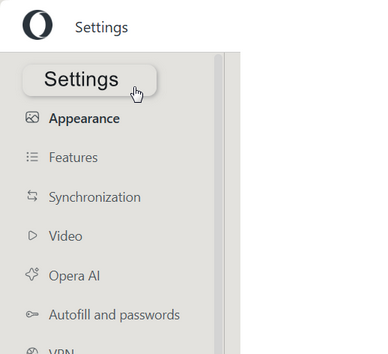
              2026-09-15_114102.png

              Reply Quote 0
                1 Reply Last reply
              • First post
                Last post

              Computer browsers

              • Opera for Windows
              • Opera for Mac
              • Opera for Linux
              • Opera beta version
              • Opera USB

              Mobile browsers

              • Opera for Android
              • Opera Mini
              • Opera Touch
              • Opera for basic phones

              • Add-ons
              • Opera account
              • Wallpapers
              • Opera Ads

              • Help & support
              • Opera blogs
              • Opera forums
              • Dev.Opera

              • Security
              • Privacy
              • Cookies Policy
              • EULA
              • Terms of Service

              • About Opera
              • Press info
              • Jobs
              • Investors
              • Become a partner
              • Contact us

              Follow Opera

              • Opera - Facebook
              • Opera - Twitter
              • Opera - YouTube
              • Opera - LinkedIn
              • Opera - Instagram

              © Opera Software 1995-