• Login
    • Search
    • Categories
    • Recent
    • Tags
    • Users
    • Groups
    • Rules
    • Help

    Do more on the web, with a fast and secure browser!

    Download Opera browser with:

    • built-in ad blocker
    • battery saver
    • free VPN
    Download Opera

    Opera 133.0.5932.20 Stable update

    Blogs
    desktop blog comments
    12
    21
    357
    Loading More Posts
    • Oldest to Newest
    • Newest to Oldest
    • Most Votes
    Reply
    • Reply as topic
    Log in to reply
    This topic has been deleted. Only users with topic management privileges can see it.
    • A
      andrew84 @cookie-drummer last edited by andrew84

      @cookie-drummer It's not broken. It's an intended 'genius' change.
      https://forums.opera.com/post/404519

      Reply Quote 1
        M 1 Reply Last reply
      • M
        MehrzadS @andrew84 last edited by

        @andrew84: WOW! they're not fixing things. They're making things more broken. It was already problematic as trying to drag a tab would cause it to scroll (mouse down instead of mouse up). Now it's even more broken.

        Reply Quote 3
          A 1 Reply Last reply
        • A
          andrew84 last edited by andrew84
          1. There's still no option to 'pin' tab islands. So after the browser closing tab islands will be lost. No need to mention the 'Retain tabs from previous session' because this option has an different purpose.

          Split tabs should be also pinnable.

          1. There's still no option to quickly 'ungroup' tab island.

          2. There should be option whether to create tab islands by moving and averlapping tabs or not.

          3. There's still the both 'pill' + tab island name bubble. But now the pill is solid but the 'bubble' is lighter (or semitransparent) which doesn't correspond the color selected in color picker popup. Also the text is black now and thus no so easy to read.
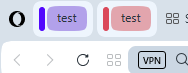
            2026-07-03_114030.png
            Previous suggetion was not to display the 'pill' if tab islands have names. And the previos bold white text looks a way better and clear.
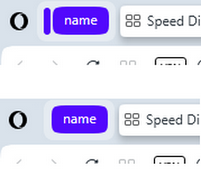
            2025-11-04_152034.png

          Reply Quote 0
            1 Reply Last reply
          • A
            andrew84 @MehrzadS last edited by

            @MehrzadS ther's also no 'create search engine' option anymore when right clicking inside search fields. It's not clear if it was again removed intentionaly or if this is a bug.

            Reply Quote 0
              1 Reply Last reply
            • A
              andrew84 last edited by andrew84

              the 'force dark page' toggle in Settings and in EasySetup menu are still not syncrhonized well. The bug is more than year old.
              I believe that's the reason why the toggle in EasySetup doesn't remember its state after switching dark/light themes.

              Reply Quote 0
                1 Reply Last reply
              • J
                jojo0587 last edited by

                I have a small visual error. Applies to Opera One 133.0.5932.24. If I move the cursor over the Opera Menu but do not click on the button and move the cursor away, there is a strange "crosshair" around the logo. If I do this several times, it changes the display intensity.
                obraz_2026-07-03_200844646.png

                My proposals for changes in Opera (Google Document).
                - There are not enough signs to put all the links here.

                Reply Quote 0
                  1 Reply Last reply
                • whisperer
                  whisperer last edited by

                  @whisperer said in Opera 133 Stable:

                  Since version 132.0.5905.102 (tested with Windows versions), there is not hint at the bottom showing the url when hovering over an link in a second Opera Window.

                  The developer version (134.0.5945.0) has this issue as well.

                  Version 132.0.5905.73 and earlier worked OK.

                  Reply Quote 0
                    1 Reply Last reply
                  • whisperer
                    whisperer last edited by

                    @whisperer said in Opera 131.0.5877.24 Stable update:

                    Still crash when switching to a tab with playing youtube video using Ctrl+Tab and releasing Ctrl late.

                    Still not fixed.

                    Reply Quote 0
                      1 Reply Last reply
                    • whisperer
                      whisperer last edited by

                      @whisperer said in Opera 131.0.5877.74 Stable update:

                      Crash when not using %s in site search definition (Opera for Windows)
                      Create a shortcut to go to the Opera website:

                      Go to opera://settings/searchEngines
                      Click the Add button to add a site search
                      Enter these details: 0789434e-ef05-40f3-8d53-86838828688c-image.png
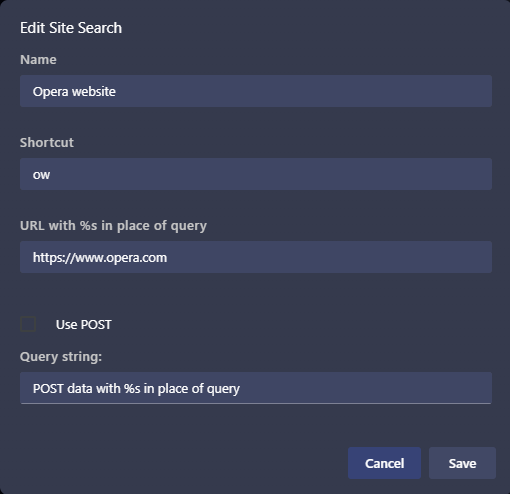
                      (Notice that no %s in used in the URL)
                      Click Save

                      Now test it:

                      Open a new tab (Ctrl+T)
                      Type "ow", then press Space, then press Enter

                      Opera crashes.
                      (Tested with Opera 131.0.5877.97)

                      Still not fixed.

                      Reply Quote 0
                        1 Reply Last reply
                      • whisperer
                        whisperer last edited by

                        @whisperer said in Opera 131.0.5877.74 Stable update:

                        Bug when changing position of bookmark in folder in boookmarks bar
                        (Opera for Windows 131.0.5877.97)

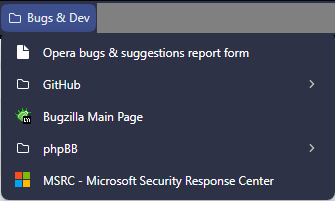
                        I have the bookmarks bar enabled. On it, I have a folder named "Bugs & Dev".
                        On the bookmarks bar, I click the folder and the folder opens. Here's an image:
                        bff47e0f-fd42-47c1-a572-40a53733f639-image.png

                        I drag the entry "Bugzilla Main Page" (in the middle) to the top, to change its position.
                        The entry "Bugzilla Main Page" is now moved to the top, but displayed at the bottom. When clicking the folder name "Bugs & Dev" twice to close it and open it again, the bookmark is shown in its correct place.

                        Still not fixed.

                        Reply Quote 0
                          1 Reply Last reply
                        • B
                          bbildman last edited by

                          @andrew84::"Restore the 2nd click for the ''scroll to top' feature and restore the 'create search engine' option for search fields https://forums.opera.com/post/404101"

                          AMEN, this was/is a necessary function, and is an unforgiveable change if it was removed by intention. These "small" changes are making Opera more and more useless. Seems as if my beloved Opera (for decades now) is going to lose the browser war, it is becoming more and more "vanilla"

                          Reply Quote 1
                            1 Reply Last reply
                          • First post
                            Last post

                          Computer browsers

                          • Opera for Windows
                          • Opera for Mac
                          • Opera for Linux
                          • Opera beta version
                          • Opera USB

                          Mobile browsers

                          • Opera for Android
                          • Opera Mini
                          • Opera Touch
                          • Opera for basic phones

                          • Add-ons
                          • Opera account
                          • Wallpapers
                          • Opera Ads

                          • Help & support
                          • Opera blogs
                          • Opera forums
                          • Dev.Opera

                          • Security
                          • Privacy
                          • Cookies Policy
                          • EULA
                          • Terms of Service

                          • About Opera
                          • Press info
                          • Jobs
                          • Investors
                          • Become a partner
                          • Contact us

                          Follow Opera

                          • Opera - Facebook
                          • Opera - Twitter
                          • Opera - YouTube
                          • Opera - LinkedIn
                          • Opera - Instagram

                          © Opera Software 1995-