• Login
    • Search
    • Categories
    • Recent
    • Tags
    • Users
    • Groups
    • Rules
    • Help

    Do more on the web, with a fast and secure browser!

    Download Opera browser with:

    • built-in ad blocker
    • battery saver
    • free VPN
    Download Opera

    Opera 130.0.5847.82 Stable update

    Blogs
    desktop blog comments
    5
    6
    176
    Loading More Posts
    • Oldest to Newest
    • Newest to Oldest
    • Most Votes
    Reply
    • Reply as topic
    Log in to reply
    This topic has been deleted. Only users with topic management privileges can see it.
    • Opera Comments Bot
      Opera Comments Bot last edited by

      Hello! Version 130.0.5847.82 is now available in the stable channel. What’s new in this stable release: You can read more about all the new features here -> Opera One becomes the best browser for video streaming: adds YouTube and Twitch to the sidebar You can find the full list in the changelog. Happy browsing! Installation […]

      Read full blog post: Opera 130.0.5847.82 Stable update

      Reply Quote 0
        1 Reply Last reply
      • Opera-QA-Team
        Opera-QA-Team Opera last edited by

        Starting the discussion

        Reply Quote 0
          1 Reply Last reply
        • A
          andrew84 last edited by andrew84

          Picture-in-Picture Improvements

          To improve the PiP the horrible full area dimming effect on hover should be removed. Along with the inadequate volume adjustment (volume increasing) top > bottom (adequate adjustment is bottom > top or left > right).

          *Btw, why on your screenshots and in demo the fake PiP is shown ?
          The controls are visible (in different place though) what means the cursor on the PiP so the the PiP on your screenshot should be dimmed.
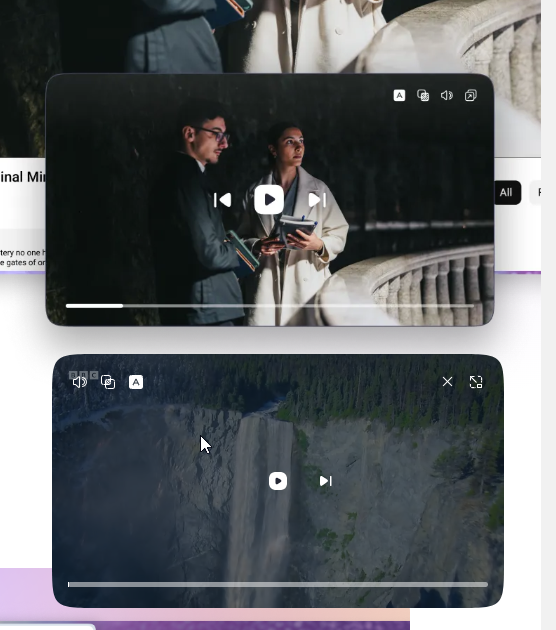
          2026-04-22_125837.png

          the volume control is fake also in your demo
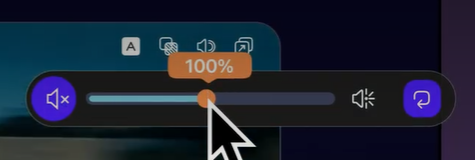
          2026-04-22_131906.png

          Reply Quote 0
            1 Reply Last reply
          • A
            andrew84 last edited by

            The obvious con of the volume boost feature is that mouse wheel can't be used to increase /decrease volume level
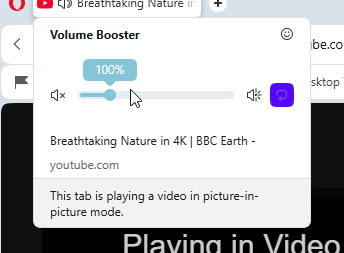
            2026-04-22_132709.png

            Reply Quote 0
              1 Reply Last reply
            • K
              karen-arzumanyan last edited by

              Please pay attention to the bug: BUG-21893

              The dialog box for adding a page or folder to the bookmarks bar extends beyond the monitor borders.

              Steps to reproduce the issue:
              1.Create multiple folders with several nesting levels (I have three).
              2.Open the dialog box for adding a new folder or page to a third-level folder.
              3.Then, you can try opening several more tree levels in this dialog box without collapsing them.
              4.Click "Save" or "Enter."
              5. After this, subsequent Add dialogs will always display the tree structure as it was when you last saved it. However, the dialog window extends beyond the screen, so much so that even collapsing all the branches doesn't help. You can only click Escape to close it.

              Reply Quote 0
                1 Reply Last reply
              • M
                MehrzadS last edited by

                Fresh install of this version. Can't play videos. IIRC it had something to do with libffmpeg.so. If someone know how exactly to fix this please let me know.

                Reply Quote 0
                  1 Reply Last reply
                • First post
                  Last post

                Computer browsers

                • Opera for Windows
                • Opera for Mac
                • Opera for Linux
                • Opera beta version
                • Opera USB

                Mobile browsers

                • Opera for Android
                • Opera Mini
                • Opera Touch
                • Opera for basic phones

                • Add-ons
                • Opera account
                • Wallpapers
                • Opera Ads

                • Help & support
                • Opera blogs
                • Opera forums
                • Dev.Opera

                • Security
                • Privacy
                • Cookies Policy
                • EULA
                • Terms of Service

                • About Opera
                • Press info
                • Jobs
                • Investors
                • Become a partner
                • Contact us

                Follow Opera

                • Opera - Facebook
                • Opera - Twitter
                • Opera - YouTube
                • Opera - LinkedIn
                • Opera - Instagram

                © Opera Software 1995-

