• Login
    • Search
    • Categories
    • Recent
    • Tags
    • Users
    • Groups
    • Rules
    • Help

    Do more on the web, with a fast and secure browser!

    Download Opera browser with:

    • built-in ad blocker
    • battery saver
    • free VPN
    Download Opera

    Where did my Aria Go?

    Bugs
    3
    14
    268
    Loading More Posts
    • Oldest to Newest
    • Newest to Oldest
    • Most Votes
    Reply
    • Reply as topic
    Log in to reply
    This topic has been deleted. Only users with topic management privileges can see it.
    • DeeBeeEff
      DeeBeeEff @leocg last edited by

      @leocg
      I clicked the link at the bottom of my previous Aria in the sidebar that said upgrade.
      The article you attached didn't really tell me why the button in the upper right that says Ask AI doesn't work.
      Can I go back?
      I use Aria multiple times a day.
      Thanks,
      Dave

      Reply Quote 0
        leocg 1 Reply Last reply
      • leocg
        leocg Moderator Volunteer @DeeBeeEff last edited by

        @DeeBeeEff Aria was replaced by Opera AI.

        Don't know why the button doesn't work for you. What Opera do you use?

        Reply Quote 0
          DeeBeeEff 1 Reply Last reply
        • DeeBeeEff
          DeeBeeEff @leocg last edited by

          @leocg
          Hi!
          I was using Opera that had an Aria button on the left sidebar.
          At the bottom of the flyout section for Aria was a link to upgrade to Opera AI.
          So I did that.
          My Aria on the sidebar disappeared and then the annoying one on the upper left appeared.
          After that, I checked to see if I needed updates, and I did.
          Then I followed the "news" page you sent me to and there was a download link there, so I downloaded that, which I think was what I already had.
          So here is what I have:

          Opera One(version: 124.0.5705.65)
          Opera is up to date
          Update stream: Stable
          System:Windows 11 64-bit
          Chromium version:140.0.7339.249

          Thanks for your help.
          Dave

          Reply Quote 0
            DeeBeeEff leocg 2 Replies Last reply
          • DeeBeeEff
            DeeBeeEff @DeeBeeEff last edited by

            @DeeBeeEff
            Correction - New button is on upper right, not upper left as I misstated.

            Reply Quote 0
              1 Reply Last reply
            • leocg
              leocg Moderator Volunteer @DeeBeeEff last edited by

              @DeeBeeEff What happens when you click on the Opera AI button?

              Reply Quote 0
                DeeBeeEff 1 Reply Last reply
              • DeeBeeEff
                DeeBeeEff @leocg last edited by

                @leocg Flyout or whatever it's called from the right side, totally blank. Reduces the screen area. Creates a computed box size of 397 px wide by 100% screen height.
                CSS only with no content.
                Right clicking that space shows me two options: oddly one of them is for a plug-ing setting and the other is to inspect element (open the developer).
                I did disable the plug-in to be sure that wasn't causing it, and it was not.
                What is the button supposed to do?

                Reply Quote 0
                  leocg 1 Reply Last reply
                • MatthijsHendrikRaetsen
                  MatthijsHendrikRaetsen @DeeBeeEff last edited by

                  @DeeBeeEff Yes!!! And also youre Aria history is deleted and all your work gone.

                  Reply Quote 0
                    1 Reply Last reply
                  • leocg
                    leocg Moderator Volunteer @DeeBeeEff last edited by

                    @DeeBeeEff It opens a panel similar to the old Aria panel, where you can ask Opera AI

                    Reply Quote 0
                      DeeBeeEff 1 Reply Last reply
                    • DeeBeeEff
                      DeeBeeEff @leocg last edited by

                      @leocg There is no place to type anything. No text box, no icons, nothing.
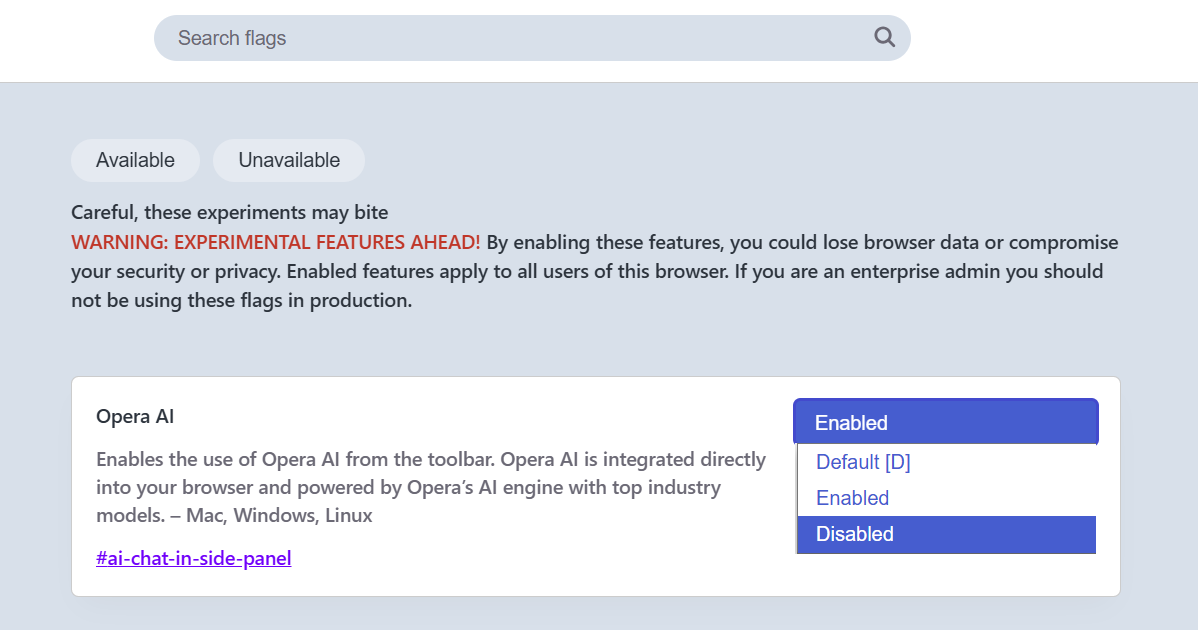
                      Wierder still, when you search the settings there is nothing for Aria or AI. I only found out how to turn it off by searching Sidebar in the settings. It stil is in there to turn off, which is what I did, since the button placement is also annoying.

                      Reply Quote 0
                        leocg 1 Reply Last reply
                      • leocg
                        leocg Moderator Volunteer @DeeBeeEff last edited by

                        @DeeBeeEff Right, something seems to be wrong with your Opera.

                        Maybe you can try a new profile directory.

                        Reply Quote 0
                          DeeBeeEff 1 Reply Last reply
                        • DeeBeeEff
                          DeeBeeEff @leocg last edited by

                          @leocg
                          I don't know what this means:
                          "Maybe you can try a new profile directory."
                          If it means starting out fresh and losing all my settings, I have been using Opera for years and don't really want to reset everything because Opera effed up their interface.
                          I also have seen where a lot of people hate how Aria now takes up screen space instead of being an overlay like it was before.
                          I did today load Opera update again to get a clean update, and the only thing that changed is the settings for turning the AI button moved in the settings.
                          So I take it from all of your talk that there is no way for me to go backwards?
                          Thanks again,
                          Dave

                          Reply Quote 0
                            leocg 1 Reply Last reply
                          • leocg
                            leocg Moderator Volunteer @DeeBeeEff last edited by

                            @DeeBeeEff The idea is just to check if the issue isn't being caused by a broken profile directory. You can keep your current data and, if a new profile doesn't fix the problem, you can return to the old one.

                            Reply Quote 0
                              1 Reply Last reply
                            • First post
                              Last post

                            Computer browsers

                            • Opera for Windows
                            • Opera for Mac
                            • Opera for Linux
                            • Opera beta version
                            • Opera USB

                            Mobile browsers

                            • Opera for Android
                            • Opera Mini
                            • Opera Touch
                            • Opera for basic phones

                            • Add-ons
                            • Opera account
                            • Wallpapers
                            • Opera Ads

                            • Help & support
                            • Opera blogs
                            • Opera forums
                            • Dev.Opera

                            • Security
                            • Privacy
                            • Cookies Policy
                            • EULA
                            • Terms of Service

                            • About Opera
                            • Press info
                            • Jobs
                            • Investors
                            • Become a partner
                            • Contact us

                            Follow Opera

                            • Opera - Facebook
                            • Opera - Twitter
                            • Opera - YouTube
                            • Opera - LinkedIn
                            • Opera - Instagram

                            © Opera Software 1995-