@burnout426 Hopefully soon. They have had 12 days so far.
D
Best posts made by DeeBeeEff
-
RE: Zoom-in cursor shows as a loading wheel/spinner and on zoom-out cursor completely goneOpera for Windows
Latest posts made by DeeBeeEff
-
RE: Zoom-in cursor shows as a loading wheel/spinner and on zoom-out cursor completely goneOpera for Windows
@burnout426 Hopefully soon. They have had 12 days so far.
-
RE: An invisible interface element moves the entire browser window.Opera for Windows
@andrew84 It appears that the latest build 136.0.6008.80 has solved it, but there still appears to be an incorrect icon over certain hovers. Shows the spinning wheel. when it should not. Pretty sure this is a Opera bug but I could be wrong.
-
RE: An invisible interface element moves the entire browser window.Opera for Windows
@anonimus1337 There also seems to be issues with pointer targeting.
-
RE: An invisible interface element moves the entire browser window.Opera for Windows
Thank goodness! I thought I was going crazy.
I also have this after latest update.
Also, once the window moves, clicking the box in upper right to restore it to full screen takes two clicks. All other APP windows only take one click. -
RE: Adblocker Causing AVG Malware notice???Opera for Windows
@leocg Thanks.
Yeah, that's what it is.
I think AVG doesn't like that it is a .txt file with the names of malware sites in it.
I will whitelist it the next time it pops up.
Thanks, again. -
Adblocker Causing AVG Malware notice???Opera for Windows
I suspect that changes in Opera's Ad blocker are causing AVG to detect and block access to a malware list??
Repeated pop-ups like this after latest update.

Is this possible?
And if so, how to stop it? -
RE: Opera One R3 arrives with new AI, Google integrations, and moreBlogs
Does the new AI still hog the right side of the screen? Or can it be set to overlay the screen like Aria does in the old version? That has been a deal-breaker for me, so right now I still haven't upgraded to the new one again--I did once and hated it--and continue to use Aria on the sidebar, and will until I not longer can!
-
RE: How to opt-in and upgrade to the new Opera AI in your browserBlogs
@leocg Well maybe someone needs to share with them that they should leave it.
Seriously? Why do they think that hogging up 20% of someone's screen space is a good idea? -
RE: How to opt-in and upgrade to the new Opera AI in your browserBlogs
@UNCLEJUNIOR
Doesn't mean you can't use it.
I have been getting that warning for years on my Schwab account. I ignore it and use it just fine.
And I think "the vast majority" is way overstating it.
I used it with all of my banks and PayPal today without any issues. -
RE: Where did my Aria Go?Bugs
@leocg Actually, I submitted a bug report and after asking the person told me that if you enter opera://flags in the browser bar it takes you to this screen:
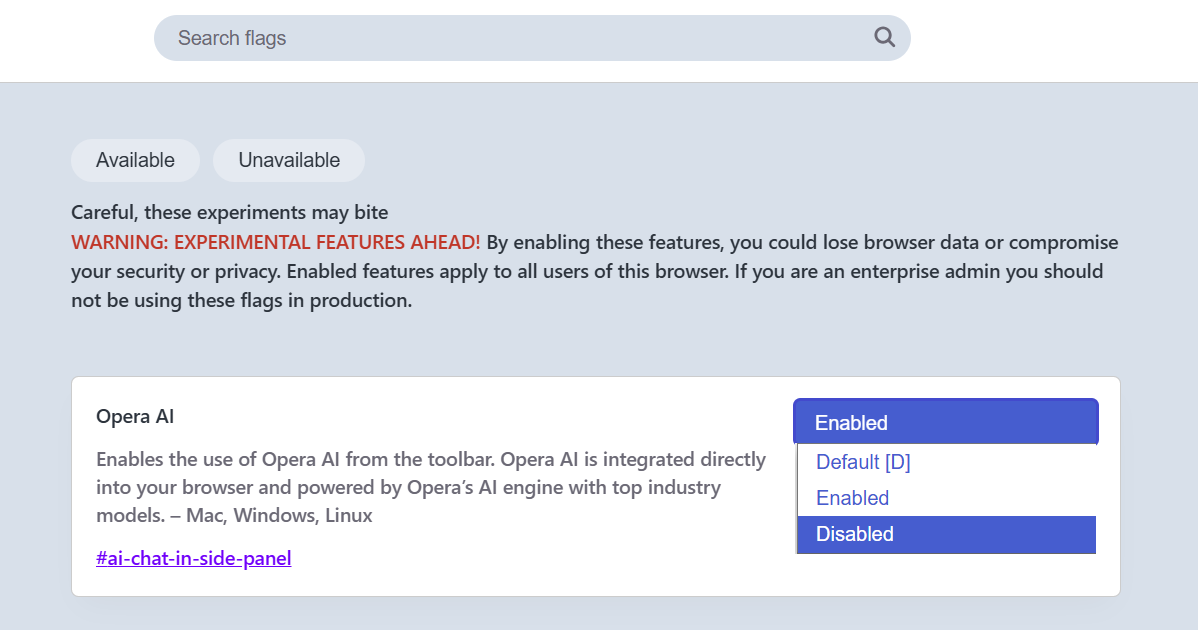
Selecting Disabled takes you back to the way it was.
Something you might wish to share with others.
Thanks,
Dave