• Login
    • Search
    • Categories
    • Recent
    • Tags
    • Users
    • Groups
    • Rules
    • Help

    Do more on the web, with a fast and secure browser!

    Download Opera browser with:

    • built-in ad blocker
    • battery saver
    • free VPN
    Download Opera

    Where did my Aria Go?

    Bugs
    4
    18
    1318
    Loading More Posts
    • Oldest to Newest
    • Newest to Oldest
    • Most Votes
    Reply
    • Reply as topic
    Log in to reply
    This topic has been deleted. Only users with topic management privileges can see it.
    • MatthijsHendrikRaetsen
      MatthijsHendrikRaetsen @DeeBeeEff last edited by

      @DeeBeeEff Yes!!! And also youre Aria history is deleted and all your work gone.

      Reply Quote 0
        1 Reply Last reply
      • leocg
        leocg Moderator Volunteer @DeeBeeEff last edited by

        @DeeBeeEff It opens a panel similar to the old Aria panel, where you can ask Opera AI

        Reply Quote 0
          DeeBeeEff 1 Reply Last reply
        • DeeBeeEff
          DeeBeeEff @leocg last edited by

          @leocg There is no place to type anything. No text box, no icons, nothing.
          Wierder still, when you search the settings there is nothing for Aria or AI. I only found out how to turn it off by searching Sidebar in the settings. It stil is in there to turn off, which is what I did, since the button placement is also annoying.

          Reply Quote 0
            leocg 1 Reply Last reply
          • leocg
            leocg Moderator Volunteer @DeeBeeEff last edited by

            @DeeBeeEff Right, something seems to be wrong with your Opera.

            Maybe you can try a new profile directory.

            Reply Quote 0
              DeeBeeEff 1 Reply Last reply
            • DeeBeeEff
              DeeBeeEff @leocg last edited by

              @leocg
              I don't know what this means:
              "Maybe you can try a new profile directory."
              If it means starting out fresh and losing all my settings, I have been using Opera for years and don't really want to reset everything because Opera effed up their interface.
              I also have seen where a lot of people hate how Aria now takes up screen space instead of being an overlay like it was before.
              I did today load Opera update again to get a clean update, and the only thing that changed is the settings for turning the AI button moved in the settings.
              So I take it from all of your talk that there is no way for me to go backwards?
              Thanks again,
              Dave

              Reply Quote 0
                leocg 1 Reply Last reply
              • leocg
                leocg Moderator Volunteer @DeeBeeEff last edited by

                @DeeBeeEff The idea is just to check if the issue isn't being caused by a broken profile directory. You can keep your current data and, if a new profile doesn't fix the problem, you can return to the old one.

                Reply Quote 0
                  DeeBeeEff 1 Reply Last reply
                • DeeBeeEff
                  DeeBeeEff @leocg last edited by

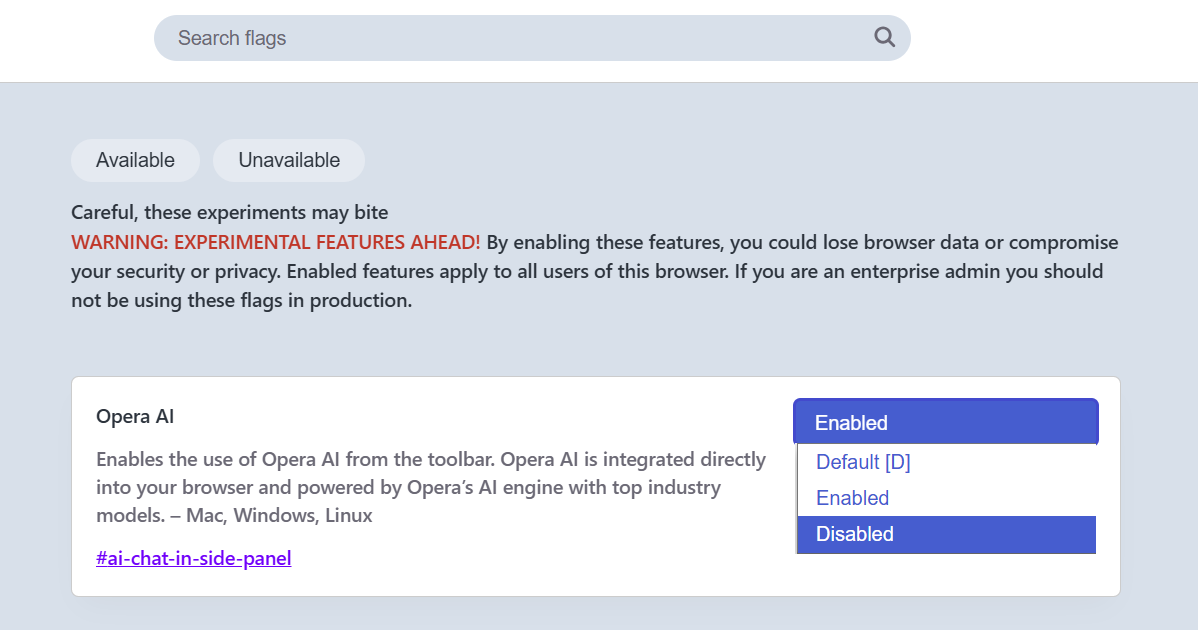
                  @leocg Actually, I submitted a bug report and after asking the person told me that if you enter opera://flags in the browser bar it takes you to this screen:
                  6ad8dae6-5916-44e2-a063-287ddb84cbee-image.png
                  Selecting Disabled takes you back to the way it was.
                  Something you might wish to share with others.
                  Thanks,
                  Dave

                  Reply Quote 0
                    leocg 1 Reply Last reply
                  • leocg
                    leocg Moderator Volunteer @DeeBeeEff last edited by

                    @DeeBeeEff It's just a temporary solution, since the flag will be removed a while after it starts being enabled by default.

                    Reply Quote 0
                      1 Reply Last reply
                    • mohamedsamirms
                      mohamedsamirms @DeeBeeEff last edited by

                      @DeeBeeEff image_2025-12-09_153729551.png it got moved

                      Reply Quote 0
                        1 Reply Last reply
                      • mohamedsamirms
                        mohamedsamirms last edited by

                        it got moved guys dw 90504dd4-2448-4032-af8f-cc61696fcc7d-image.png

                        Reply Quote 0
                          1 Reply Last reply
                        • First post
                          Last post

                        Computer browsers

                        • Opera for Windows
                        • Opera for Mac
                        • Opera for Linux
                        • Opera beta version
                        • Opera USB

                        Mobile browsers

                        • Opera for Android
                        • Opera Mini
                        • Opera Touch
                        • Opera for basic phones

                        • Add-ons
                        • Opera account
                        • Wallpapers
                        • Opera Ads

                        • Help & support
                        • Opera blogs
                        • Opera forums
                        • Dev.Opera

                        • Security
                        • Privacy
                        • Cookies Policy
                        • EULA
                        • Terms of Service

                        • About Opera
                        • Press info
                        • Jobs
                        • Investors
                        • Become a partner
                        • Contact us

                        Follow Opera

                        • Opera - Facebook
                        • Opera - Twitter
                        • Opera - YouTube
                        • Opera - LinkedIn
                        • Opera - Instagram

                        © Opera Software 1995-