• Login
    • Search
    • Categories
    • Recent
    • Tags
    • Users
    • Groups
    • Rules
    • Help

    Do more on the web, with a fast and secure browser!

    Download Opera browser with:

    • built-in ad blocker
    • battery saver
    • free VPN
    Download Opera

    How to opt-in and upgrade to the new Opera AI in your browser

    Blogs
    news blog comments
    12
    17
    2155
    Loading More Posts
    • Oldest to Newest
    • Newest to Oldest
    • Most Votes
    Reply
    • Reply as topic
    Log in to reply
    This topic has been deleted. Only users with topic management privileges can see it.
    • raver126p
      raver126p last edited by

      Hello. I think you messed this up badly. The ai button is in the wrong place. I would like to put it back on the left menu bar.

      Reply Quote 0
        1 Reply Last reply
      • tobyhehe
        tobyhehe last edited by

        I dont want it pls let me have my aria back i didnt know it was going yo replace her pls theres have to be a way i can get her back

        Reply Quote 0
          1 Reply Last reply
        • Firsidh
          Firsidh last edited by

          Why did you remove the Aria Chat from the left side of the screen, I am okay with Opera AI on the left,
          but Aria is part of my routine, with Opera AI fixed on the right it is worse than Aria being locked to the left.

          we need to experience this with familiarity, this makes the entire Opera Browser feel like a clone browser knockoff

          We need the Aria chat bot back, even if it is just a shell to Opera AI.

          Reply Quote 0
            1 Reply Last reply
          • DeeBeeEff
            DeeBeeEff last edited by

            The Aria AI button on the right side now does nothing except open a flyout that reduces my screen size.
            A blank flyout by the way, so I can't even do anything with it!
            I want the old ARIA back!
            I loved that it overlayed the screen!
            This is horrible!

            Reply Quote 0
              1 Reply Last reply
            • GEorg3
              GEorg3 last edited by

              Overlay AI made so much sense and now that it's moved to the side it's quite antiproductive, hope it'll be fixed in a new version otherwise please let us know how to revert to old aria

              Reply Quote 0
                1 Reply Last reply
              • hsikkema
                hsikkema last edited by

                I see the Ask AI button at the top right. Can this please be added to the sidebar as it was previously. This new functionality is more difficult to use and breaks the normal work flow. The overlay made much more sense.

                Reply Quote 0
                  1 Reply Last reply
                • MontyPyFly
                  MontyPyFly last edited by

                  Why can't I have Opera AI in the side bar where Aria was? seriously... it t\even took me a while to find where it oved too, I don't like it up there, and it seems like others don't either.... let us decide, don't just move it and leave no way to move it back or revert to the old AL model.

                  Reply Quote 0
                    DeeBeeEff 1 Reply Last reply
                  • DeeBeeEff
                    DeeBeeEff @MontyPyFly last edited by

                    @MontyPyFly
                    Just received a response from Opera directly after I submitted a bug report.
                    In browser bar, enter opera://flags
                    Choose Disabled and restart.
                    It is back to what it was before.
                    Just a shame it took me this long to get the answer.
                    Dave
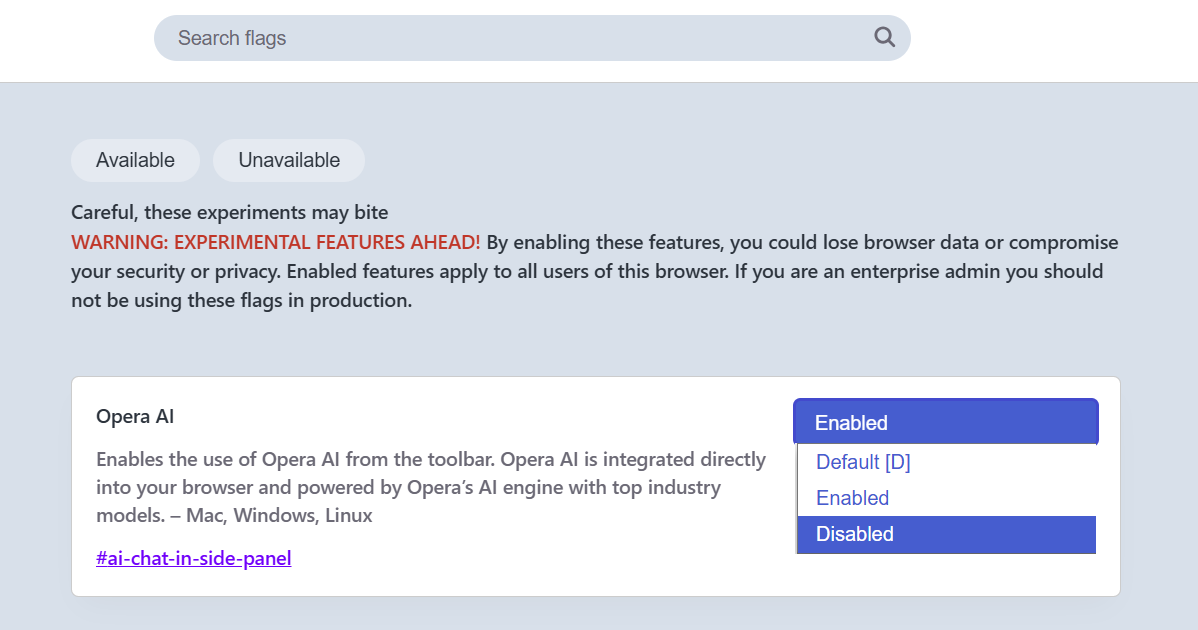
                    40c82da1-383b-44c1-bf10-a3d2d6657431-image.png

                    Reply Quote 0
                      MontyPyFly UNCLEJUNIOR leocg 3 Replies Last reply
                    • MontyPyFly
                      MontyPyFly @DeeBeeEff last edited by

                      @DeeBeeEff thanks so much.
                      I assume this will revert to the original Aria and we will not have access to any new features.

                      Reply Quote 0
                        1 Reply Last reply
                      • UNCLEJUNIOR
                        UNCLEJUNIOR @DeeBeeEff last edited by

                        @deebeeeff: The vast majority of important websites do not recognize the Opera browser; e.g., MS mail, various banking & financial websites, PayPal, etc.

                        Reply Quote 0
                          DeeBeeEff MontyPyFly 2 Replies Last reply
                        • leocg
                          leocg Moderator Volunteer @DeeBeeEff last edited by

                          @DeeBeeEff Just remind that the solution is temporary and will cease to work when the flag is removed.

                          Reply Quote 0
                            1 Reply Last reply
                          • DeeBeeEff
                            DeeBeeEff @UNCLEJUNIOR last edited by

                            @UNCLEJUNIOR
                            Doesn't mean you can't use it.
                            I have been getting that warning for years on my Schwab account. I ignore it and use it just fine.
                            And I think "the vast majority" is way overstating it.
                            I used it with all of my banks and PayPal today without any issues.

                            Reply Quote 0
                              1 Reply Last reply
                            • MontyPyFly
                              MontyPyFly @UNCLEJUNIOR last edited by

                              @UNCLEJUNIOR Sure they do. Some MS sites don't because they are bad sites that do not conform to the web standards. (like apple trying to make everything proprietary.)
                              I the odd event a site is coded poorly, there are other browsers for that one site (probably already on your computer/device ce) and then you get Opera goodness for the other 99.5%

                              Reply Quote 0
                                1 Reply Last reply
                              • First post
                                Last post

                              Computer browsers

                              • Opera for Windows
                              • Opera for Mac
                              • Opera for Linux
                              • Opera beta version
                              • Opera USB

                              Mobile browsers

                              • Opera for Android
                              • Opera Mini
                              • Opera Touch
                              • Opera for basic phones

                              • Add-ons
                              • Opera account
                              • Wallpapers
                              • Opera Ads

                              • Help & support
                              • Opera blogs
                              • Opera forums
                              • Dev.Opera

                              • Security
                              • Privacy
                              • Cookies Policy
                              • EULA
                              • Terms of Service

                              • About Opera
                              • Press info
                              • Jobs
                              • Investors
                              • Become a partner
                              • Contact us

                              Follow Opera

                              • Opera - Facebook
                              • Opera - Twitter
                              • Opera - YouTube
                              • Opera - LinkedIn
                              • Opera - Instagram

                              © Opera Software 1995-
