• Login
    • Search
    • Categories
    • Recent
    • Tags
    • Users
    • Groups
    • Rules
    • Help

    Do more on the web, with a fast and secure browser!

    Download Opera browser with:

    • built-in ad blocker
    • battery saver
    • free VPN
    Download Opera

    Vertical Tabs and an Upgraded Google Lens land in Opera One

    Blogs
    news blog comments
    26
    38
    5092
    Loading More Posts
    • Oldest to Newest
    • Newest to Oldest
    • Most Votes
    Reply
    • Reply as topic
    Log in to reply
    This topic has been deleted. Only users with topic management privileges can see it.
    • leocg
      leocg Moderator Volunteer @ncdave4life last edited by

      @ncdave4life Maybe because Google Lens icon is somehow very well known?

      Reply Quote 0
        N 1 Reply Last reply
      • N
        ncdave4life @leocg last edited by ncdave4life

        @leocg, the reason I couldn't find it is that it is not in the search bar. It's only on the new-tab / home page.

        The point remains that the article would be improved with an image and arrow. That would make it clear that what was meant was the search box on the new-tab / home page, rather than "in the search bar."

        Reply Quote 1
          T 1 Reply Last reply
        • alobpreis
          alobpreis @HaroldReed last edited by

          I just found what @ncdave4life mentioned. As I've removed the search bar from the home page, I'd never found the Google Lens icon until now. I had to un-hide it in opera://settings/appearance.

          I'll tag below those who had the same issue:

          @HaroldReed said in Vertical Tabs and an Upgraded Google Lens land in Opera One:

          There is no Google Lens icon in my search bar.

          @icbrown said in Vertical Tabs and an Upgraded Google Lens land in Opera One:

          Same here, nothing shown and nothing in the settings except for the context menu

          @NickyT said in Vertical Tabs and an Upgraded Google Lens land in Opera One:

          Same here. Just did the latest update. No icon, ì checked them all.

          Reply Quote 1
            H 1 Reply Last reply
          • N
            ncdave4life @GeebsRilie last edited by

            @GeebsRilie, wrote, "Sad that the google lens doesnt work on pinterest or google photos."

            In Windows you can use ⊞+Shift+S to screenshot any part of the screen (including a PInterest photo) to the Windows clipboard as an image. Then you can switch to the Opera Home tab with the Google Lens icon in the search box, click the icon to open Google Lens, and press Ctrl+V to paste the image.

            (If you're using Ditto Clipboard Manager, you can also select a previous screenshot.)

            Reply Quote 1
              Janijan alobpreis 2 Replies Last reply
            • Janijan
              Janijan @ncdave4life last edited by Janijan

              @ncdave4life That's a really helpful tip for anyone struggling to use Google Lens directly on Pinterest or Google Photos. I use this trick too!

              Reply Quote 0
                1 Reply Last reply
              • alobpreis
                alobpreis @ncdave4life last edited by

                @ncdave4life said in Vertical Tabs and an Upgraded Google Lens land in Opera One:

                In Windows you can use ⊞+Shift+S to screenshot any part of the screen (including a PInterest photo) to the Windows clipboard as an image.

                Or you could use Opera's internal screenshot shortcut: Ctrl+Shift+5 (above the 'T', not from the numeric pad) by default. It depends on which keys you prefer or react faster for you. 😁

                Reply Quote 0
                  1 Reply Last reply
                • A
                  Anah68 last edited by

                  That's a good idea. I have a question: why is the left side of the screen used for menus? Like in the days of print magazines? I know some graphic designers justify it by saying that people mostly read text from left to right. But when it comes to functions that aren't used constantly, the right side for those options is more satisfactory, in my opinion.

                  Reply Quote 0
                    1 Reply Last reply
                  • H
                    HaroldReed @alobpreis last edited by

                    @alobpreis I didn't hide my search bar, but still have no Google Lens. But I did find that if I right-click in the search bar I can choose the Visual Search option. This may do the same thing.

                    Reply Quote 0
                      alobpreis 1 Reply Last reply
                    • alobpreis
                      alobpreis @HaroldReed last edited by

                      @HaroldReed said in Vertical Tabs and an Upgraded Google Lens land in Opera One:

                      @alobpreis I didn't hide my search bar, but still have no Google Lens.

                      Do you have "Google Lens in Start Page search" enabled here?
                      opera://settings/search

                      Reply Quote 0
                        1 Reply Last reply
                      • T
                        trumpman @ncdave4life last edited by

                        @ncdave4life: I can't find the Google Lens icon even on the new tab / home page. Yes, I have the option selected in settings. I totally agree, have some example image.
                        @leocg: if the icon is so well-known, I would have seen it.

                        Reply Quote 0
                          leocg 1 Reply Last reply
                        • leocg
                          leocg Moderator Volunteer @trumpman last edited by

                          @trumpman For me, it was well known.

                          Opera Instantâneo_2026-11-22_221302_opera.png

                          Reply Quote 0
                            T 1 Reply Last reply
                          • T
                            trumpman @leocg last edited by

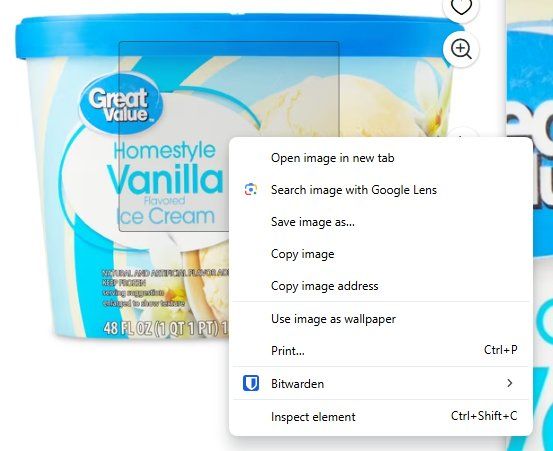
                            @leocg: thanks. But for me, there is no Google Lens in the search bar, colored or otherwise. It IS shown (in color) in the contextual (right-click) menu when an images is selected.GoogleLens.jpg

                            Reply Quote 0
                              1 Reply Last reply
                            • First post
                              Last post

                            Computer browsers

                            • Opera for Windows
                            • Opera for Mac
                            • Opera for Linux
                            • Opera beta version
                            • Opera USB

                            Mobile browsers

                            • Opera for Android
                            • Opera Mini
                            • Opera Touch
                            • Opera for basic phones

                            • Add-ons
                            • Opera account
                            • Wallpapers
                            • Opera Ads

                            • Help & support
                            • Opera blogs
                            • Opera forums
                            • Dev.Opera

                            • Security
                            • Privacy
                            • Cookies Policy
                            • EULA
                            • Terms of Service

                            • About Opera
                            • Press info
                            • Jobs
                            • Investors
                            • Become a partner
                            • Contact us

                            Follow Opera

                            • Opera - Facebook
                            • Opera - Twitter
                            • Opera - YouTube
                            • Opera - LinkedIn
                            • Opera - Instagram

                            © Opera Software 1995-