• Login
    • Search
    • Categories
    • Recent
    • Tags
    • Users
    • Groups
    • Rules
    • Help

    Do more on the web, with a fast and secure browser!

    Download Opera browser with:

    • built-in ad blocker
    • battery saver
    • free VPN
    Download Opera

    Bookmarks and History panels are empty

    Opera for computers
    10
    17
    6216
    Loading More Posts
    • Oldest to Newest
    • Newest to Oldest
    • Most Votes
    Reply
    • Reply as topic
    Log in to reply
    This topic has been deleted. Only users with topic management privileges can see it.
    • K
      kru62 last edited by kru62

      I click Menu > History.

      Reply Quote 0
        A 1 Reply Last reply
      • K
        kru62 last edited by

        I set the history icon to use full page and fixed. Thanks for reminding me about that. All good!

        Reply Quote 0
          A 1 Reply Last reply
        • A
          andrew84 @kru62 last edited by

          @kru62 said in History Panel Blank:

          I click Menu > History.

          Then it's a bug, OMenu > depends on the sidebar setting 'open i panel/open full page'. If you hide the sidebar or change option to 'open full page' in the sidebar settings, the OMenu should as previously.

          *I reported many times regarding the issue, but I didn't get any response from Opera and as a result the bug is in Stable now.

          Reply Quote 1
            K 1 Reply Last reply
          • A
            andrew84 @kru62 last edited by andrew84

            @kru62 said in History Panel Blank:

            I set the history icon to use full page and fixed

            Indeed, but the sidebar setting should not affect OMenu.

            Reply Quote 0
              1 Reply Last reply
            • K
              kru62 @andrew84 last edited by

              @andrew84 Thanks!

              Reply Quote 0
                1 Reply Last reply
              • A
                ApexAlphaGaming last edited by

                Same issue here. Any chance they'll make it functional to not have to open in full page and actually make it useable in sidebar?

                Reply Quote 0
                  1 Reply Last reply
                • ?
                  A Former User last edited by

                  Opera has been great over the years. However your last update have completely ruined it for me.
                  Whenever I click on bookmarks or history, I keep getting a blank page.
                  Also I really don't like this small pan on the side, I like the older way of full page for bookmarks.

                  Reply Quote 0
                    1 Reply Last reply
                  • diezi
                    diezi last edited by

                    you can check https://forums.opera.com/topic/44191/history-panel-blank

                    Reply Quote 0
                      1 Reply Last reply
                    • ?
                      A Former User last edited by A Former User

                      Hello all

                      I have many bookmarks in Opera, but none show up when I select the Bookmarks 'panel' (Ctrl+Shift+B). Only a blank, black field appears.

                      My bookmarks in the 'bookmark bar' works as intended, but I wanted to organise my bookmarks.

                      My Opera version is 71.0.3770.228, on Windows 10 (64 bit)
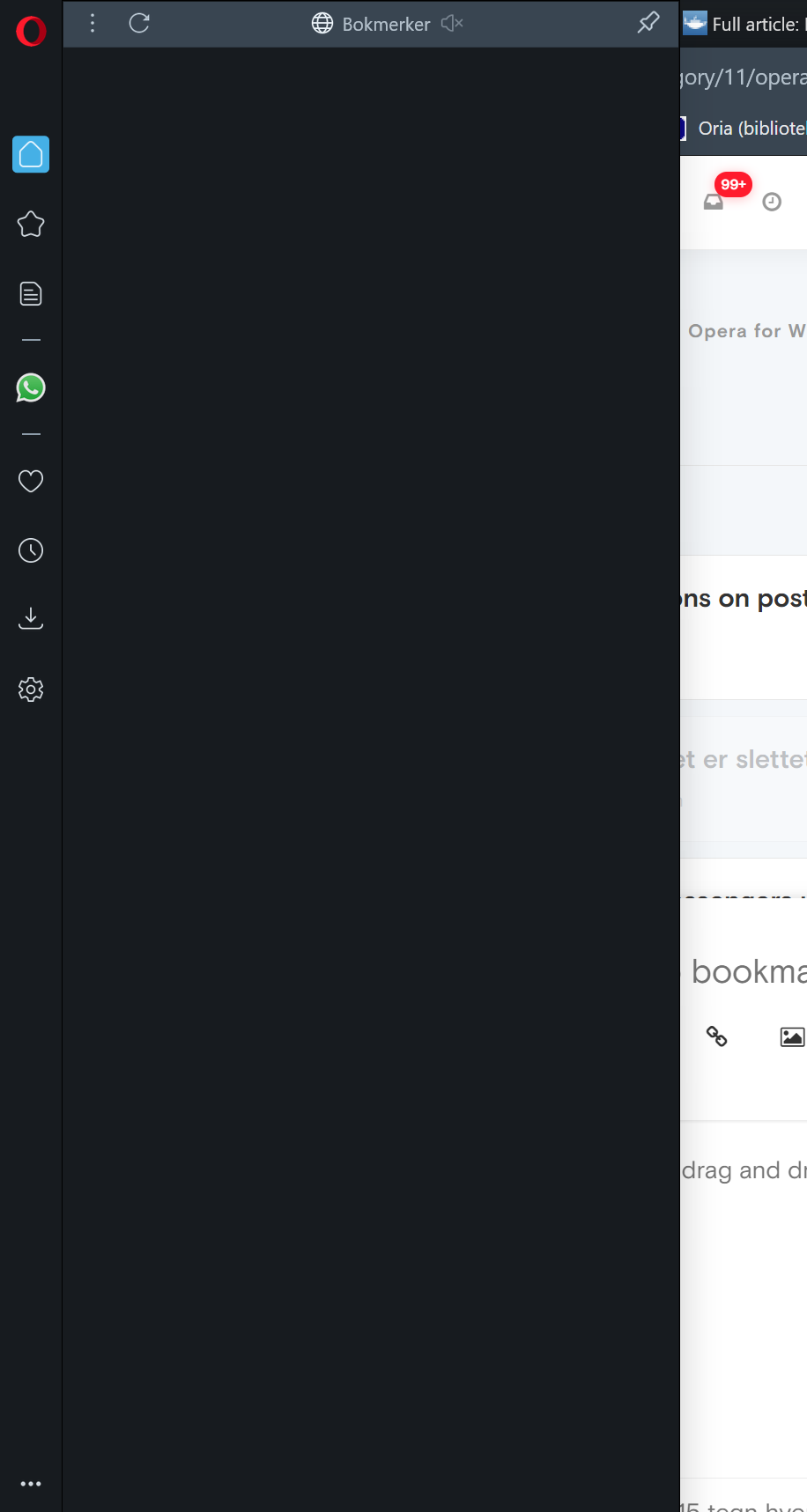
                      2020-10-16.png

                      Reply Quote 0
                        A 1 Reply Last reply
                      • S
                        spirosftns last edited by

                        and me have a problem with the history its dont saved anywhere i mean i use on my pc and my phone and never the history is saved if i uninstall and reinstall the browser my history never backup what im gonna do?

                        Reply Quote 0
                          1 Reply Last reply
                        • A
                          andrew84 @Guest last edited by

                          @jetro said in Bookmarks and History panels are empty:

                          when I select the Bookmarks 'panel' (Ctrl+Shift+B). Only a blank, black field appears.

                          As written above it's a known bug (and was reported since the time when it first appeared in Dev/Beta versions, but despite of multiple reports they released Stable with the known bug).
                          To see the full Bookmarks page (using Ctrl+Shift+B) you have to select 'open full page' in the sidebar settings if you have the sidebar active all the time. Or just hide the sidebar.

                          Reply Quote 0
                            1 Reply Last reply
                          • ?
                            A Former User last edited by

                            This is the oddest thing I've ever come across. I tried to click my bookmarks and the page never loads and the URL never shows up in the URL bar.

                            I tried to type in an URL and the same thing happens. No page loads and the URL bar reverts to being blank.

                            Reply Quote 0
                              1 Reply Last reply
                            • ?
                              A Former User last edited by

                              I think I am just going to switch away from Opera, just need to move my bookmarks and such, can't get why do I have to debug such an obvious thing as opening up my history, or if I have to click on icons on such just to access bookmarks, whatever added functionality someone thought these features would do have actually moved away users from Opera.

                              Reply Quote 0
                                1 Reply Last reply
                              • Locked by  leocg leocg 
                              • First post
                                Last post

                              Computer browsers

                              • Opera for Windows
                              • Opera for Mac
                              • Opera for Linux
                              • Opera beta version
                              • Opera USB

                              Mobile browsers

                              • Opera for Android
                              • Opera Mini
                              • Opera Touch
                              • Opera for basic phones

                              • Add-ons
                              • Opera account
                              • Wallpapers
                              • Opera Ads

                              • Help & support
                              • Opera blogs
                              • Opera forums
                              • Dev.Opera

                              • Security
                              • Privacy
                              • Cookies Policy
                              • EULA
                              • Terms of Service

                              • About Opera
                              • Press info
                              • Jobs
                              • Investors
                              • Become a partner
                              • Contact us

                              Follow Opera

                              • Opera - Facebook
                              • Opera - Twitter
                              • Opera - YouTube
                              • Opera - LinkedIn
                              • Opera - Instagram

                              © Opera Software 1995-