Warum kann man mit Opera dies Video sehen, aber nicht mit Brave, Firefox ua ??
Kein VPN aktiviert.
https://m.youtube.com/watch?v=fM6ZXqxtyjQ
lg
Do more on the web, with a fast and secure browser!
Download Opera browser with:
Warum kann man mit Opera dies Video sehen, aber nicht mit Brave, Firefox ua ??
Kein VPN aktiviert.
https://m.youtube.com/watch?v=fM6ZXqxtyjQ
lg
hi.
Opera adds news bookmarks only at the bottom in each folder?
Is there no option to change this behaviour and choose always to add them to the top?
This is missing.
I did not find any addon.
no option to add a page to bookmarks per sidebar and right click on a folder as possible on the top bookmark bar?
Why not?
How to disable right click context menu option: close other tabs, close right tabs ?
When i only wanted to close one tab i closed too often too many tabs by mistake.
The mouse pointer can easily be misplaced in the opera context menu because all close options are too near together.
Either way i do not use the options of closing many tabs by mouse, so why not disable these dangerouse options in the context menu?
thx
Also good:
Tab Position Customizer - Modified
But the opening of new blank tabs lasts very longer done by Strg+T than by context right click on the tabs bar.
WHY??
And with the addon Vimium closing of a tab by key x is very faster than the built in method. Why?
Opera: control of offline special website data ?
The allocated HD space for offline data from websites, not the Cache, is enormous!
opera://settings/content/all
"Von Websites belegter Speicherplatz insgesamt: 7,1 GB"
From web sites allocated space 7.1 GB !
WTF?!
100s websites save massive data on your computer in Opera - secretly !
Some pages i cant even remember to have visited them:
Used: 3,6 GB, 809 MB mozilla, 537 MB google and many more.
Question:
Is there no Opera option, addon or external App to see and control that??
More questions:
Is this a special cache for sites outside the normal cache?
This has nothing to do with "clear browser data"?
cache, cookies, history, hosted app data, ..
opera://settings/clearBrowserData
Nothing to do with Web worker, wervice worker, which also uses "secret" space on my computer?
It could be a big security leak, tracking?
thx
The Opera addon Classic Tabs is also good :
https://addons.opera.com/en/extensions/details/classic-tabs/
tags: open close new tabs next to active tab closing opening
Opera was too slow. 
Version:92.0.4561.21
But i found a Solution - and and a severe Opera error?
Opera used too much CPU and Harddisk in the Windows task manager.
This also together with the "System" Task. 
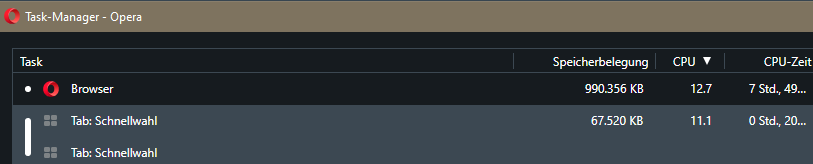
I looked in the Opera Task-Manager and found that "Tab Speed Dial" is using too much CPU when pages are loading.
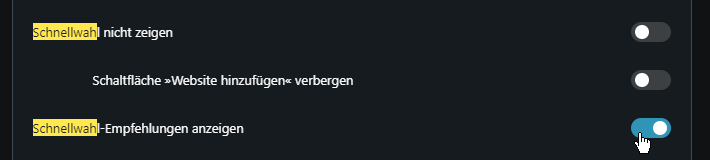
So in options i unchecked, disabled "Show Speed Dial Suggestions" and at once it runs much faster! 
This must be an Opera error because this has nothing to do with opening new tabs with speed dials.
AND System Task is quiet now too 
Perhaps this could be no coincidence and is also a Windows error.
Opera war zu langsam 
Version:92.0.4561.21
Aber ich fand eine LΓΆsung - und einen schweren Opera-Fehler?
Opera verbrauchte zuviel CPU und Festplatten-Leistung im Windows Task-Manager.
Dies auch noch zusammen mit dem Task "System". 
Ich schaute im Opera Task-Manager und fand heraus, dass "Tab: Schnellwahl" zu viel CPU nutzte wenn Seiten geladen wurden.

Also deaktivierte ich "Schnellwahl-Empfehlungen" anzeigen und sofort lief Opera viel schneller! 

Das muss ein Opera Fehler sein, weil es nichts zu tun hat mit dem Γffnen neuer Tabs mit Schnellwahl.
UND der Windows System Task ist nun auch ruhig 
Vielleicht kΓΆnnte dies kein Zufall sein, sondern auch ein Windows-Fehler ?
sometimes not all text is selected automatically but only a random part.
This is an error i think.
So there must be the possibility to change this option
@tnowak ok, i dont know the URL anymore.
But how do you know that a specific site shall be guilty and not this addon?
no, on every page there are scripts from google.com and wikipedia.org loaded.
This will be used for Tracking by these sites 
I will deactivate it.
the appearing icons are to near to the mouse pointer.
I want to mark a text block by 3 clicks but the icons appear after the second click and so i click alwasy the second icon unwanted 
Please correct this.
Clicking in the address bar selects the whole URL.
But dont want this.
How can i change it?
thx
Addons like Lastpass und pages like Googlemail use their dedicated worker, web worker, service worker as local Data safes in the Opera background.
They use sometimes a lot of RAM, HD space, CPU.
I block them all and allow them if a site does not run without it.
These workers can be disabled at several places.
Here are my workarounds against the Service Worker "Overload":
Read here for more:
The Service Worker, Webworker-Case : Where too much RAM+CPU+HD+Internet-Traffic usage could be caused by.
https://forums.opera.com/post/199274
Try it and reply what happened 
The search with Strg+F / F3 opens a search field at the top of the web page.
But this let's it scroll down a row And reformat the whole page what is very disturbing 
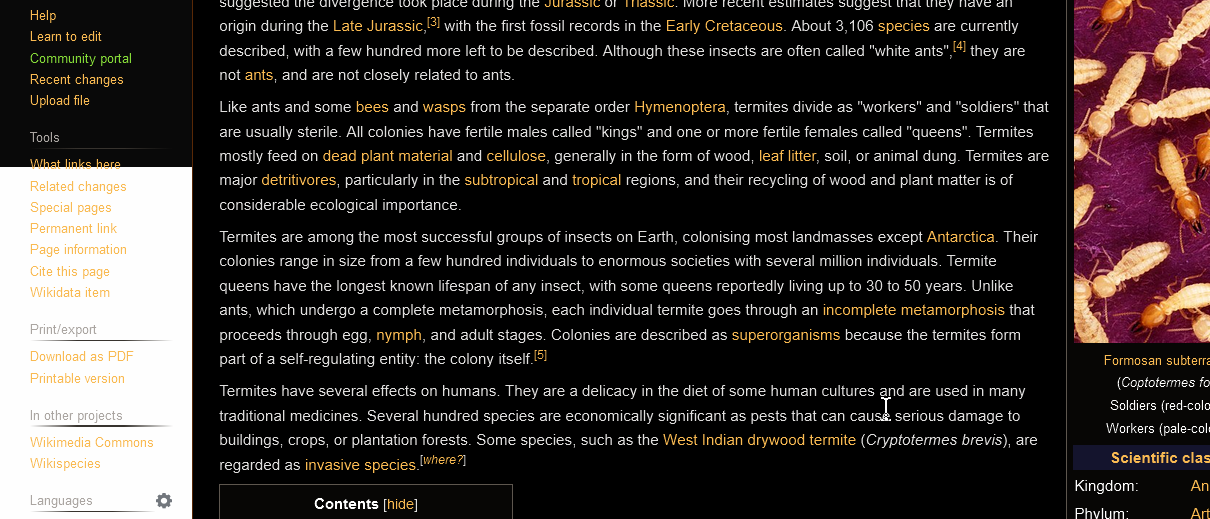
See the screenshots where the top is without search bar:

You see that the text and graphics are smaller with the search bar and this has to be rendered every time. o_O
There should be an option to display the search bar at the top or bottom of the browser as an Overlay or floating bar so it would not interfere with the web page.
Perhaps by addon?
thx
@friedhelm27 yes, this is activated.
BUT Opera fails too often regaining all tabs by restart. 
So i use the mentioned workaround once a month, ca all 4. restart. o_O
@leocg ok, the x is only window specific not the whole browser.
Perhaps Opera should integrate a warning window with the option to exit all.
thx