I just installed Adguard for Opera. I can't say whether it actually blocks ads in Facebook, because it actually prevents Facabook from launching! A total waste of time.
B
Posts made by Barrgi
-
RE: AdguardOpera add-ons
-
RE: F.B.(FluffBusting)PurityOpera add-ons
@randomcatmom I just checked the FBP Facebook page, as I've done several times in the past few weeks, since FBP stopped blocking ads. Nothing had been posted until now suddenly there a a couple of posts from people experiencing the same problem and who are saying that FBP is now dead. The author has not been heard from for months and no updates are available. You may have just downloaded the last version, and no doubt it works to some extent (i.e. it blocks posts from groups and pages you don't follow), but I'm afraid if you aren't already finding that ads are slipping through, they will do so eventually. The author of FBP was constantly having to update the extension as FB found ways of getting around it, and if no updates are available from now on, it will become useless - as indeed it already is, from my point of view.
-
RE: F.B.(FluffBusting)PurityOpera add-ons
@randomcatmom: I installed version 38.4.0.0 when it was released in January this year. As far as I can tell, there is no newer version. What do you mean by "developer version 135.0.5960"? I cannot find anything about that. Forgive me if I seem slow, but I'm just an ordinary user!
-
RE: F.B.(FluffBusting)PurityOpera add-ons
FBP has become very erratic over the past few days. Sometimes it fails to work completely. Refreshing the FB page sometimes kick-starts it, but sometimes this has to be done several times before it starts working.. This morning, however many times I refresh, I still get unwanted ads in my feed.
-
RE: Can't watch YouTube videos with adblocker turned onOpera for computers
@leocg Yes, I understand that there is no connection between Opera's ad blocker and uBlock Origin.. My point is that I had no way of knowing which of the ad blockers was preventing the videos from running. So first I disabled the Opera ad blocker but this seemed to have no effect. I then disabled uBlock and this seemed to solve the issue. So I added Youtube to uBlock's trusted site list, basically disabling it while running Youtube. The weird thing is that a day later I suddenly remembered that I had not re-activated the Opera ad blocker, so now I actually have nothing blocking ads in Youtube, but apart from the 4-5 second delay when I press "play", the videos run anyway. I have noticed that I now get sponsored videos on my home page, but I can ignore those. So apparently I don't have a problem. The only problem is that I don't know why!
By the way, prior to yesterday, the message that popped up when I started a video was "Experiencing interruptions? Find out why", and if I clicked on it I was basically told to turn off my ad blocker. However, since this latest incident, the message simply says "Experiencing interruptions?", without the second part. -
RE: Can't watch YouTube videos with adblocker turned onOpera for computers
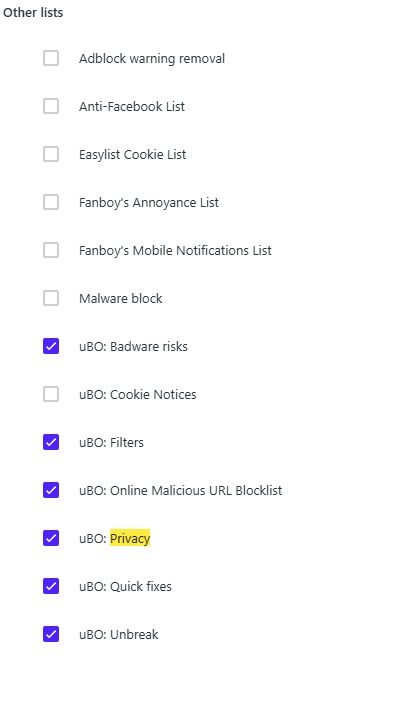
@leocg Okay, I did that and found these. I'm not sure I understand what these do. Are you saying I should disable all the uBO ones? Can I do this without affecting how uBO works on other sites?
However, all this might be unnecessary, because, strangely enough, I have now discovered that even after setting YouTube as a trusted site in uBlock Origin and disabling the Opera ad blocker, I can in fact watch YouTube videos without ads! All I get is a message saying "Experiencing interruptions" for about 4 seconds when I press "Play". This has been normal until now anyway, and obviously I can live with it. I just don't understand why I'm not getting ads when I have actually disabled the only two ad blockers I have.
-
RE: Can't watch YouTube videos with adblocker turned onOpera for computers
@leocg I'm not sure what you mean by disabling the uBlock lists.. I have turned off uBlock for YouTube by adding an exception. Surely uBlock will have no effect on YouTube now? The point is that after I did that a couple of days ago I found that YouTube worked again and that the built-in Opera ad blocker successfully blocked ads. Then today, following an update of Opera, YouTube suddenly won't allow me to watch videos. The only way I can is to turn off Opera's ad blocker.
-
Can't watch YouTube videos with adblocker turned onOpera for computers
A couple of days ago, YouTube suddenly got wise to uBlock Origin, and I discovered that I had to disable it in YouTube. However, the built-in Opera ad blocker still worked, so I was happy. Today there was an update to Opera. The "what's new" page afterwards made a lot of fuss about Opera's ad blocker. I've been using this for some time and I couldn't see anything that has actually changed with this update. However, when I tried to view a YouTube video I was prevented from doing so because I was using an ad blocker! I had to disable the Opera ad blocker in able to use YouTube. So much for the update of the ad blocker that Opera made such a big thing of! Has anybody else experienced this?
-
RE: How to turn off Facebook auto-refreshLounge
@mjz2325 Unfortunately, in my experience, trying to get any sort of support from Facebook is a waste of time. You never even get a response or even an acknowledgement of receipt from them. In fact, it's several years since I tried to get help, and I doubt if it's even possible to "contact" their support any longer.
-
RE: How to turn off Facebook auto-refreshLounge
@leocg I thought the extension called "Super Auto Refresh" worked. At least it seemed to reduce the frequency of refreshing, but now I'm finding that Facebook still refreshes annoyingly often. I find this really annoying! If, for example, I am reading comments to a FB post and one of these includes a link that I want to check out, when I come back, FB automatically refreshes and I have to search to find the post I was reading!
-
RE: Super Auto RefreshOpera add-ons
I installed this because I wanted to STOP auto refresh in Facebook and it seemed to be the only extension that had such an option. At first it seemed to at least reduce the frequency of refreshing, but now I'm finding it really doesn't work at all.
-
RE: How to turn off Facebook auto-refreshLounge
@leocg Thanks for your response. Yes, I had noticed that this was a solution that's suggested online, but I couldn't find an extension in Opera. Now, thanks to you, I looked a bit more closely and realised that I had misunderstood the Extensions page. I was using the search field where it says "Search extensions" at the top, and was finding nothing. Now I realise that this only searches the extensions that are already installed. To me that seems a bit pointless, as I only have a couple, but maybe other users have a lot more? Anyway, I now remember that you have to click "Get more extensions" first, before searching! When I did so, I found several auto refresh extensions. Most of them seem to be for setting up auto refresh after a certain number of seconds or minutes, but I found one that has an option for "no auto refresh", and set that up. And sure enough, Facebook now only refreshes when I ask it to (by clicking on the "home" icon).
-
How to turn off Facebook auto-refreshLounge
I'm trying to to turn off Facebook's annoying auto-refresh feature. I have searched for a solution online and all the solutions either assume you are using Opera on a phone (which I'm not: I'm using a PC) or, as is almost always the case, the instructions provided online describe a procedure (either in Facebook or in a browser) that isn't possible because at some point you will be told to do something that is impossible because an item you are told to click on doesn't actually exist!
Does anybody know of a way to turn off auto-refresh that actually can be done? -
RE: Can't print web pages in OperaOpera for Windows
Here's an update. I sent a bug report to Opera and received an acknowledgment e-mail saying that they could respond by e-mail but had noted the issue. I don't know whether they actually did anything about it, because I haven't been notified, but after a week of using a different browser and missing Opera, I tried again today and now find that I can print web pages from Opera, as before.
-
Can't print web pages in OperaOpera for Windows
Since setting up a Lenovo Thinkpad T480, I find that I can no longer print web pages in Opera, as I was able to do with my previous PC. Pressing Ctrl-P results in the message "Print preview failed" and everything in the dialogue box is greyed out. What is causing this and how can I set up Opera so that it will print on a Canon Pixma TS 3420?
I've tried printing from MS Edge and this works fine, so It seems this is a specific Opera issue. -
RE: [Solved]VPN blocks search engineOpera for Windows
@leocg Aha! I've found that setting now, and it works. Thank you for making me aware of this!
-
RE: [Solved]VPN blocks search engineOpera for Windows
@leocg I didn't know there was any such option. Where do I find that?
-
[Solved]VPN blocks search engineOpera for Windows
If the VPN is active, searching in DuckDuckGo is blocked. Whatever I search for, I get the following message:
This site can’t be reached
The webpage at https://duckduckgo.com/(search string) might be temporarily down or it may have moved permanently to a new web address.
ERR_TUNNEL_CONNECTION_FAILED
What's the point of a VPN if you can't browse while it is active?