Can't watch YouTube videos with adblocker turned on
-
Barrgi last edited by leocg
A couple of days ago, YouTube suddenly got wise to uBlock Origin, and I discovered that I had to disable it in YouTube. However, the built-in Opera ad blocker still worked, so I was happy. Today there was an update to Opera. The "what's new" page afterwards made a lot of fuss about Opera's ad blocker. I've been using this for some time and I couldn't see anything that has actually changed with this update. However, when I tried to view a YouTube video I was prevented from doing so because I was using an ad blocker! I had to disable the Opera ad blocker in able to use YouTube. So much for the update of the ad blocker that Opera made such a big thing of! Has anybody else experienced this?
-

-
Barrgi last edited by
@leocg I'm not sure what you mean by disabling the uBlock lists.. I have turned off uBlock for YouTube by adding an exception. Surely uBlock will have no effect on YouTube now? The point is that after I did that a couple of days ago I found that YouTube worked again and that the built-in Opera ad blocker successfully blocked ads. Then today, following an update of Opera, YouTube suddenly won't allow me to watch videos. The only way I can is to turn off Opera's ad blocker.
-
-
Barrgi last edited by
@leocg Okay, I did that and found these. I'm not sure I understand what these do. Are you saying I should disable all the uBO ones? Can I do this without affecting how uBO works on other sites?
However, all this might be unnecessary, because, strangely enough, I have now discovered that even after setting YouTube as a trusted site in uBlock Origin and disabling the Opera ad blocker, I can in fact watch YouTube videos without ads! All I get is a message saying "Experiencing interruptions" for about 4 seconds when I press "Play". This has been normal until now anyway, and obviously I can live with it. I just don't understand why I'm not getting ads when I have actually disabled the only two ad blockers I have.
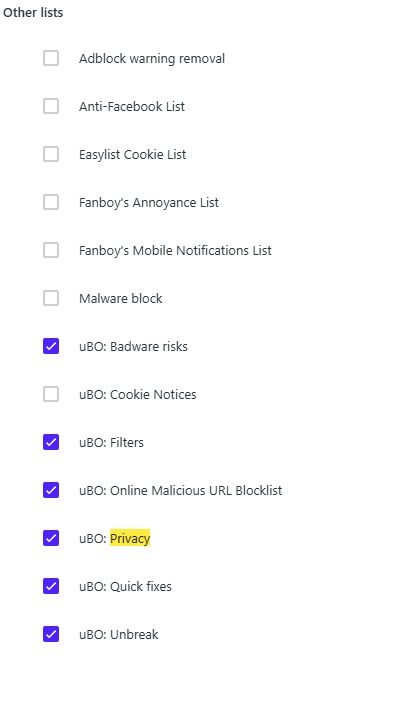
-
-
isaia last edited by
Same issue here.
After reading this thread, i just tried disabling the UBO filters and it seem that disabling the UBO Quick fixes let me access again the youtube videos without warnings and without ads. -
Barrgi last edited by Barrgi
@leocg Yes, I understand that there is no connection between Opera's ad blocker and uBlock Origin.. My point is that I had no way of knowing which of the ad blockers was preventing the videos from running. So first I disabled the Opera ad blocker but this seemed to have no effect. I then disabled uBlock and this seemed to solve the issue. So I added Youtube to uBlock's trusted site list, basically disabling it while running Youtube. The weird thing is that a day later I suddenly remembered that I had not re-activated the Opera ad blocker, so now I actually have nothing blocking ads in Youtube, but apart from the 4-5 second delay when I press "play", the videos run anyway. I have noticed that I now get sponsored videos on my home page, but I can ignore those. So apparently I don't have a problem. The only problem is that I don't know why!
By the way, prior to yesterday, the message that popped up when I started a video was "Experiencing interruptions? Find out why", and if I clicked on it I was basically told to turn off my ad blocker. However, since this latest incident, the message simply says "Experiencing interruptions?", without the second part.