• Login
    • Search
    • Categories
    • Recent
    • Tags
    • Users
    • Groups
    • Rules
    • Help

    Do more on the web, with a fast and secure browser!

    Download Opera browser with:

    • built-in ad blocker
    • battery saver
    • free VPN
    Download Opera

    Opera 136 Stable

    Blogs
    desktop blog comments
    5
    9
    245
    Loading More Posts
    • Oldest to Newest
    • Newest to Oldest
    • Most Votes
    Reply
    • Reply as topic
    Log in to reply
    This topic has been deleted. Only users with topic management privileges can see it.
    • Opera Comments Bot
      Opera Comments Bot last edited by

      Hello! We’ve rolled out a new Opera Stable release built on Chromium 152.0.7977.120. The headline addition is support for the chrome.sidePanel API, which lets extensions render their own side panels. On the fixes side, “Save as PDF” now captures pages correctly again, the bookmarks bar no longer disappears after exiting full screen, and macOS 26 […]

      Read full blog post: Opera 136 Stable

      Reply Quote 0
        1 Reply Last reply
      • A
        andrew84 last edited by
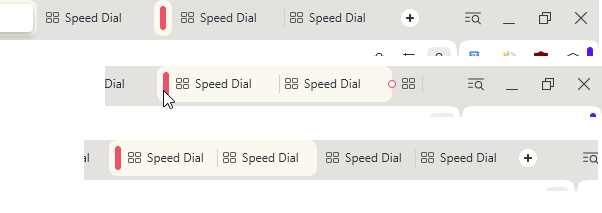
        • Despite of multiple reports you relesed Stable version with the not working SearchTabs button in vertical mode.

        • tabs and new tab button are still sliding away while expanding islands in horizontal mode.
        2026-08-19_144045.png

        Reply Quote 0
          1 Reply Last reply
        • A
          andrew84 last edited by

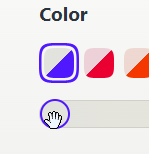
          the slider icon on hover looks confusing since it seems like it allows to move it left right up down. Actually only right and left.
          It seems this is an old slider from the previous square pallette.
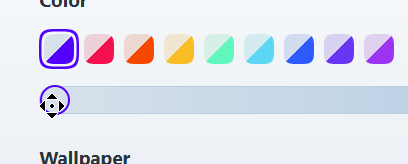
          2026-09-17_133200.png

          in Dev.
          2026-09-17_133610.png

          Reply Quote 0
            1 Reply Last reply
          • J
            jojo0587 last edited by

            Again, moving tabs in a vertical tab bar actually copies them.

            My proposals for changes in Opera (Google Document).
            - There are not enough signs to put all the links here.

            Reply Quote 0
              1 Reply Last reply
            • S
              slim54 last edited by slim54

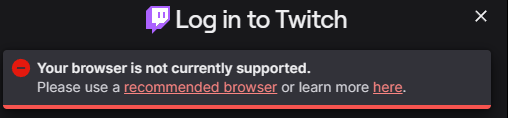
              After the update, I can’t log in. Twitch
              a515b966-ec4d-4207-938b-825125726529-image.png

              Reply Quote 0
                S 1 Reply Last reply
              • S
                sicu220 last edited by

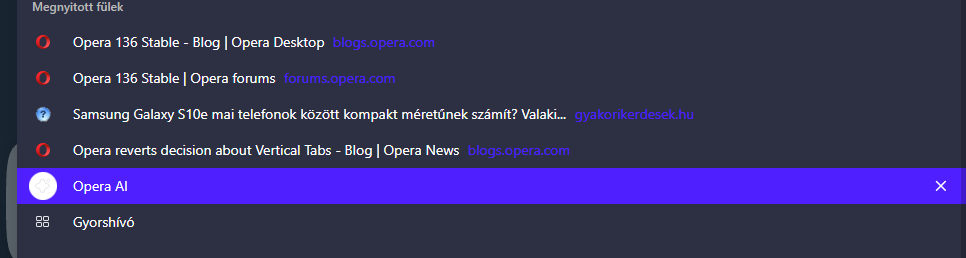
                Hello everyone! Problems: Opera AI highlighter is still ugly at the top.
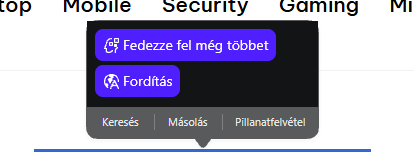
                8ce91c36-6171-4dd7-8244-fec3dfeff4d1-image.png

                Opera AI's icon is very bright in dark theme. It's not like the icons above or below it.
                7c0909e6-eb13-45bc-82d7-1f8eda0c3346-image.png
                When I click on the VPN icon in the Settings menu, the browser starts to jump. This error does not occur in other menu items.
                https://drive.google.com/file/d/19YDvdZkvsDN55I7JrnmgmJuKdLtDBM5P/view?usp=sharing
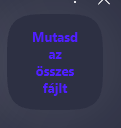
                The text in the pop-up window is very difficult to see. The text is very dark.
                3af028ad-1898-4de2-8201-9ed87bd93085-image.png

                Reply Quote 0
                  J 1 Reply Last reply
                • J
                  jojo0587 @sicu220 last edited by

                  @sicu220: Settings >> VPN - page settings jump only one time on Windows 11.

                  My proposals for changes in Opera (Google Document).
                  - There are not enough signs to put all the links here.

                  Reply Quote 1
                    S 1 Reply Last reply
                  • S
                    sicu220 @jojo0587 last edited by

                    @jojo0587 It works differently for me.

                    Reply Quote 0
                      1 Reply Last reply
                    • S
                      slim54 @slim54 last edited by

                      I disabled the ad‑blocking extension, and everything started working... without it, nothing works, some functions don’t function...))

                      • if you press the middle mouse button and drag it down, you’ll see a strange cursor in the shape of a mouse with a disk around it
                      Reply Quote 0
                        1 Reply Last reply
                      • First post
                        Last post

                      Computer browsers

                      • Opera for Windows
                      • Opera for Mac
                      • Opera for Linux
                      • Opera beta version
                      • Opera USB

                      Mobile browsers

                      • Opera for Android
                      • Opera Mini
                      • Opera Touch
                      • Opera for basic phones

                      • Add-ons
                      • Opera account
                      • Wallpapers
                      • Opera Ads

                      • Help & support
                      • Opera blogs
                      • Opera forums
                      • Dev.Opera

                      • Security
                      • Privacy
                      • Cookies Policy
                      • EULA
                      • Terms of Service

                      • About Opera
                      • Press info
                      • Jobs
                      • Investors
                      • Become a partner
                      • Contact us

                      Follow Opera

                      • Opera - Facebook
                      • Opera - Twitter
                      • Opera - YouTube
                      • Opera - LinkedIn
                      • Opera - Instagram

                      © Opera Software 1995-