Opera 135.0.5966.0 developer update
-
 Opera Comments Bot last edited by
Hello! We’ve rolled out a new Opera Developer release! Highlights of this release: For a full list of changes check out our changelog. Happy browsing! Installation links:
Read full blog post: Opera 135.0.5966.0 developer update
-
andrew84 last edited by andrew84
- Restore the 2nd click for the 'scroll to top' feature.
- Restore the search engines creation by using right click.
- Disable the automated search engines adding. Currently, at least, fix the bug the 'search with' list showing inactive search engines.
- Fix the search popup position when page zoom is less or moree than 100%. Also in Stable. https://forums.opera.com/post/406217
- Fix the 'force dark pages' toggle not remembered state.
- In EasySetup and for the right split screen the scrollbar can't be grabbed while the cursor is far right (EesySetup closes, split screen has no reaction).
-
burnout426 Volunteer last edited by
Not new to this build and also present in stable, but is anyone else having issues on Windows when clicking the Omenu button when Opera's window is not maximized?
For me, when I do a single left click (not holding or anything), in addition to opening the menu, it triggers an item in the menu. As for what item it triggers, it depends on the size and position of the window. For the default size and position of the window, left-clicking the button opens a new window.
-
andrew84 last edited by andrew84
@burnout426 I don't have such behaviour here on Win 10.
*The only thing I noticed a while ago is that after opening OMenu and hovering 'History' item some random item in the opened list is already highlighted. And it doesn't matter if the window is maximized or not.
-
andrew84 last edited by andrew84
Btw, I still don't understand the decision why the previous levels of menus should have the barely visible (in light mode at least) item's highlighting effect.
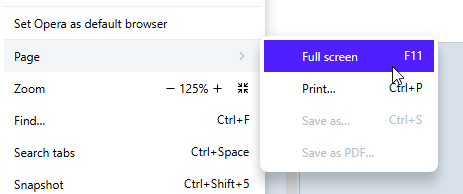
why not the common variant.
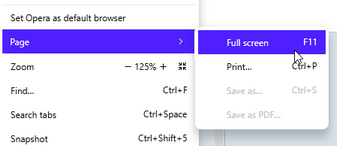
-
andrew84 last edited by
Make the dimming effect only for the controls bars finally in PiP's mouse hover.
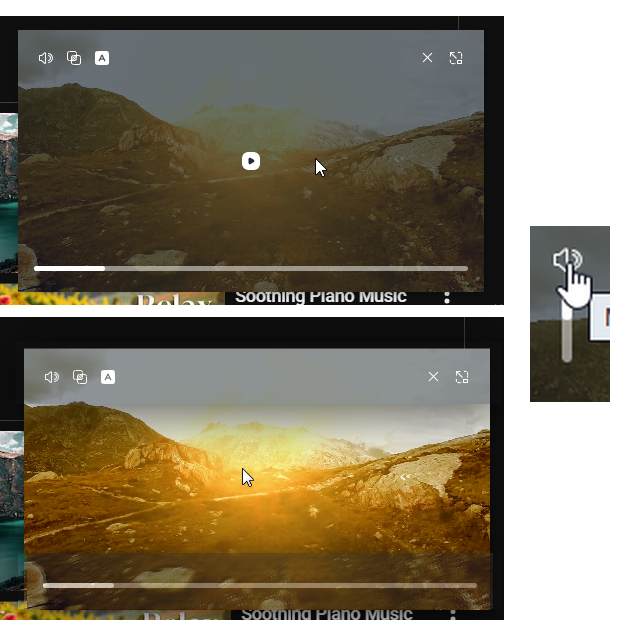
The additional bug I noticed now is that the full dimming effect stays even after moving cursor away after the PiP moving or changing its size.
-
also redesign the volume bar. Currently it has inversive adjustment (from top to bottom for increasing). It'd better using some horizontal bar.
In overall, the PiP's controls need rearranging. -
Allow to pause/play by simply clicking somewhere on a video.
-
return video timing.
*I don't know if this is chromium change but PiP doesn't have the rounded corners anymore and this is great. The oversharpness increasing while decreasing the PiP size is still there as it seems https://forums.opera.com/post/390078
-
-
burnout426 Volunteer last edited by
@burnout426 Strange. It doesn't happen with a test standalone installation of the same build. Still happens with a regular installation, even with a fresh profile and even with fresh program files. No compat settings set for the regular installation either. No difference if I rename opera.exe to something else.
-
vladbabinets last edited by
Hello. I noticed a bug regarding YouTube notifications. I enable browser notifications in YouTube settings. But after restarting the browser, notifications are disabled. Opera is installed on a portable USB drive.
-
SiMcarD78 last edited by
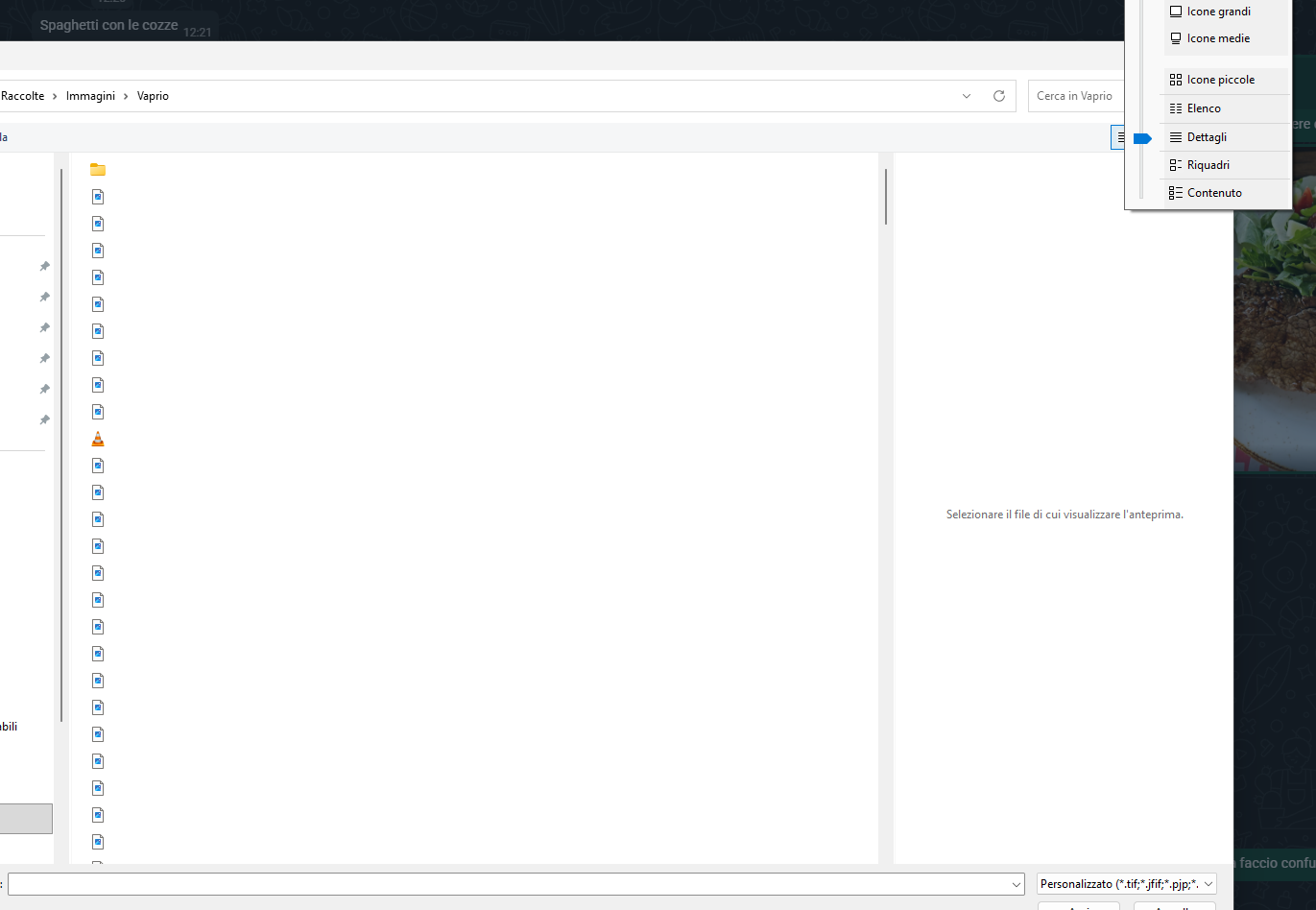
Very often when I send some image/video/file and the file selection windows opens, selecting "details" the file list shows like this:
-
beboss last edited by
Bug 1: Full-Page Screenshot Issue
When will the screenshot function finally be fixed? When I try to take a screenshot of a whole page, it only captures the visible part and then repeats that section a couple of times in the final image. I reported this months ago, and nothing has changed. I even bought a new MacBook Air two months ago, tried it there, and it does the exact same thing.
Bug 2: Workspace Switching & Misaligned Buttons
There is another bug that has persisted for months regarding workspace switching. The visual position of a button becomes misaligned with its actual clickable area.For example: if I am browsing a page and switch to another workspace with Google Search, I cannot click the search button. Visually, my mouse is hovering directly over it, but the actual clickable area has shifted. I have to move my mouse downward over an empty space just to trigger the button's hover effect so I can click it.
Additionally, when switching workspaces, there are sometimes rendering artifacts where the page doesn't fully render and stays small on my large screen. To fix this, I have to cycle through my workspaces and come back, or refresh the page, to force it to render properly. I'm not sure if this is happening because I use different zoom levels on different pages.
Here is a quick example:

This just happened right now. I switched from a page with default zoom to this one, which is zoomed to 200%. When I hover over the button (in this case, Zen Mode), nothing happens. I have to move my mouse further down for it to register and become clickable. (My pointer is missing in the screenshot, but you can see the Zen Mode tooltip text exactly where my mouse actually had to be to trigger it).
Something is definitely wrong with the rendering. I'm not sure if mixing zoomed and unzoomed pages across different workspaces causes this, but it is undoubtedly a bug.
-
burnout426 Volunteer last edited by
@beboss said in Opera 135.0.5966.0 developer update:
Full-Page Screenshot Issue
I see there's RNA-2135 file for this. It hasn't been analyzed yet.
-
aaa839 last edited by
Did you guys had backtrack with MV2 support?
As I try to use my browser after upgrade the windows insider build
all the MV2 extension just disable.no way to reenable it... -
-
Locked by
 leocg
leocg

