• Login
    • Search
    • Categories
    • Recent
    • Tags
    • Users
    • Groups
    • Rules
    • Help

    Do more on the web, with a fast and secure browser!

    Download Opera browser with:

    • built-in ad blocker
    • battery saver
    • free VPN
    Download Opera

    Opera 133.0.5932.20 Stable update

    Blogs
    desktop blog comments
    9
    15
    239
    Loading More Posts
    • Oldest to Newest
    • Newest to Oldest
    • Most Votes
    Reply
    • Reply as topic
    Log in to reply
    This topic has been deleted. Only users with topic management privileges can see it.
    • OrjiPrince004
      OrjiPrince004 last edited by This post is deleted!
      Reply Quote 0
        1 Reply Last reply
      • cookie-drummer
        cookie-drummer last edited by

        The 2nd click for the ''scroll to top' feature is still broken, OMG!

        Reply Quote 0
          A 1 Reply Last reply
        • A
          albano23 last edited by leocg

          I wrote this before, in previous messages, and we're still having the same issue with Snap Opera on Ubuntu IN THIS CASE TODAY IN THIS VERSION 133.0.5932.20. Please correct these errors. To avoid repeating myself, here's the message I left in the previous post (133):I already posted it in the stable version of Opera 131.0.5877.74 (I use Ubuntu 22.04.5 LTS) and it's still not fixed; in fact, it's gotten worse: The messages "INVALID RE2: INVALID REPETITION SIZE (200, 1300)" and "INVALID RE2: INVALID PEARL OPERATOR : (?!, //)" keep appearing, filling the GNOME system with junk files that consume a lot of megabytes daily. And now in this version 133, it's still there, and if you right-click and select "Recover Tab," my PC freezes completely (four times today). With all due respect, it's a disgrace. The only version without this problem, among all the recent stable releases, that didn't have the "invalid RE2 SIZE" and "PEARL OPERATOR" errors was Opera 132.0.5905.37. I'm adding my previous message, which I posted in the Opera stable version. 131.0.5877.74. I'M using the snap format. Please, even if it's an automated script, do things right. I know you put a lot of effort into it, but the Linux user in Snap seems abandoned. It's unacceptable that these errors occur throughout the entire 131 range, part of 132, and now in 133. And on top of that, version 133 doesn't recognize h.265, and Netflix says that even though I have DRM enabled to watch Netflix, it gives me error 077701-1003. In other words, it says I can't watch it because DRM isn't enabled in the Opera 133 configuration, When It Is Activated.

          I'm adding my previous message, which I posted in the Opera stable version. 131.0.5877.74. "The stable versions of Opera 131, from version 54 to the current one ending in 97, have several serious bugs in their snap (Ubuntu 22.04.05 LTS in my case) that should be fixed: 1) They fill the GNOME logs with thousands of messages with the error "Invalid RE2 repetition size, invalid perl operator"; 2) This causes a large amount of disk space to be consumed in a single session, as can be seen with the commands sudo journalctl --disk-usage and sudo ls -lh /var/log/journal//.journal; and 3) In version 74, a very serious error occurred when updating the chromium-ffmpeg snap: "at least file with resources (.pak) is corrupted, please reinstall opera". Luckily, shutting down and restarting my PC fixed it for me. // In version 131 ending in 24, none of these bugs were present. I don't recommend using sudo journalctl --vacuum-time=1d to fix the issue of thousands of messages mentioned in point 1, because it could break your current session. I would like these problems to be reviewed by both you and the Snap Opera packagers. I hope all these issues will be resolved in version 132, which will use Chrome's 148 engine."

          Reply Quote 0
            1 Reply Last reply
          • S
            saultrax last edited by

            Sidebar autohide is broken on macOS (it hides but never shows back again).

            And it's been MONTHS, when is classic mode system setting actually work again? it never switches between dark and light more anymore.

            Reply Quote 0
              1 Reply Last reply
            • I
              ironbone last edited by

              Snap Opera on Ubuntu
              when I click with the left mouse button on the empty space of the tabs bar it freeze the Opera.
              I have to click CTRL+TAB to go to an other program. Then return to Opera and it works.
              Additionally in the context menu there, there is the system menu and not the Opera menu.

              see
              https://ibb.co/jPxgd2WG

              Reply Quote 0
                I 1 Reply Last reply
              • I
                ironbone @ironbone last edited by

                The same when opening opera like this. So this is not my configuration

                opera --user-data-dir=$(mktemp -d --tmpdir=.

                Reply Quote 0
                  I 1 Reply Last reply
                • I
                  ironbone @ironbone last edited by

                  opera --user-data-dir=$(mktemp -d --tmpdir=.)

                  Reply Quote 0
                    1 Reply Last reply
                  • A
                    andrew84 @cookie-drummer last edited by andrew84

                    @cookie-drummer It's not broken. It's an intended 'genius' change.
                    https://forums.opera.com/post/404519

                    Reply Quote 0
                      M 1 Reply Last reply
                    • M
                      MehrzadS @andrew84 last edited by

                      @andrew84: WOW! they're not fixing things. They're making things more broken. It was already problematic as trying to drag a tab would cause it to scroll (mouse down instead of mouse up). Now it's even more broken.

                      Reply Quote 1
                        A 1 Reply Last reply
                      • A
                        andrew84 last edited by andrew84
                        1. There's still no option to 'pin' tab islands. So after the browser closing tab islands will be lost. No need to mention the 'Retain tabs from previous session' because this option has an different purpose.

                        Split tabs should be also pinnable.

                        1. There's still no option to quickly 'ungroup' tab island.

                        2. There should be option whether to create tab islands by moving and averlapping tabs or not.

                        3. There's still the both 'pill' + tab island name bubble. But now the pill is solid but the 'bubble' is lighter (or semitransparent) which doesn't correspond the color selected in color picker popup. Also the text is black now and thus no so easy to read.
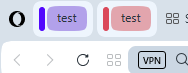
                          2026-07-03_114030.png
                          Previous suggetion was not to display the 'pill' if tab islands have names. And the previos bold white text looks a way better and clear.
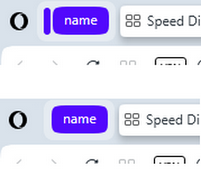
                          2025-11-04_152034.png

                        Reply Quote 0
                          1 Reply Last reply
                        • A
                          andrew84 @MehrzadS last edited by

                          @MehrzadS ther's also no 'create search engine' option anymore when right clicking inside search fields. It's not clear if it was again removed intentionaly or if this is a bug.

                          Reply Quote 0
                            1 Reply Last reply
                          • A
                            andrew84 last edited by andrew84

                            the 'force dark page' toggle in Settings and in EasySetup menu are still not syncrhonized well. The bug is more than year old.
                            I believe that's the reason why the toggle in EasySetup doesn't remember its state after switching dark/light themes.

                            Reply Quote 0
                              1 Reply Last reply
                            • First post
                              Last post

                            Computer browsers

                            • Opera for Windows
                            • Opera for Mac
                            • Opera for Linux
                            • Opera beta version
                            • Opera USB

                            Mobile browsers

                            • Opera for Android
                            • Opera Mini
                            • Opera Touch
                            • Opera for basic phones

                            • Add-ons
                            • Opera account
                            • Wallpapers
                            • Opera Ads

                            • Help & support
                            • Opera blogs
                            • Opera forums
                            • Dev.Opera

                            • Security
                            • Privacy
                            • Cookies Policy
                            • EULA
                            • Terms of Service

                            • About Opera
                            • Press info
                            • Jobs
                            • Investors
                            • Become a partner
                            • Contact us

                            Follow Opera

                            • Opera - Facebook
                            • Opera - Twitter
                            • Opera - YouTube
                            • Opera - LinkedIn
                            • Opera - Instagram

                            © Opera Software 1995-