• Login
    • Search
    • Categories
    • Recent
    • Tags
    • Users
    • Groups
    • Rules
    • Help

    Do more on the web, with a fast and secure browser!

    Download Opera browser with:

    • built-in ad blocker
    • battery saver
    • free VPN
    Download Opera

    Opera 131.0.5868.0 developer update

    Blogs
    desktop blog comments
    4
    9
    351
    Loading More Posts
    • Oldest to Newest
    • Newest to Oldest
    • Most Votes
    Reply
    • Reply as topic
    Log in to reply
    This topic has been deleted. Only users with topic management privileges can see it.
    • Opera Comments Bot
      Opera Comments Bot last edited by

      Hello! The newest update for Opera developer is now live, version 131.0.5868.0. Key highlights: Stay tuned for more updates! For a full list of changes check out our changelog. Happy browsing! Installation links:

      Read full blog post: Opera 131.0.5868.0 developer update

      Reply Quote 0
        1 Reply Last reply
      • A
        andrew84 last edited by

        The relaunch button is still looking inactive and without indication on hover.
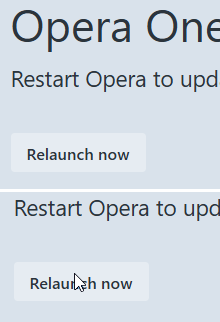
        2026-04-14_103519.png

        Reply Quote 0
          burnout426 1 Reply Last reply
        • A
          andrew84 last edited by andrew84

          You continue breaking the features that worked well.

          Now the search popup looks like icons only (none of the buttons is preactivated) and on hover it flickers while oversized button appear.
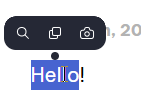
          2026-04-14_104513.png
          At the same time, I can move cursor over the searh popup and nothing happens (most probably because of the huge buttons padding)
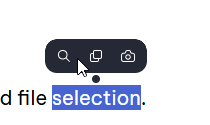
          2026-04-14_111642.png

          Suggestions were described here https://forums.opera.com/post/401600

          *I don't even mention again the partially broken 'scroll to top' feature. It's phenomenal but it's still scrolling to top while moving tab (~3 years bug). Also the PiP still looks bad with its full dimming on hover, without timing and with its reverse volume adjustment from top to bottom.

          Reply Quote 0
            1 Reply Last reply
          • A
            andrew84 last edited by andrew84

            It's sad that despite of multiple reports and requests the habitual (like in pre One versions) tabstrip's tabs management smoothness wasn't fully restored during three years.

            for example...

            1. It's still not possible to drop a tab after the [+] button, new window is created instead.

            2026-04-13_140157.png

            1. Still not possible easily insert a tab between existing tab.
              On the particular screenshot under the tab which is being dragged there's fully hid another tabstrip's tab

              2026-04-13_140221.png

            2. So is need to move draggable tab left and right to put is correctly. But in this case there'll tabs overlay and thus tab island creation is coming depending on how fast and precise user must be.
              But there's no option to disable the tab islands creation by draggingtabs.
              *Btw, Edge has such option

              2026-04-14_112208.png

            3. after such manipulation often a new tab is created not as the last one but somewhere between existing tabs.
              alt text

            Th new UI is more complicated to use in overall.

            Reply Quote 0
              1 Reply Last reply
            • V
              vladbabinets last edited by

              Opera Снимок_2026-04-14_120133_www.speedtest.net.png
              Hello. Could you please tell me why my speed is so slow with the built-in VPN?

              Reply Quote 0
                1 Reply Last reply
              • burnout426
                burnout426 Volunteer @andrew84 last edited by

                @andrew84 I filed DNA-119219 on that in October of 2024. No comments on it.

                Reply Quote 1
                  A 1 Reply Last reply
                • A
                  andrew84 @burnout426 last edited by

                  @burnout426 Now they have RNA instead. Maybe it was just lost while transferring DNA > RNA.
                  But taking into account that bugs stay for years probably they don't care much.

                  Reply Quote 0
                    1 Reply Last reply
                  • A
                    andrew84 last edited by

                    RNA-2865 Extension popup is cut when AI feature is disabled

                    It can be said that it's still cut (the right border and its shadow are not visible)
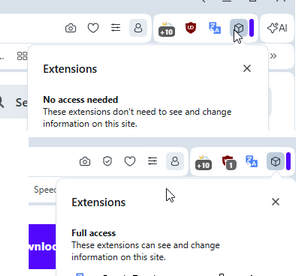
                    2026-04-14_180210.png

                    Reply Quote 0
                      A 1 Reply Last reply
                    • A
                      andrew84 @andrew84 last edited by

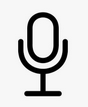
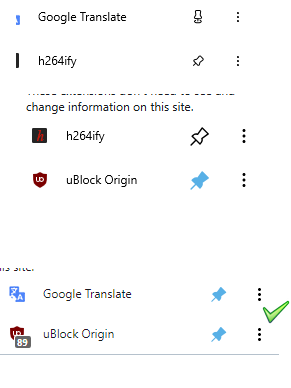
                      @andrew84 I also don't like the new pin/unpin icons. They look too small and 'pinned' icon is similar to 'microphone icon' like this
                      2026-04-14_223716.png

                      The old one is better. the icons a bit too big in One version comparing to text and extensions icons, in pre One version the size is optimal.
                      2026-04-14_223040.png

                      Reply Quote 0
                        1 Reply Last reply
                      • First post
                        Last post

                      Computer browsers

                      • Opera for Windows
                      • Opera for Mac
                      • Opera for Linux
                      • Opera beta version
                      • Opera USB

                      Mobile browsers

                      • Opera for Android
                      • Opera Mini
                      • Opera Touch
                      • Opera for basic phones

                      • Add-ons
                      • Opera account
                      • Wallpapers
                      • Opera Ads

                      • Help & support
                      • Opera blogs
                      • Opera forums
                      • Dev.Opera

                      • Security
                      • Privacy
                      • Cookies Policy
                      • EULA
                      • Terms of Service

                      • About Opera
                      • Press info
                      • Jobs
                      • Investors
                      • Become a partner
                      • Contact us

                      Follow Opera

                      • Opera - Facebook
                      • Opera - Twitter
                      • Opera - YouTube
                      • Opera - LinkedIn
                      • Opera - Instagram

                      © Opera Software 1995-