Opera 137 developer
-
 Opera Comments Bot last edited by
Hello! We’ve rolled out a new Opera Developer release (version: 137.0.6010.1) with a Chromium bump, a rewritten Settings page, VPN autoconnect enabled, and a new option for where new tabs open in vertical tab strip. Core Settings Vertical Tabs VPN For a full list of changes check out our changelog. Happy browsing! Installation links:
Read full blog post: Opera 137 developer
-
andrew84 last edited by
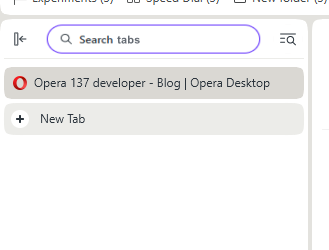
search tabs bytton doesn't work in vertical mode. Only after enabling the sidebar it works.
*I still think that on top of the panel there could be search fields to directly filter open tabs.
-
andrew84 last edited by andrew84
- Restore the 2nd click for the 'scroll to top' feature.
- Restore the search engines creation by using right click.
- Disable the automated search engines adding.
- In EasySetup and for the right split screen the scrollbar can't be grabbed when the cursor is far right (EesySetup closes, split screen has no reaction)
- The 'force dark page' toggle should remember its state depending on what mode (dark/light theme) it was activated for. So if I disable it while in light theme mode but enable it while in dark mode, next time I switch light theme the toggle should be off and next time I activate dark mode the toggle should be automatically on. *It's obvious and habitual algorithm(of course, if the 'force dark page' toggle visibility while in light theme is an intended, previously the toggle was visible only in dark theme).
-
andrew84 last edited by
RNA-4483 Hide wallpapers section in Easy-Setup while the wallpapers are disabled in settings
Instead of restoring the wallpaper on/off toggle you removed the section.
-
SiMcarD78 last edited by
There are some problem of "activation area" on buttons on some websites like Facebook or Instagram.
The most obvious example is on the Facebook logo moving around the mouse. -
andrew84 last edited by
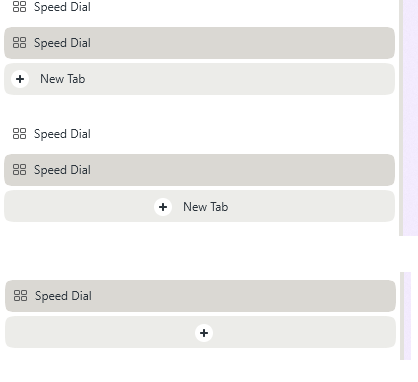
In vertical mode the new tab icon + text or the new tab icon only (better variant) should be placed on the center and shouldn't be aligned the right edge like open tabs names.
-
Locked by
 leocg
leocg
