• Login
    • Search
    • Categories
    • Recent
    • Tags
    • Users
    • Groups
    • Rules
    • Help

    Do more on the web, with a fast and secure browser!

    Download Opera browser with:

    • built-in ad blocker
    • battery saver
    • free VPN
    Download Opera

    Language change to Hebrew

    Opera for Windows
    4
    41
    9612
    Loading More Posts
    • Oldest to Newest
    • Newest to Oldest
    • Most Votes
    Reply
    • Reply as topic
    Log in to reply
    This topic has been deleted. Only users with topic management privileges can see it.
    • L
      leocg Moderator Volunteer @rami1234 last edited by

      @rami1234 That option is to tell webpages that you prefer the Hebrew language, so they can provide one in that language if a available.

      Reply Quote 0
        1 Reply Last reply
      • L
        leocg Moderator Volunteer @rami1234 last edited by

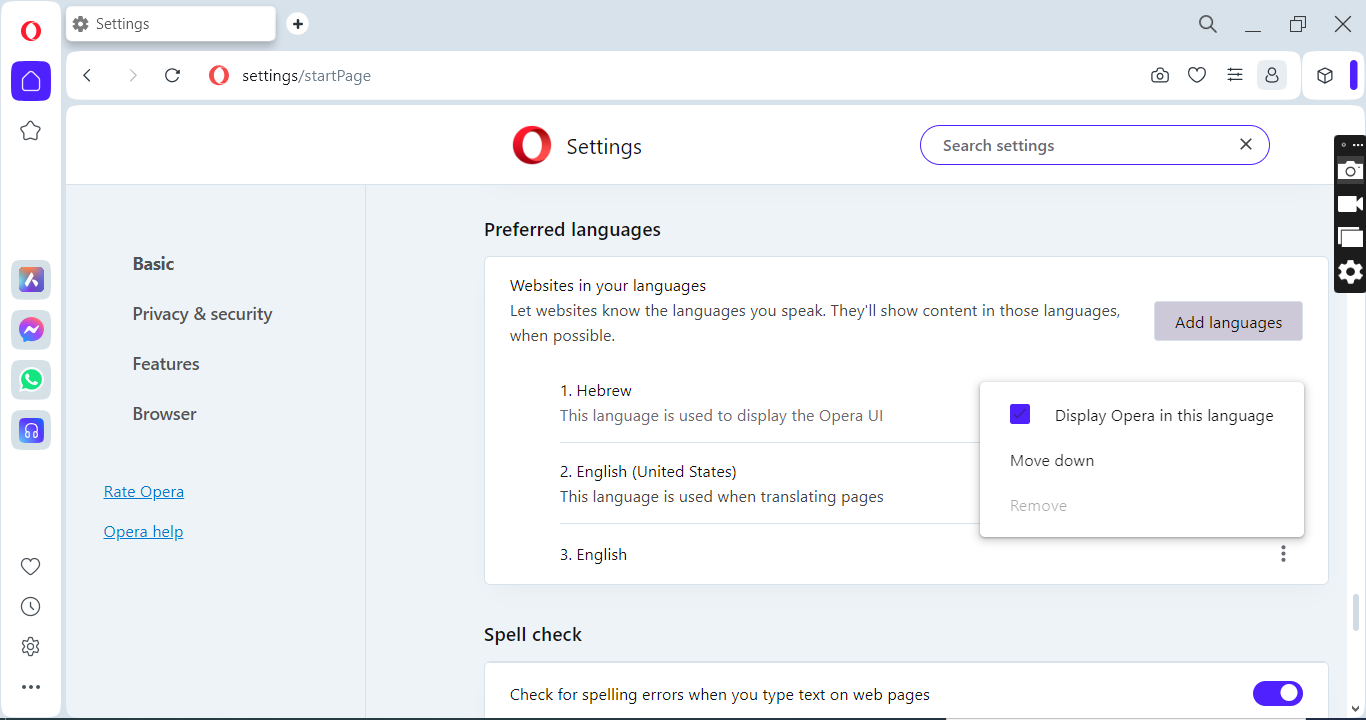
        @rami1234 To change Opera's UI language, click on the three dots next to the chosen language.

        Reply Quote 0
          R 1 Reply Last reply
        • R
          rami1234 @leocg last edited by

          @leocg
          I did it and clicked on relunch,
          But it did not change to the Hebrew language,
          What is the reason for this?
          17.08.2024_06.22.48_REC.png

          Reply Quote 0
            L 1 Reply Last reply
          • L
            leocg Moderator Volunteer @rami1234 last edited by

            @rami1234 Probably the language is not available to be used in the UI.

            Reply Quote 0
              R 2 Replies Last reply
            • R
              rami1234 @leocg last edited by This post is deleted!
              Reply Quote 0
                1 Reply Last reply
              • R
                rami1234 @leocg last edited by

                @leocg
                Why is this language not available for this use?
                and who can I contact to make this language available for this use?

                Reply Quote 0
                  L 1 Reply Last reply
                • L
                  leocg Moderator Volunteer @rami1234 last edited by

                  @rami1234 Probably because Opera doesn't have its UI translated to Hebrew.

                  Reply Quote 0
                    R 1 Reply Last reply
                  • R
                    rami1234 @leocg last edited by

                    @leocg
                    Who can I contact to request that the Hebrew language be available there
                    ?

                    Reply Quote 0
                      L 1 Reply Last reply
                    • L
                      leocg Moderator Volunteer @rami1234 last edited by

                      @rami1234 You probably need to wait for Opera to have its UI translated into that language.

                      You can make a request here, in the proper section of the forum and/or in the official channel for that.

                      Reply Quote 0
                        R 2 Replies Last reply
                      • R
                        rami1234 @leocg last edited by rami1234 This post is deleted!
                        Reply Quote 0
                          1 Reply Last reply
                        • R
                          rami1234 @leocg last edited by

                          @leocg
                          how can i know easily, Is my request was received?
                          and
                          If I want to make a request on your official channel, then where exactly can I make the request there
                          ?

                          Reply Quote 0
                            L 1 Reply Last reply
                          • L
                            leocg Moderator Volunteer @rami1234 last edited by

                            @rami1234 Go to https://opera.atlassian.net/servicedesk/customer/portal/9 and choose the Suggest improvement option

                            Reply Quote 0
                              R 1 Reply Last reply
                            • R
                              rami1234 last edited by This post is deleted!
                              Reply Quote 0
                                1 Reply Last reply
                              • R
                                rami1234 @leocg last edited by

                                @leocg
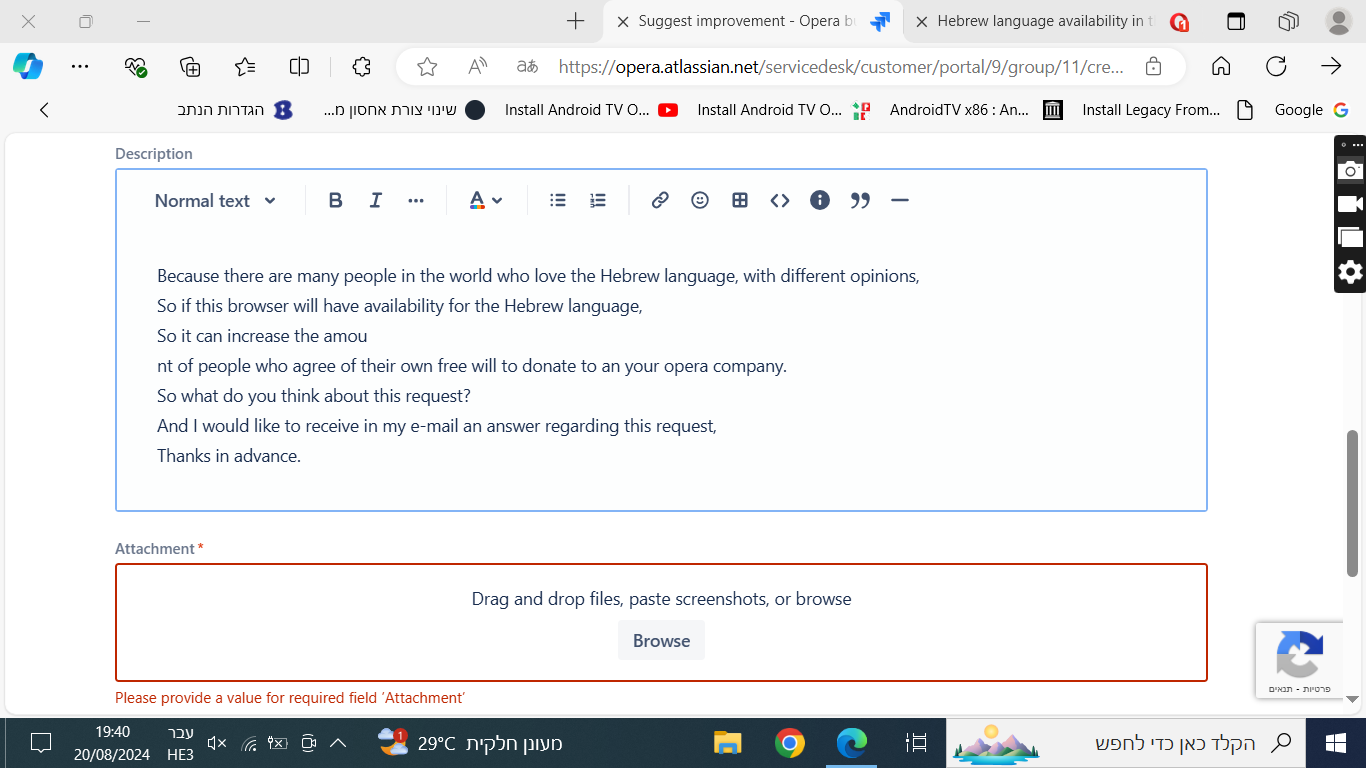
                                What exactly to write there in system information?
                                To send the page there, it requires a file attachment,
                                But how can I show what is not there?

                                Reply Quote 0
                                  L 1 Reply Last reply
                                • L
                                  leocg Moderator Volunteer @rami1234 last edited by

                                  @rami1234 You shouldn't need to add anything there.

                                  Reply Quote 0
                                    R 2 Replies Last reply
                                  • R
                                    rami1234 @leocg last edited by This post is deleted!
                                    Reply Quote 0
                                      1 Reply Last reply
                                    • R
                                      rami1234 @leocg last edited by

                                      @leocg
                                      He won't let me send the information.
                                      45.png

                                      Reply Quote 0
                                        L D 2 Replies Last reply
                                      • L
                                        leocg Moderator Volunteer @rami1234 last edited by

                                        @rami1234 just write anything there, it's not important for a suggestion.

                                        Reply Quote 0
                                          1 Reply Last reply
                                        • D
                                          donq @rami1234 last edited by donq

                                          @rami1234
                                          Attach the same screenshot of Opera settings you posted previously, should be enough.

                                          Reply Quote 1
                                            R 1 Reply Last reply
                                          • B
                                            burnout426 Volunteer last edited by

                                            Do any RTL languages (Arabic and Persian too for example) work in Opera's UI? If not, it's probably a general RTL-support issue.
                                            Reply Quote 0
                                              R 1 Reply Last reply
                                            • First post
                                              Last post

                                            Computer browsers

                                            • Opera for Windows
                                            • Opera for Mac
                                            • Opera for Linux
                                            • Opera beta version
                                            • Opera USB

                                            Mobile browsers

                                            • Opera for Android
                                            • Opera Mini
                                            • Opera Touch
                                            • Opera for basic phones

                                            • Add-ons
                                            • Opera account
                                            • Wallpapers
                                            • Opera Ads

                                            • Help & support
                                            • Opera blogs
                                            • Opera forums
                                            • Dev.Opera

                                            • Security
                                            • Privacy
                                            • Cookies Policy
                                            • EULA
                                            • Terms of Service

                                            • About Opera
                                            • Press info
                                            • Jobs
                                            • Investors
                                            • Become a partner
                                            • Contact us

                                            Follow Opera

                                            • Opera - Facebook
                                            • Opera - Twitter
                                            • Opera - YouTube
                                            • Opera - LinkedIn
                                            • Opera - Instagram

                                            © Opera Software 1995-
