The Opera One is in dark theme, but the address bar keeps white when it's in private mode. strange.
PS - Opera One finally brings tab grouping to the users. Good work - keep it up.
Opera One 100.0.4815.21
Win 11
Do more on the web, with a fast and secure browser!
Download Opera browser with:
The Opera One is in dark theme, but the address bar keeps white when it's in private mode. strange.
PS - Opera One finally brings tab grouping to the users. Good work - keep it up.
Opera One 100.0.4815.21
Win 11
@xetatrader understood. glad that the community gave you a fix to see if that works. re-signing in is the best guess I have, but I am afraid that i cannot guarantee it works 100%. Please do so considering your own convenience and needs.
@neetesha Your advice works. I've learned this resolution now. Thank you.
@andrew84 Hope the 94 roll out soon and have this problem fix!
Hi developers at Opera, I appreciate your effort in including social media and crypto elements to the flagship browser, but would you take a moment to talk to us about what you guys think about the extension sync feature? We'd love to hear from you!
it seems the added synced tab button on desktop version is just gone in 68.0.3618.63, replaced by the open all tabs magnifying glass icon!?
I found out the 72.0.3815.320 does not have the download button on the top right, which previous versions do.
I am aware that the download could be shown on the sidebar, but that functions differently than the one at the top right corner.
Any thought?
@leocg Just curious if installing extensions from chrome web store instead of 'opera extension' only will prevent Opera team to develop sync function around it.
It is consistently happening when I did ctrl+c in private mode browsing. It did not happen with normal browsing.
Any clue?
Version 99.0.4788.9
@Pyll0 said in Where is the download button previously at the top right?:
@leocg good to know - that means i just have to 'turn it back on'
I tried download some stuff, but the button didn't come back such way
Strange - restart the browser brought it back.
---This issue can be closed---
Simplified Chinese:
Japanese:
Don't know what went wrong with the browser after a recent update, celebrated its fix on providing a dark address bar in private mode... what a tradeoff
just to come back, shout out to the devs, and wanted to close this topic with a perfect ending. a journey that takes about 2 years. what a dark address bar...
I realized one day that browsing with Opera will often come across cloudflare's connection checking page, whilst Edge won't as much.
Is that a misperception? Or some protective configurations on Opera by default trigger cloudflare's response?
Resolved at my Opera, version 105.0.4970.16
thanks for all your input. I set all activated extensions to be allowed in incognito mode to see how it went. intersetingly the scroll bar did not exist.
What else could be run differently in normal browsing vs cognito mode that would affect this specific UI issue?
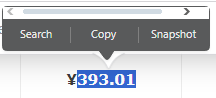
In Windows Opera version 104.0.4944.33, when I double clicked some text, the 'quick menu' will popup. Why is there a scroll bar at the top? It has nothing to do with the zoom level of the webpage. I don't expect it to be there.
The Opera One is in dark theme, but the address bar keeps white when it's in private mode. strange.
PS - Opera One finally brings tab grouping to the users. Good work - keep it up.
Opera One 100.0.4815.21
Win 11
Sad to here some folks are facing the same problem.
I updated the browser today (Jun12, 99.0.4788.65) I'll see if things get any better. If yes, I suppose I'd mark a close to this thread. Voice out, folks.
It is consistently happening when I did ctrl+c in private mode browsing. It did not happen with normal browsing.
Any clue?
Version 99.0.4788.9
okay looks like Edge doesn't have the same problem - I should disable stuff around in Opera to see what goes wrong...??