• Login
    • Search
    • Categories
    • Recent
    • Tags
    • Users
    • Groups
    • Rules
    • Help

    Do more on the web, with a fast and secure browser!

    Download Opera browser with:

    • built-in ad blocker
    • battery saver
    • free VPN
    Download Opera

    Opera Air’s mindful cat has a name now

    Blogs
    news blog comments
    6
    7
    755
    Loading More Posts
    • Oldest to Newest
    • Newest to Oldest
    • Most Votes
    Reply
    • Reply as topic
    Log in to reply
    This topic has been deleted. Only users with topic management privileges can see it.
    • Opera Comments Bot
      Opera Comments Bot last edited by

      Hey all, Last month, just in time for Global Cat Day, we gave a stray cat a home in Opera Air. You’ve probably noticed her already, sleeping, stretching, meditating – keeping you company as you mindfully browse the web. Now, thanks to the Opera Air community, our mindful cat got a name: Inara. Ever since […]

      Read full blog post: Opera Air’s mindful cat has a name now

      Reply Quote 0
        1 Reply Last reply
      • Lalau49
        Lalau49 last edited by

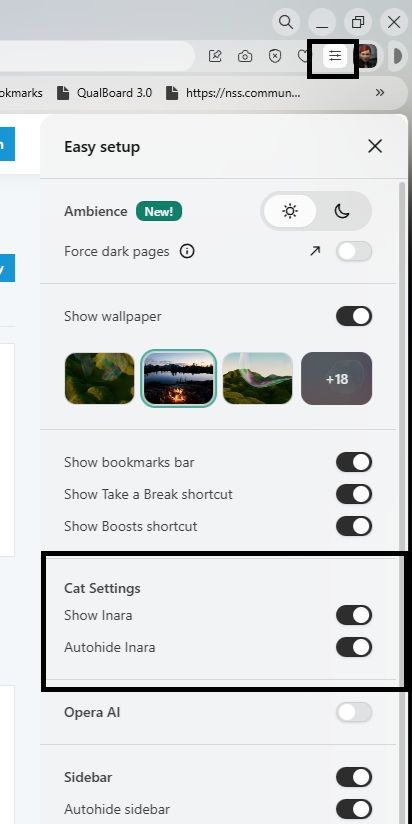
        I made her go away because she was blocking to open a new tab 😞 Now I want her back, how can I do it??

        Reply Quote 0
          CCa53 1 Reply Last reply
        • JonathanTodd
          JonathanTodd last edited by

          Open up the easy setup window it should be on the far right-hand side of the address bar, open that, and about half way down will be 'cat settings'
          Reply Quote 0
            JonathanTodd 1 Reply Last reply
          • TwyloZoneMedia
            TwyloZoneMedia last edited by

            Please get rid of "modern" interface and go back to the "old" one. Or at least give us the option of going back to the "old" ond. This new "everything is rounded" design is nauseating.

            Reply Quote 0
              leocg 1 Reply Last reply
            • CCa53
              CCa53 @Lalau49 last edited by

              @lalau49: @lalau49: how do you made her go away ? I have the same problem with the blocking thing to open or close a new tab.

              Reply Quote 0
                1 Reply Last reply
              • leocg
                leocg Moderator Volunteer @TwyloZoneMedia last edited by

                @TwyloZoneMedia What modern UI? What old UI?

                Reply Quote 0
                  1 Reply Last reply
                • JonathanTodd
                  JonathanTodd @JonathanTodd last edited by

                  @JonathanTodd said in Opera Air’s mindful cat has a name now:

                  Open up the easy setup window it should be on the far right-hand side of the address bar, open that, and about half way down will be 'cat settings'

                  Browser cat.jpg

                  The image attached shows how to find the settings to hide or restore the cat.

                  Reply Quote 0
                    1 Reply Last reply
                  • First post
                    Last post

                  Computer browsers

                  • Opera for Windows
                  • Opera for Mac
                  • Opera for Linux
                  • Opera beta version
                  • Opera USB

                  Mobile browsers

                  • Opera for Android
                  • Opera Mini
                  • Opera Touch
                  • Opera for basic phones

                  • Add-ons
                  • Opera account
                  • Wallpapers
                  • Opera Ads

                  • Help & support
                  • Opera blogs
                  • Opera forums
                  • Dev.Opera

                  • Security
                  • Privacy
                  • Cookies Policy
                  • EULA
                  • Terms of Service

                  • About Opera
                  • Press info
                  • Jobs
                  • Investors
                  • Become a partner
                  • Contact us

                  Follow Opera

                  • Opera - Facebook
                  • Opera - Twitter
                  • Opera - YouTube
                  • Opera - LinkedIn
                  • Opera - Instagram

                  © Opera Software 1995-
