My Opera GX suddenly crashes on start up, anything I can do to fix?
-
Delsait Última edición por
Starting today, my Opera GX just suddenly crashed on me without warning when I was browsing. Restarting my iphone and starting Opera GX again resulted in it crashing on start up.
Should I wake for a store update, is there anything I can do? I really want to keep my tabs/history on my IOS, so I hope there's a way to save it.
-
A Former User Última edición por
I have the same problem I can’t open opera gx and I don’t want to lose my tabs so I don’t delete it
-
davidoliver-1 Última edición por
If Opera GX is crashing on startup, there are several troubleshooting steps you can try to resolve the issue:
Restart your computer: Sometimes, a simple restart can fix temporary issues with software. Restart your computer and then try launching Opera GX again to see if the crashing issue is resolved.
Update Opera GX: Ensure that you have the latest version of Opera GX installed on your computer. Outdated versions may have compatibility issues or bugs that can cause crashes. Visit the official Opera GX website or check for updates within the browser settings to update to the latest version.
Disable extensions: Extensions can sometimes conflict with Opera GX and cause crashes. Temporarily disable all extensions and then launch Opera GX to see if it starts without crashing. If it does, you can enable the extensions one by one to identify the problematic one. Consider removing or updating the problematic extension.
Clear cache and browsing data: Corrupted or overloaded cache and browsing data can lead to stability issues. Clear the cache and browsing data in Opera GX by going to the settings menu, selecting "Clear browsing data," and choosing the appropriate options to clear cache, cookies, and other browsing data. Restart Opera GX and check if the crashing issue is resolved.
Reset Opera GX settings: Resetting Opera GX to its default settings can help resolve issues caused by misconfigured settings. Go to the settings menu, select "Advanced," and choose "Reset settings." This will reset all settings to their default values. Note that this action will remove your personalized settings, so make sure to back up any important data beforehand.
-
Moved from Opera Browser by
 leocg
leocg
-
zeroxmith Última edición por
I just downloaded it for the first time myself and it's crashing on start up. I can't even do any kind of troubleshooting because it flat out won't let me.
I've checked all over the internet for the various file manager "fixes" and none work.
It's not tripping any antivirus. It's got permission to run on my system.
It's obviously not a Windows 10 issue. It's not an update issue. I have a gaming rig that can easily handle a web browser of all things.
I've read all over the internet (the official reddit forum, twitter, even some lost forums on this forum site that this has been an issue since day 1 of Opera Gx's releases and that's absolutely sad. The people behind this browser should be ashamed and embarrassed. Not to mention, they actually acknowledged this very issue popping back up again not that long ago on Twitter.
-
A Former User Última edición por
@zeroxmith After about two years of using gx this is happening to me as well, it just opens and closes around 3 or 4 times then closes completely, its super frustrating cause its always worked until now and now all the sudden gx is completely unusable
-
anonimous8 Última edición por
no mames pinche este mierda . me entro asta la tres de la manana con esto piece a
 . no fix working. 8/31/2023
-
Notsobad Última edición por
@davidoliver-1 and how are we supposed to do that when it crashes when we boot it?
-
LeeFelixxx Última edición por
@davidoliver-1 how are we supposed to do that when we can't even open the app?
-
A Former User Última edición por
@davidoliver-1 How can anyone follow your advice when opera does not start? As stated in the initial and followup questions? This seems to be my general experience with Opera support.
-
darksorcy Última edición por
I had the same issue during last weeks. I tried a lot and played around, because as a Merchant Integration Manager I want to understand how to fix stuff and make it work again instead of completely delete and reinstalling something, because reinstallation is not an option in the most running customer production environments.
So first of all, here is how you can do the whole stuff that @davidoliver-1 mentioned in his post:
- Right-Click to your OperaGX in Taskbar or Start menu and select "New Private Window" instead of starting it normally
- Now OperaGX should start and you are able to access all required functionality to do the magics that @davidoliver-1 described.
- In my (first) case where I faced this issue, it was enough to just start OperaGX in private mode one time. After I closed it I was directly able to start it in normal mode again and even if all of my previously opened tabs where gone the browser did his great work as usual.
Additional information from the 2nd time I've faced this issue:
- Today - about two weeks after the story above - starting in private mode wasn't enough. The browser closes and closes himself again and again. No chance to make any changes and even the cli start with
--disable-extensionsdidn't work. - At the end of the day I opened it in private mode and then I switched to the settings and extension settings. In extension settings I got information about a broken extension, and I removed it completely.
- Additionally, I removed cache, browser history, stored tabs and so on, just to make sure that this was not another reason for the behaviour.
- Afterwards I left private mode and restarted in normal mode, and everything works absolutely fast and smooth again.
I really hope it may help you guys and even if I'm not an Opera employee I really appreciate this browser!
-
RAP1D69 Última edición por
hi i have looked at other posts about it and i have searched all about it crashing to settings and i have found nothing that works. i have disabled any extensions, deleted my avast security, deleted my account and even deleted opera gx. can anyone pls reach out to me about this is it about operas servers are down or is there something i am doing wrong.
-
darksorcy Última edición por
Hi guys,
Sorry for my late response, but I had a very busy week.
@TiqkleMeElmo, what I meant was this icon in the Windows taskbar:
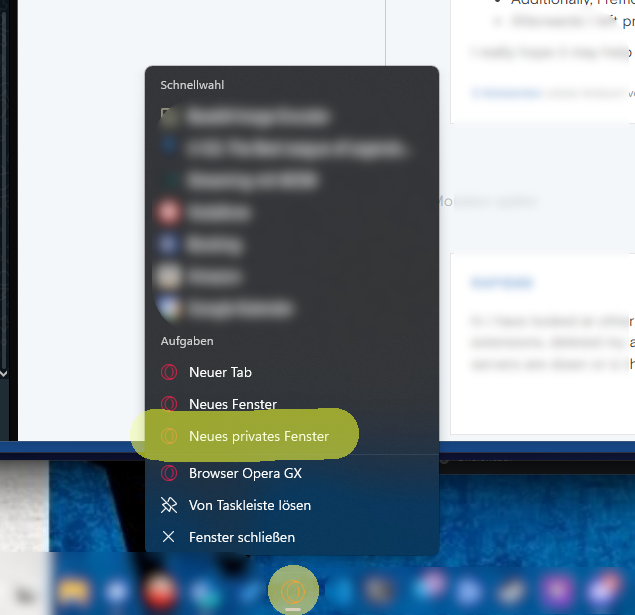
In an English Windows installation, it should be called "New private window" (or something like this). If you haven't had a taskbar entry so far, you can just create one.
@thefufuateme, not even sure what you are meaning, but maybe the additional information, including the screenshot, may help. If not, you could maybe add some more information like the installed GX version, screenshots, and/or screencapture of the current behavior and so on.
I hope this helps! If you need further assistance or more revisions, feel free to let me know!
-
IdkIndex Última edición por IdkIndex
I have that problem too, but when I try to install Opera GX the first time, I always crash on startup. Here for video
-
NikxEF50 Última edición por
I've fixed this like right now, i checked the time it took to crash and it took exactly 25.416 seconds for me to crash. i disabled all the extensions and it doesnt crash anymore. make sure that you dont have any extensions enabled (like i had an adblocker for youtube). if it doesnt work get the installation setup and run the repair option, it should fix everything
-
itzmaxxxx Última edición por
@NikxEF50 dang thats nice i just had this problem starting since yesterday. it just opened in the task manager but nothing popped up on the screen. i turned off my firewall antivirus and cleared cache to see if that would do anything. It didn't, but all of a sudden this morning it started to open a black small screen (opening opera animation) on the screen, opening for a second, closing, and this process repeating three or four times before giving up. In the task manager it says a opera crash reporter was on in the background too. I came back from school today and now the black screen thing happens, but a opera gx logo appears. is there anything youve done to fix anything similar to this?
-
NikxEF50 Última edición por
@itzmaxxxx Only thing that i suggest you to do is to get the installation file and try repairing opera GX, its the only thing that comes to my mind.
-
Alpha-Kiman Última edición por
Same problem cant use Opera at the moment. To many problems rising up.