• Giriş
    • Arama
    • Kategoriler
    • Güncel
    • Etiketler
    • Kullanıcılar
    • Gruplar
    • Rules
    • Help

    Do more on the web, with a fast and secure browser!

    Download Opera browser with:

    • built-in ad blocker
    • battery saver
    • free VPN
    Download Opera

    The High CPU/RAM/ETC Usage Topic - Opera GX

    Opera GX
    cpu usage ram usage
    43
    105
    150024
    Daha fazla ileti
    • En eskiden en yeniye
    • En yeniden en eskiye
    • En çok oylanan
    Cevap
    • Yeni başlık oluşturarak cevapla
    Cevaplamak için giriş yapın
    Bu başlık silindi. Sadece başlık düzenleme yetkisi olan kullanıcılar görebilir.
    • palikka0x45
      palikka0x45 @leocg Son düzenleyen: palikka0x45

      @leocg This wont be final resolve for this issue.

      Edit:
      hardware acceleration makes videos diashow, laggy and unstable.

      Like a said, this wasent issue on 2weeks ago.

      Cevap Alıntı 1
        leocg 1 Cevap Son cevap
      • leocg
        leocg Moderator Volunteer @palikka0x45 Son düzenleyen:

        @palikka0x45 Hardware acceleration should make videos run better. If it doesn't happen, then maybe there is a incompatibility with your graphics card.

        Its drivers are up to date?

        Cevap Alıntı 0
          palikka0x45 1 Cevap Son cevap
        • palikka0x45
          palikka0x45 @leocg Son düzenleyen: palikka0x45

          @leocg Drivers are okay. GX ain't. No problems on different browsers.

          Edit:

          Im just waiting Chromium update.

          Cevap Alıntı 1
            sophienixNeuroi 1 Cevap Son cevap
          • crisper
            crisper Son düzenleyen:

            Why does the opera gx use 100% cpu when only one tab is open? I am watching twitch and the cpu consumption is 100%

            Cevap Alıntı 1
              1 Cevap Son cevap
            • MikahS
              MikahS Son düzenleyen:

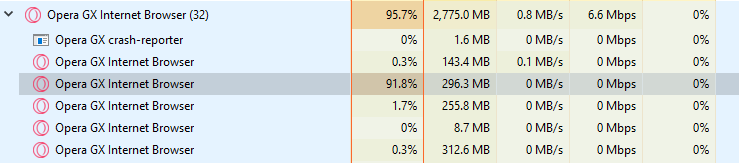
              Hello. I've been running to an issue where after some time of using the browser a process seems to appear out of nowhere that consumes a lot of CPU resources. Ending this process doesn't affect the browser in any way. Any idea what might be causing this issue? This happens once a day every time I use the browser.
              bfb7c7dd-67da-4b4c-a4d9-3548419e30cc-image.png

              Cevap Alıntı 1
                leocg 1 Cevap Son cevap
              • leocg
                leocg Moderator Volunteer @MikahS Son düzenleyen:

                @mikahs Use Menu > Developer > Task Manager or Shift + Esc to see what those processes are and which ones are using that much CPU

                Cevap Alıntı 0
                  palikka0x45 1 Cevap Son cevap
                • palikka0x45
                  palikka0x45 @leocg Son düzenleyen:

                  @leocg

                  kuva_2021-11-18_220957.png

                  Cevap Alıntı 1
                    palikka0x45 1 Cevap Son cevap
                  • palikka0x45
                    palikka0x45 @palikka0x45 Son düzenleyen:

                    @palikka0x45 said in The High CPU/RAM/ETC Usage Topic - Opera GX:

                    @leocg

                    kuva_2021-11-18_220957.png

                    Still same issue as last time. Hardware Acceleration fixes this, but makes videos/streams/gifs diashow, laggy and unstable.

                    Cevap Alıntı 1
                      MikahS 1 Cevap Son cevap
                    • MikahS
                      MikahS @palikka0x45 Son düzenleyen:

                      @palikka0x45 Yeah it's the same issue. I also have hardware acceleration turned-off since Discord streaming doesn't work properly with the browser having it turned on.

                      Cevap Alıntı 1
                        palikka0x45 1 Cevap Son cevap
                      • palikka0x45
                        palikka0x45 @MikahS Son düzenleyen:

                        @mikahs are you using ryzen processor?

                        Cevap Alıntı 0
                          MikahS 1 Cevap Son cevap
                        • MikahS
                          MikahS @palikka0x45 Son düzenleyen:

                          @palikka0x45 Nope. Intel i7-9700k

                          Cevap Alıntı 0
                            palikka0x45 1 Cevap Son cevap
                          • palikka0x45
                            palikka0x45 @MikahS Son düzenleyen:

                            @mikahs did these issues become in last 2months?

                            Cevap Alıntı 0
                              MikahS 1 Cevap Son cevap
                            • MikahS
                              MikahS @palikka0x45 Son düzenleyen:

                              @palikka0x45 Yeah they started around this time frame

                              Cevap Alıntı 1
                                palikka0x45 1 Cevap Son cevap
                              • palikka0x45
                                palikka0x45 @MikahS Son düzenleyen:

                                @mikahs so it's Opera GX problem. I made comment around 2months ago in here. I just get trolled by staff. Nothing has changed.

                                Cevap Alıntı 0
                                  Titoir98 1 Cevap Son cevap
                                • masoud70
                                  masoud70 @leocg Son düzenleyen:

                                  hi i found a way for fix that just remove everything in side bar
                                  Just keep workspace
                                  It well be ok

                                  Cevap Alıntı 0
                                    sonwman 1 Cevap Son cevap
                                  • Titoir98
                                    Titoir98 @palikka0x45 Son düzenleyen: leocg

                                    @palikka0x45 you are right i got this issue like 2 months ago last update does nothing try all flags that are related to hardware accel. when i play a youtube video my gtx970 take 12% of decoding it's totally normal on 1080p60 but Why when i have nothing just the home page of opera the browser take more then 30% of my ryzen 1200 ???

                                    alt text

                                    Cevap Alıntı 1
                                      1 Cevap Son cevap
                                    • jaekobcaed
                                      jaekobcaed Son düzenleyen:

                                      It must just be me since I haven't seen any other reports but since the most recent update for Opera GX, I've noticed that the browser uses a huge amount of disk activity when I try to open tabs while running an application that uses any significant amount of system resources. When I observe this in Resource Monitor, I've noticed it's a high amount of my disk trying to read a DLL, for whatever reason. It'll lock up my entire browser for a few seconds when this happens, though when I'm not running anything other than GX, it runs flawlessly.

                                      Is this only on my end or is anyone else experiencing this as well?

                                      Cevap Alıntı 1
                                        1 Cevap Son cevap
                                      • operauserx
                                        operauserx Son düzenleyen:

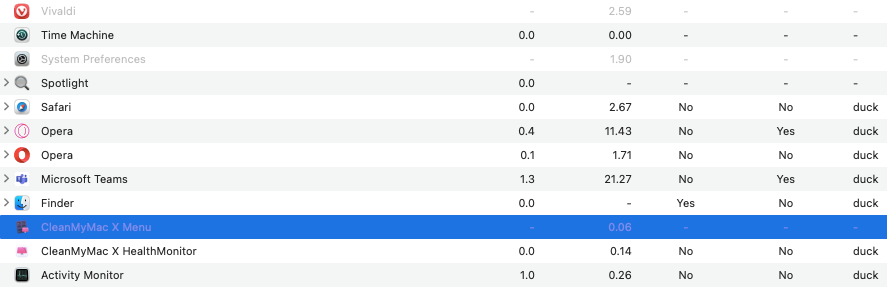
                                        opera takes a lot of memory and CPU and ram too, maybe this is becuase i am using a hackintosh (this makes mac OS run on intel based laptops by changing some drivers or something). i have used GX cleaner to resolve this problem but it is not getting resolved.
                                        Other browser like safari are having 0.0% cpu. Opera has 44% 12 hour power impact on the computer.
                                        da7f0a4a-8fd1-40e5-82e7-f423d05477b2-image.png

                                        please tell me a solution for this

                                        Cevap Alıntı 0
                                          operauserx 1 Cevap Son cevap
                                        • operauserx
                                          operauserx @operauserx Son düzenleyen:

                                          @operauserx

                                          opera takes the highest of all of this, that time i play chess, or do programming it goes up to 50% and the electricity bill goes for a toss

                                          Cevap Alıntı 0
                                            1 Cevap Son cevap
                                          • Eski Kullanıcı
                                            Eski Kullanıcı Son düzenleyen: leocg

                                            High CPU usage when Downloads tab is open and a file is downloading

                                            Steps to reproduce:

                                            1. Start downloading a larger file, to be able to watch the issue (some MB or more)
                                            2. Open the Downloads tab (Ctrl+J) with the active download and its progress bar
                                            3. Start Windows Task Manager

                                            Result:
                                            The Windows Task Manager shows many new opera.exe processes, randomly appearing and terminating itself again, repeatedly.
                                            The CPU usage of the main Opera CPU process (see Opera task manager) jumps up to 30-100%.
                                            If you close the Opera tab with Downloads with the file still being downloaded, the CPU usage returns to normal values, about 3% in my case.

                                            Expected behavior: Keeping the Downloads tab open should have no effect to CPU usage.

                                            This bug has been reported more times in recent years by different users, but never fixed. I have read that it affects only Windows 7 systems, not Windows 10.

                                            Opera GX 82.0.4227.50 on Windows 7 SP1, no extensions installed.

                                            Cevap Alıntı 0
                                              leocg 1 Cevap Son cevap
                                            • İlk ileti
                                              Son ileti

                                            Computer browsers

                                            • Opera for Windows
                                            • Opera for Mac
                                            • Opera for Linux
                                            • Opera beta version
                                            • Opera USB

                                            Mobile browsers

                                            • Opera for Android
                                            • Opera Mini
                                            • Opera Touch
                                            • Opera for basic phones

                                            • Add-ons
                                            • Opera account
                                            • Wallpapers
                                            • Opera Ads

                                            • Help & support
                                            • Opera blogs
                                            • Opera forums
                                            • Dev.Opera

                                            • Security
                                            • Privacy
                                            • Cookies Policy
                                            • EULA
                                            • Terms of Service

                                            • About Opera
                                            • Press info
                                            • Jobs
                                            • Investors
                                            • Become a partner
                                            • Contact us

                                            Follow Opera

                                            • Opera - Facebook
                                            • Opera - Twitter
                                            • Opera - YouTube
                                            • Opera - LinkedIn
                                            • Opera - Instagram

                                            © Opera Software 1995-