• Login
    • Search
    • Categories
    • Recent
    • Tags
    • Users
    • Groups
    • Rules
    • Help

    Do more on the web, with a fast and secure browser!

    Download Opera browser with:

    • built-in ad blocker
    • battery saver
    • free VPN
    Download Opera

    At the bottom of the page, when you click Help & support, it redirects to https://www.opera.com/ru/legacy

    Opera for Windows
    3
    8
    476
    Loading More Posts
    • Oldest to Newest
    • Newest to Oldest
    • Most Votes
    Reply
    • Reply as topic
    Log in to reply
    This topic has been deleted. Only users with topic management privileges can see it.
    • xlmagnat
      xlmagnat @leocg last edited by

      @leocg said in Opera "Report an issue" does not work:

      @larsnagel It's working here. Try disabling Acceptable Ads on Ad Blocker settings. Also try cleaning the cache.

      I click at the bottom of this page and ???
      At the bottom of the page, when you click Help & support, it redirects to https://www.opera.com/ru/legacy

      Sorry for being off-topic, but the same behavior occurs in other places in the program on a PC.
      When trying to connect my Flow, scanning the OR code does not give me the option to confirm. Also transfers to https://www.opera.com/ru/legacy

      Reply Quote 0
        leocg 1 Reply Last reply
      • leocg
        leocg Moderator Volunteer @xlmagnat last edited by

        @xlmagnat Help and Support leads to https://www.opera.com/help

        Reply Quote 0
          xlmagnat 1 Reply Last reply
        • xlmagnat
          xlmagnat @leocg last edited by

          @leocg Опера.JPG Фаерфокс.JPG

          Reply Quote 0
            leocg 1 Reply Last reply
          • leocg
            leocg Moderator Volunteer @xlmagnat last edited by

            @xlmagnat It's probably due to your location, if it's not some bug on the page.

            Any difference if you use a VPN or change page language?

            Reply Quote 0
              xlmagnat 1 Reply Last reply
            • xlmagnat
              xlmagnat @leocg last edited by

              @leocg Opera Touch downloaded to my phone and connected to my Flow. Opera regular continues to transfer to the account. Help and other things work through the help menu. On the left in the panel.
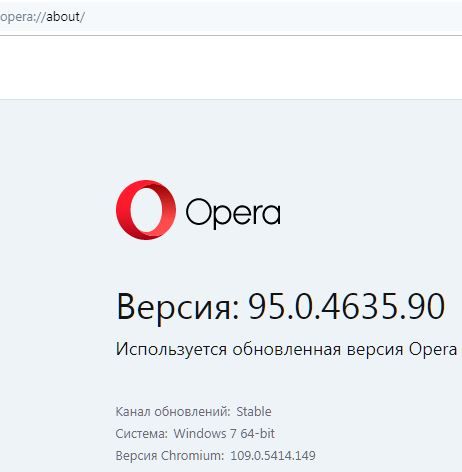
              Version:95.0.4635.90
              Using an updated version of Opera
              Update channel:Stable
              System:Windows 7 64-bit
              Chromium version:109.0.5414.149
              If I install Opera 103 or beta Opera 104 on my smartphone, it doesn’t connect to Flow. Language Russian. I don't switch to others. Thanks for your help. Looks like I figured it out with this Flow.
              P.S. I wanted to know if something can be done with the regular mobile version. After all, there is this Flow, but it’s impossible to connect to a PC. If you know, please tell me. This was the question about Help & support.

              Reply Quote 0
                1 Reply Last reply
              • burnout426
                burnout426 Volunteer last edited by

                What specific version of Opera do you have as shown at the URL opera://about?

                Reply Quote 0
                  xlmagnat 1 Reply Last reply
                • xlmagnat
                  xlmagnat @burnout426 last edited by

                  @burnout426 opera_about.JPG

                  Reply Quote 0
                    1 Reply Last reply
                  • xlmagnat
                    xlmagnat last edited by

                    Thank you very much. I received advice from Google Play to set a light theme. It was systemic. Today I connected this Flow to the beta version of Opera 104.0.5262.911.43

                    Reply Quote 0
                      1 Reply Last reply
                    • First post
                      Last post

                    Computer browsers

                    • Opera for Windows
                    • Opera for Mac
                    • Opera for Linux
                    • Opera beta version
                    • Opera USB

                    Mobile browsers

                    • Opera for Android
                    • Opera Mini
                    • Opera Touch
                    • Opera for basic phones

                    • Add-ons
                    • Opera account
                    • Wallpapers
                    • Opera Ads

                    • Help & support
                    • Opera blogs
                    • Opera forums
                    • Dev.Opera

                    • Security
                    • Privacy
                    • Cookies Policy
                    • EULA
                    • Terms of Service

                    • About Opera
                    • Press info
                    • Jobs
                    • Investors
                    • Become a partner
                    • Contact us

                    Follow Opera

                    • Opera - Facebook
                    • Opera - Twitter
                    • Opera - YouTube
                    • Opera - LinkedIn
                    • Opera - Instagram

                    © Opera Software 1995-