• Login
    • Search
    • Categories
    • Recent
    • Tags
    • Users
    • Groups
    • Rules
    • Help

    Do more on the web, with a fast and secure browser!

    Download Opera browser with:

    • built-in ad blocker
    • battery saver
    • free VPN
    Download Opera

    Change tabs back to list layout

    Opera for Android
    4
    10
    757
    Loading More Posts
    • Oldest to Newest
    • Newest to Oldest
    • Most Votes
    Reply
    • Reply as topic
    Log in to reply
    This topic has been deleted. Only users with topic management privileges can see it.
    • Z
      Zeviticus last edited by

      Recently, my page tabs changed to a grid picture layout. Is there a way to change back to a list layout so they're easier to scroll through and find what I need?

      Reply Quote 0
        leocg 1 Reply Last reply
      • leocg
        leocg Moderator Volunteer @Zeviticus last edited by

        @Zeviticus Click on the display mode button to change among the three tabs display modes.

        Reply Quote 0
          Z 1 Reply Last reply
        • Z
          Zeviticus @leocg last edited by

          @leocg There is no display mode button on mobile.

          Reply Quote 0
            leocg 1 Reply Last reply
          • leocg
            leocg Moderator Volunteer @Zeviticus last edited by

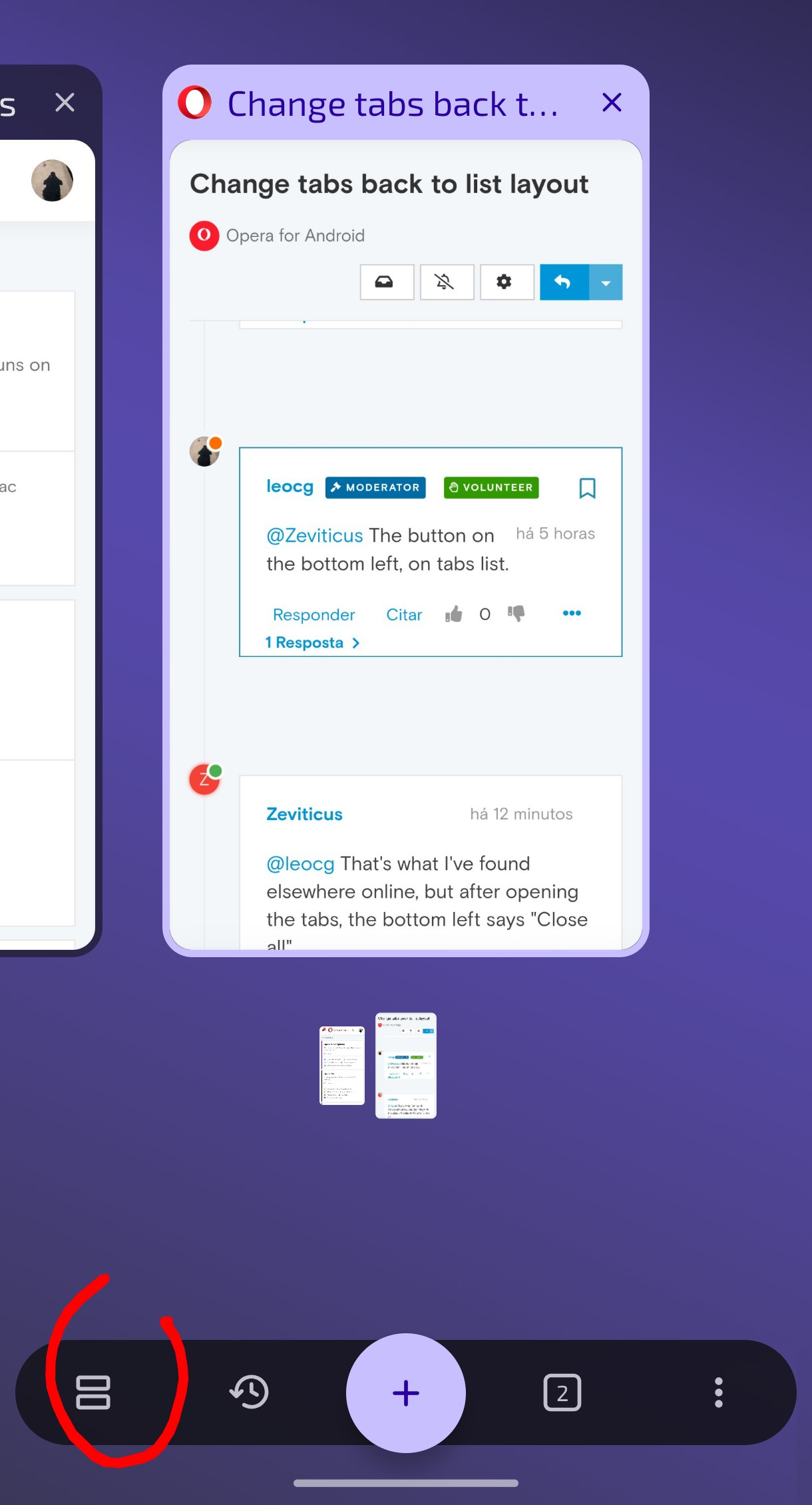
            @Zeviticus The button on the bottom left, on tabs list.

            Reply Quote 0
              Z 1 Reply Last reply
            • Z
              Zeviticus @leocg last edited by

              @leocg That's what I've found elsewhere online, but after opening the tabs, the bottom left says "Close all"

              Reply Quote 0
                leocg 1 Reply Last reply
              • leocg
                leocg Moderator Volunteer @Zeviticus last edited by

                @Zeviticus

                Screenshot_20260915-194848_Opera beta (1).png

                I'm talking about that button

                Reply Quote 0
                  H 1 Reply Last reply
                • H
                  HughJarsole @leocg last edited by

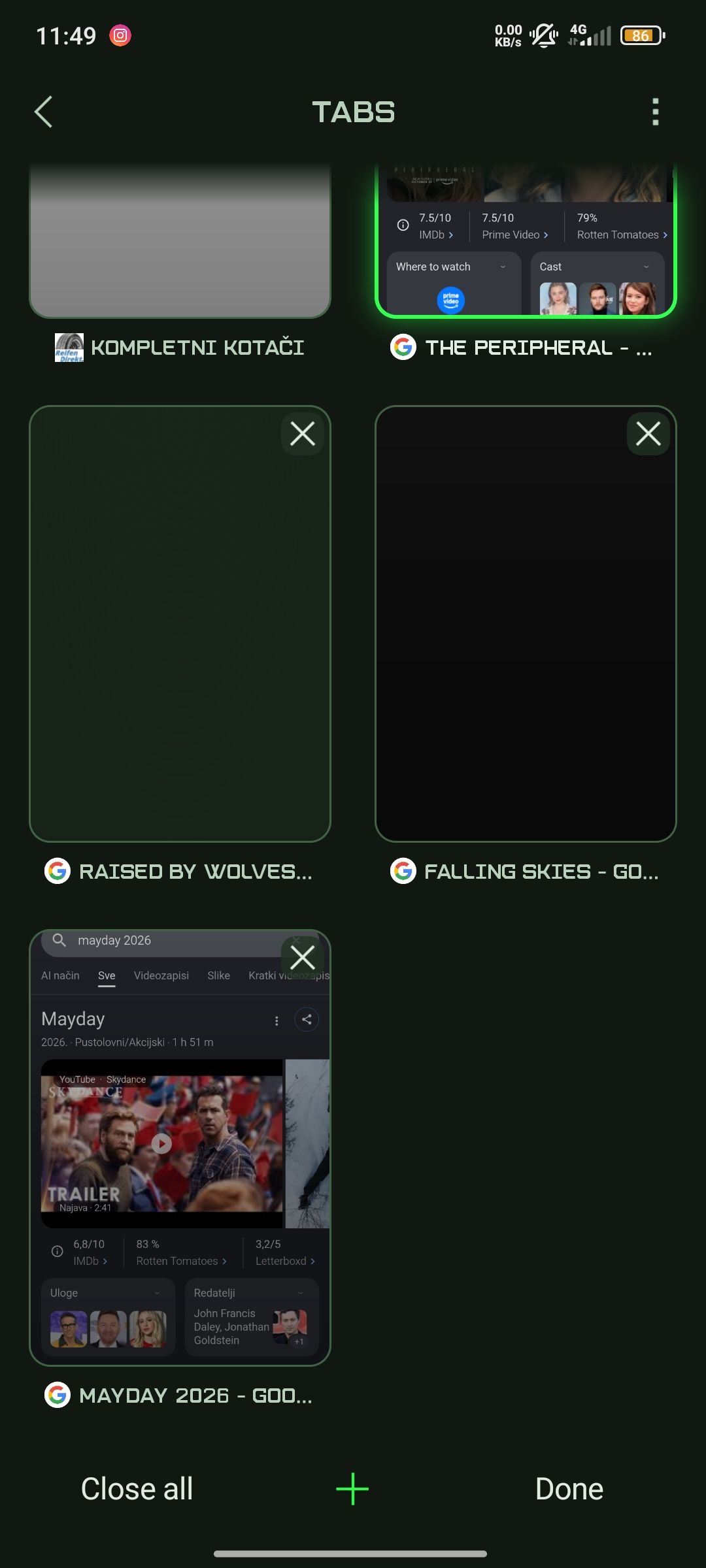
                  @leocg He's most likely refferencing the Opera GX mobile app

                  opera gx mobile tabs.jpg

                  Reply Quote 0
                    E 1 Reply Last reply
                  • E
                    Eric05Bee @HughJarsole last edited by

                    @HughJarsole
                    In GX on Android, the best you can do is turn the phone from Tall to Wide mode.
                    2nd user to miss the options button.
                    https://forums.opera.com/topic/89583/change-tabs-back-to-list-layout/

                    Reply Quote 0
                      H 1 Reply Last reply
                    • Referenced by  E Eric05Bee 
                    • H
                      HughJarsole @Eric05Bee last edited by

                      @Eric05Bee The user before me and I both use the same browser and have used it for a long time if I'm not wrong about them.

                      I don't know if you're trying to convince us that there was never a list layout for tabs (like a rolodex), or that there's a button that would help us change it back, because there is no options button anywhere, where ever you press.

                      If you're sure that we're both missing it, please tell us where we could find it instead of just telling us we missed it. Thanks.

                      Reply Quote 0
                        Z 1 Reply Last reply
                      • Z
                        Zeviticus @HughJarsole last edited by

                        @HughJarsole Correct. That button does not appear. It would seem that it would explain a lot if we knew why Opera forced the users' layout setting to change, in the first place.
                        In the meantime, Firefox works.
                        Reply Quote 0
                          1 Reply Last reply
                        • First post
                          Last post

                        Computer browsers

                        • Opera for Windows
                        • Opera for Mac
                        • Opera for Linux
                        • Opera beta version
                        • Opera USB

                        Mobile browsers

                        • Opera for Android
                        • Opera Mini
                        • Opera Touch
                        • Opera for basic phones

                        • Add-ons
                        • Opera account
                        • Wallpapers
                        • Opera Ads

                        • Help & support
                        • Opera blogs
                        • Opera forums
                        • Dev.Opera

                        • Security
                        • Privacy
                        • Cookies Policy
                        • EULA
                        • Terms of Service

                        • About Opera
                        • Press info
                        • Jobs
                        • Investors
                        • Become a partner
                        • Contact us

                        Follow Opera

                        • Opera - Facebook
                        • Opera - Twitter
                        • Opera - YouTube
                        • Opera - LinkedIn
                        • Opera - Instagram

                        © Opera Software 1995-