[Duplicated]How to completely disable visited site suggestions in the address bar?
-
bimeu5000 last edited by
Hi,
Whenever I type something in the address bar to search, Opera keeps showing autocomplete suggestions, including my search history and previously visited websites.I would like to know how to completely turn off these suggestions so that previously visited sites no longer appear.
Could you please guide me on how to disable this feature entirely?
Thank you. -
 leocg Moderator Volunteer last edited by
@bimeu5000 As far as I know, there isn't a way to disable history suggestions.
-
andrew84 last edited by andrew84
@bimeu5000 There used to be address bar's experimental settings for that purpose. User could select what suggestions are good. But the options were removed completely for some reason.
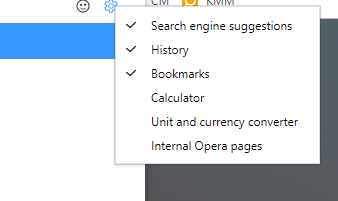
Defenitely the settings should be restored (was requested multiple times). There were other complaints regarding other categories, calculator fo example.