Search popup position issue
-
maai1 last edited by
Hi everyone,
I am reporting a layout bug regarding the text selection tooltip (the search/copy popup menu) in the current stable build of Opera One. The positioning of the popup appears to be broken by page scaling, shifting incorrectly based on whether the page is zoomed in or out.
When highlighting text on a webpage, the popup menu shifts to the wrong position if the zoom level is altered from the default 100 percent. Because I use a large screen, I keep my browser set to a standard 125 percent zoom as my daily default, meaning this bug is constantly present for me.
The tracking behaviour changes depending on the zoom scale:
At 100 percent zoom: The popup positions itself perfectly directly above the selected text.
Above 100 percent zoom (e.g., 125 percent): The popup consistently spawns offset to the bottom right of the selection.
Below 100 percent zoom: The popup incorrectly shifts to the top left of the selection.
The moment any scaling factor is applied, the coordinates break, making the menu awkward to click and causing it to overlap other page content.
Try it by yourself:
Open any webpage.
Change the browser zoom level (try 125 percent, then try less than 100 percent).
Highlight a word, phrase, or sentence at each zoom level.
Observe the placement of the search/copy popup menu.Expected Result: The popup should always appear directly above the selected text, maintaining its relative position regardless of the layout scale.
Actual Result: The popup tracking breaks, spawning bottom right when zoomed in and top left when zoomed out.
Is anyone else using page scaling (zoom) experiencing this tracking issue?
Opera Version: 133.0.5932.60
Update stream: Stable
System: Windows 11 64-bit
Chromium version: 149.0.7827.201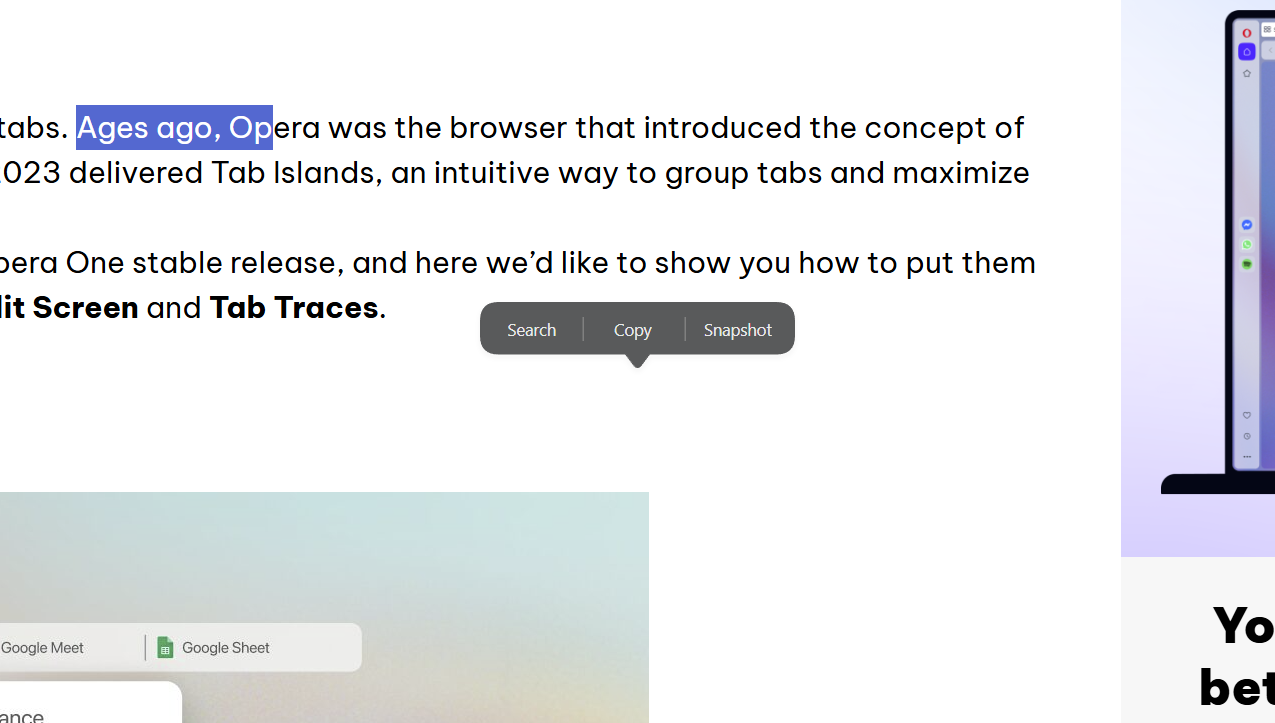
-

-
andrew84 last edited by andrew84
@Janijan Yes, I noticed as well in both Developer and Stable.
It also changes the position of the bottom's pointer. I just didn't link the issue with page zoom.
https://forums.opera.com/post/405965 -
Janijan last edited by
@andrew84 said in Search popup position issue:
@Janijan Yes, I noticed as well in both Developer and Stable.
It also changes the position of the bottom's pointer. I just didn't link the issue with page zoom.
https://forums.opera.com/post/405965Thanks for checking. Your test makes the zoom issue much clearer.
-
maai1 last edited by
Hi everyone, and hello to the @Opera-QA-Team,
I am reporting a UI regression in yesterday's stable build of Opera One regarding the text selection popup menu (the little search/copy tooltip that appears when you highlight text).
It seems yesterday's update brought back the bug where the popup menu jumps out of alignment whenever the page is zoomed in or out:
• Above 100 percent zoom (e.g., 125 percent): The popup consistently appears offset down and to the right of the highlighted text.
• Below 100 percent zoom: The popup shifts up and to the left of the selection.
• At 100 percent zoom: The popup works normally and stays directly above the highlighted text.Because I use a large screen and keep my default browser zoom at 125 percent for comfortable reading, this displacement is happening constantly. The floating menu keeps covering surrounding text and buttons, making it awkward to quickly click "Copy" or "Search".
Could the team please look into how the text selection menu calculates its position on zoomed pages so this can be fixed for good?
Is anyone else using page zoom experiencing this issue after yesterday's update?
Opera One(version: 135.0.5973.66)
Update stream:Stable
System:Windows 11 64-bit
Chromium version:151.0.7922.176 -
andrew84 last edited by
@maai1 said in Search popup position issue:
Is anyone else using page zoom experiencing this issue after yesterday's update?
Yes, the same on Win 10.
Are you sure it was fixed in Stable previously? I see it fixed in Developer but I don't use Stable version so I can't say. The last version is .76 but in .66 version it was still buggy. -
pow1 last edited by
Same issue here.
I have a big ultrawide monitor so I use at least 125% zoom. It hasnt been fixed by any patch, and has been like this for me for the last months -
maai1 last edited by
fixed on this version:
Opera One - version: 136.0.6008.52
Update stream:Stable
System:Windows 11 64-bit
Chromium version:152.0.7977.130