• Login
    • Search
    • Categories
    • Recent
    • Tags
    • Users
    • Groups
    • Rules
    • Help

    Do more on the web, with a fast and secure browser!

    Download Opera browser with:

    • built-in ad blocker
    • battery saver
    • free VPN
    Download Opera

    how do i get my passwords from my sync stuff and how do i sync my things to opera sync?

    Opera GX
    3
    16
    462
    Loading More Posts
    • Oldest to Newest
    • Newest to Oldest
    • Most Votes
    Reply
    • Reply as topic
    Log in to reply
    This topic has been deleted. Only users with topic management privileges can see it.
    • T
      techguy1224 last edited by

      Hi! i am just wondering if i am able to grab my passwords from the sync thing and unencrypt it. if there's any other way via doing the export your data from opera services. if so please let me know. Thanks!

      Reply Quote 0
        leocg 1 Reply Last reply
      • leocg
        leocg Moderator Volunteer @techguy1224 last edited by

        @techguy1224 Just logging in to Sync and enabling passwords synchronisation should be enough.

        Reply Quote 0
          T 1 Reply Last reply
        • T
          techguy1224 @leocg last edited by techguy1224

          @leocg how do I do that? I uninstalled opera gx on my pc so I lost my passwords so how?

          Reply Quote 0
            leocg 1 Reply Last reply
          • leocg
            leocg Moderator Volunteer @techguy1224 last edited by

            @techguy1224 The same way you did it before, menu - synchronisation. Or click on the icon on the top right or go to the sync section in settings page.

            Reply Quote 0
              T 1 Reply Last reply
            • T
              techguy1224 @leocg last edited by

              @leocg so I would do that even though I deleted the app with my passwords saved there. I can just do that and get my passwords back? Even though it’s encrypted?

              Reply Quote 0
                leocg 1 Reply Last reply
              • leocg
                leocg Moderator Volunteer @techguy1224 last edited by

                @techguy1224 Let's see if we are on the same page.

                You are talking about getting your data from sync.opera.com?

                Reply Quote 0
                  T 1 Reply Last reply
                • T
                  techguy1224 @leocg last edited by

                  @leocg yes

                  Reply Quote 0
                    leocg 1 Reply Last reply
                  • leocg
                    leocg Moderator Volunteer @techguy1224 last edited by

                    @techguy1224 So doing what I said should be enough.

                    Reply Quote 0
                      F T 2 Replies Last reply
                    • F
                      fitzydj @leocg last edited by

                      @leocg Just out of interest does the Op have to use an Opera Browser to access the data at sync.opera.com please?

                      Reply Quote 0
                        1 Reply Last reply
                      • T
                        techguy1224 @leocg last edited by

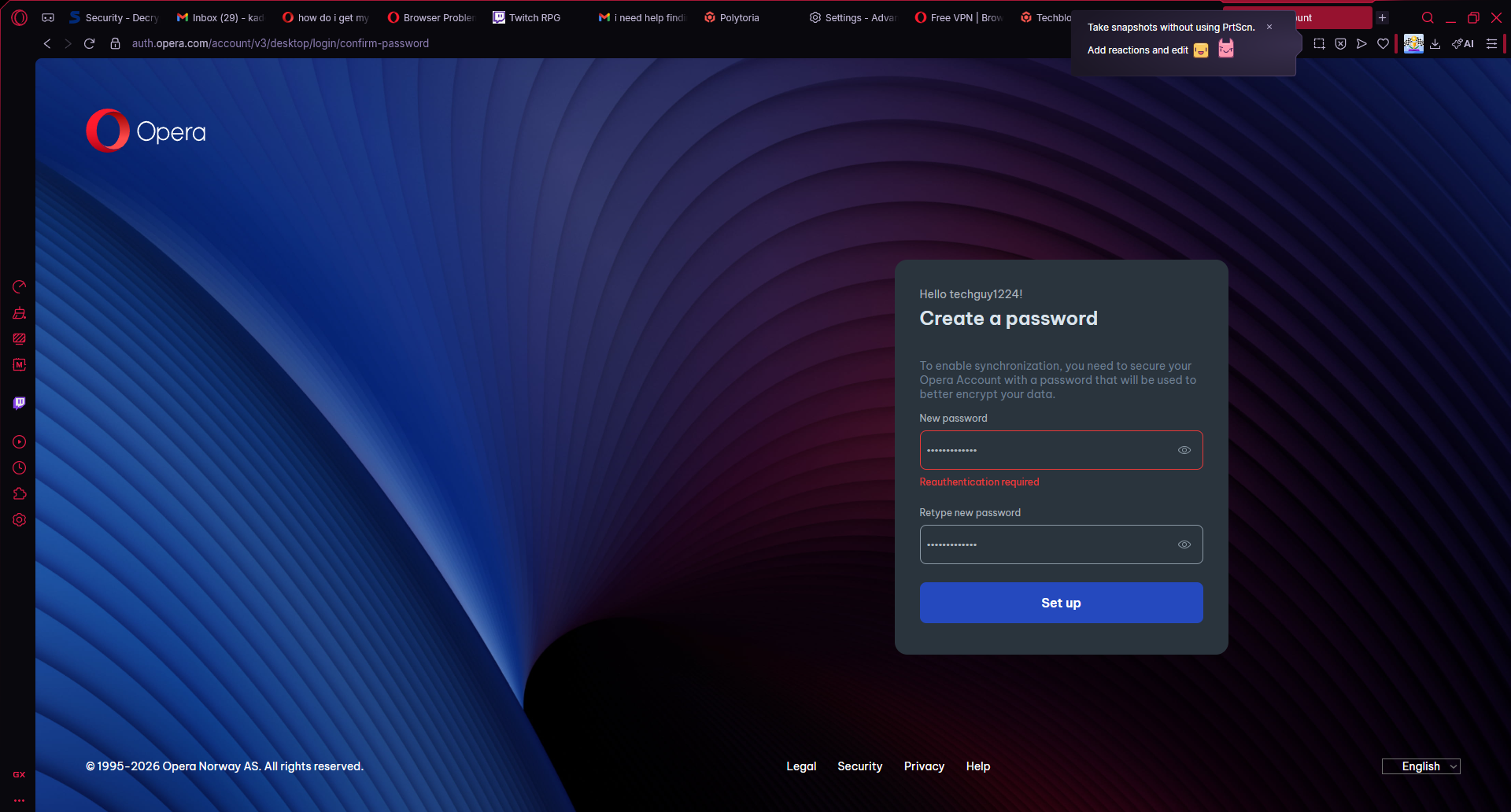
                        @leocg i tried doing it but for some reason it says reauthentication requiredimage_2026-03-07_142911920.png see anything i can do to fix it?

                        Reply Quote 0
                          leocg 1 Reply Last reply
                        • leocg
                          leocg Moderator Volunteer @techguy1224 last edited by

                          @techguy1224 You are using the same account you were using before?

                          Reply Quote 0
                            T 1 Reply Last reply
                          • T
                            techguy1224 @leocg last edited by

                            @leocg same Google account I used

                            Reply Quote 0
                              leocg 1 Reply Last reply
                            • leocg
                              leocg Moderator Volunteer @techguy1224 last edited by

                              @techguy1224 It may be a/the problem. For passwords synchronisation to work and for Opera to be able to decrypt the information, your Opera account needs to have a password.

                              Reply Quote 0
                                T 1 Reply Last reply
                              • T
                                techguy1224 @leocg last edited by

                                @leocg how can I do that? With a Google account?

                                Reply Quote 0
                                  leocg 1 Reply Last reply
                                • leocg
                                  leocg Moderator Volunteer @techguy1224 last edited by

                                  @techguy1224 Go to https://auth.opera.com/account/edit-profile/security and set a password.

                                  Reply Quote 0
                                    T 1 Reply Last reply
                                  • T
                                    techguy1224 @leocg last edited by

                                    @leocg so if I set this password up and get it working it will save everything? All my passwords before I deleted opera gx?

                                    Reply Quote 0
                                      1 Reply Last reply
                                    • First post
                                      Last post

                                    Computer browsers

                                    • Opera for Windows
                                    • Opera for Mac
                                    • Opera for Linux
                                    • Opera beta version
                                    • Opera USB

                                    Mobile browsers

                                    • Opera for Android
                                    • Opera Mini
                                    • Opera Touch
                                    • Opera for basic phones

                                    • Add-ons
                                    • Opera account
                                    • Wallpapers
                                    • Opera Ads

                                    • Help & support
                                    • Opera blogs
                                    • Opera forums
                                    • Dev.Opera

                                    • Security
                                    • Privacy
                                    • Cookies Policy
                                    • EULA
                                    • Terms of Service

                                    • About Opera
                                    • Press info
                                    • Jobs
                                    • Investors
                                    • Become a partner
                                    • Contact us

                                    Follow Opera

                                    • Opera - Facebook
                                    • Opera - Twitter
                                    • Opera - YouTube
                                    • Opera - LinkedIn
                                    • Opera - Instagram

                                    © Opera Software 1995-